







Question: This is in Java participationAssignemnt1 class _____________________________ public class ParticipationAssignment1A { public ArrayList getCustomerRecords(String filepath) { /* INSERT YOUR CODE HERE */ } public void
This is in Java
![} public static void main(String[] args) { ParticipationAssignment1A app = new ParticipationAssignment1A();](https://dsd5zvtm8ll6.cloudfront.net/si.experts.images/questions/2024/09/66f455ee2c59e_81366f455edb40e0.jpg)
participationAssignemnt1 class _____________________________
public class ParticipationAssignment1A {
public ArrayList
/* INSERT YOUR CODE HERE */
}
public void printCustomerRecords(ArrayList
/* INSERT YOUR CODE HERE */
}
public static void main(String[] args) {
ParticipationAssignment1A app = new ParticipationAssignment1A();
String filename = "input.csv";
String foldername = "Desktop";
String profilepath = System.getenv("USERPROFILE"); // for Windows
if (profilepath == null) {
profilepath = System.getProperty("user.home"); // for Unix
}
String sep = File.separator;
String fullpath = profilepath + sep + foldername + sep + filename;
ArrayList
app.printCustomerRecords(records, "AL");
}
} _____________________________________________ Costumer record class
public class CustomerRecord {
private String firstName,lastName,city,state,address,rate;
private char middleInt,box;
private double zipCode;
public String getFirstName() {
return firstName;
}
public void setFirstName(String firstName) {
this.firstName = firstName;
}
public String getLastName() {
return lastName;
}
public void setLastName(String lastName) {
this.lastName = lastName;
}
public String getCity() {
return city;
}
public void setCity(String city) {
this.city = city;
}
public String getState() {
return state;
}
public void setState(String state) {
this.state = state;
}
public String getAddress() {
return address;
}
public void setAddress(String address) {
this.address = address;
}
public String getRate() {
return rate;
}
public void setRate(String rate) {
this.rate = rate;
}
public char getMiddleInt() {
return middleInt;
}
public void setMiddleInt(char middleInt) {
this.middleInt = middleInt;
}
public char getBox() {
return box;
}
public void setBox(char box) {
this.box = box;
}
public double getZipCode() {
return zipCode;
}
public void setZipCode(double zipCode) {
this.zipCode = zipCode;
}
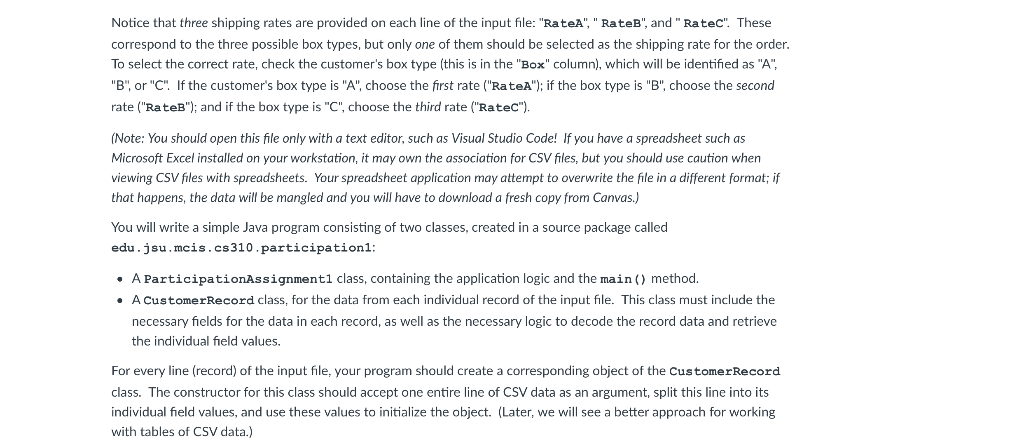
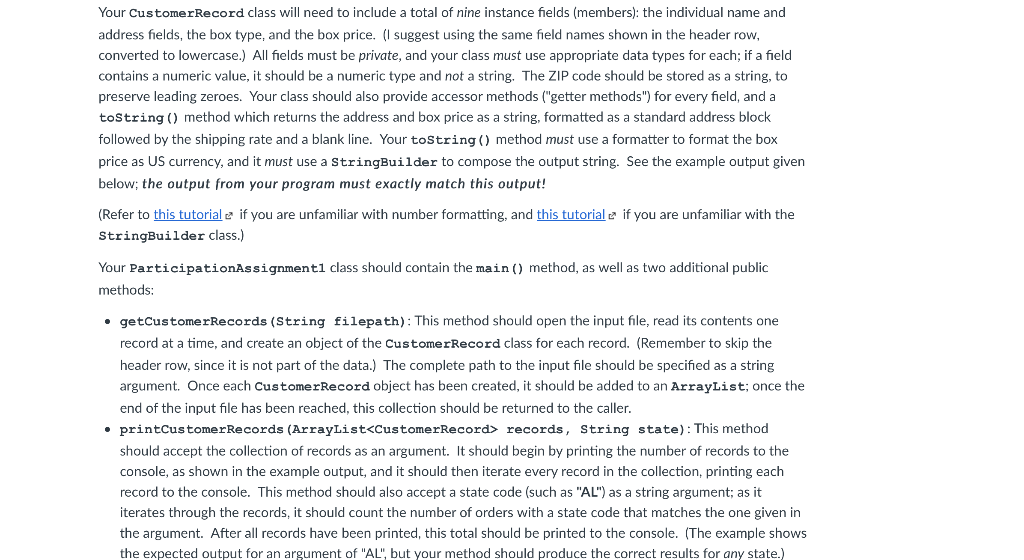
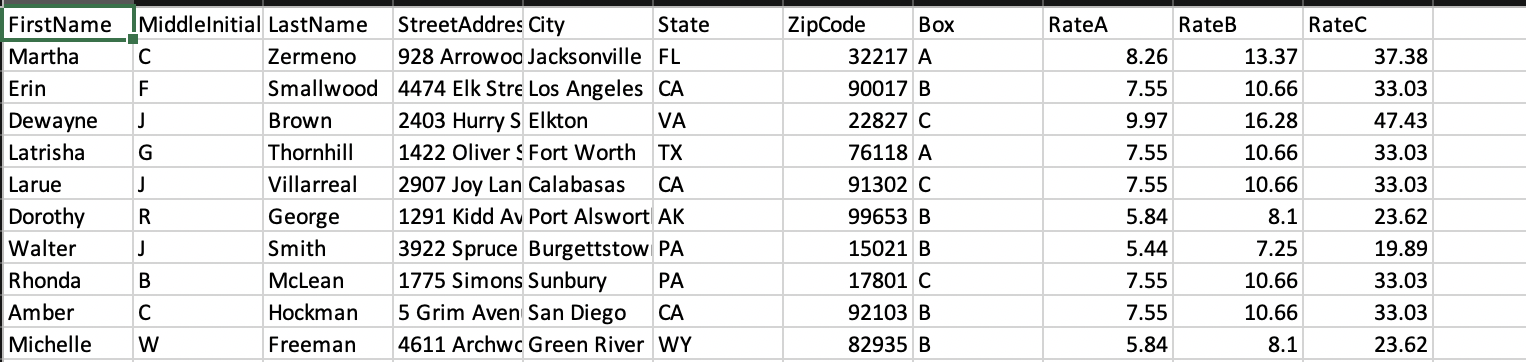
Notice that three shipping rates are provided on each line of the input file: "RateA", "RateB", and "Ratec". These correspond to the three possible box types, but only one of them should be selected as the shipping rate for the order. To select the correct rate, check the customer's box type (this is in the "Box" column), which will be identified as "A", "B" or "C". If the customer's box type is "A", choose the first rate ("RateA"); if the box type is "B", choose the second rate ("RateB"); and if the box type is "C", choose the third rate ("Ratec"). (Note: You should open this file only with a text editor, such as Visual Studio Code! If you have a spreadsheet such as Microsoft Excel installed on your workstation, it may own the association for CSV files, but you should use caution when viewing CSV files with spreadsheets. Your spreadsheet application may attempt to overwrite the file in a different format; if that happens, the data will be mangled and you will have to download a fresh copy from Canvas.) You will write a simple Java program consisting of two classes, created in a source package called edu.jsu.mcis.cs310 participationi: A ParticipationAssignmenti class, containing the application logic and the main() method. A CustomerRecord class, for the data from each individual record of the input file. This class must include the necessary fields for the data in each record, as well as the necessary logic to decode the record data and retrieve the individual field values. For every line (record) of the input file, your program should create a corresponding object of the CustomerRecord class. The constructor for this class should accept one entire line of CSV data as an argument, split this line into its individual field values, and use these values to initialize the object. (Later, we will see a better approach for working with tables of CSV data.) Your CustomerRecord class will need to include a total of nine instance fields (members): the individual name and address fields, the box type, and the box price. (I suggest using the same field names shown in the header row, converted to lowercase.) All fields must be private, and your class must use appropriate data types for each; if a field contains a numeric value, it should be a numeric type and not a string, The ZIP code should be stored as a string, to preserve leading zeroes. Your class should also provide accessor methods ("getter methods") for every field, and a toString() method which returns the address and box price as a string, formatted as a standard address block followed by the shipping rate and a blank line. Your toString() method must use a formatter to format the box price as US currency, and it must use a stringBuilder to compose the output string. See the example output given below; the output from your program must exactly match this output! (Refer to this tutorial e if you are unfamiliar with number formatting, and this tutoriale if you are unfamiliar with the StringBuilder class.) Your ParticipationAssignmenti class should contain the main() method, as well as two additional public methods: .getCustomerRecords (String filepath): This method should open the input file, read its contents one record at a time, and create an object of the CustomerRecord class for each record. (Remember to skip the header row, since it is not part of the data.) The complete path to the input file should be specified as a string argument. Once each CustomerRecord object has been created, it should be added to an ArrayList; once the end of the input file has been reached, this collection should be returned to the caller. printCustomerRecords (ArrayList
Step by Step Solution
There are 3 Steps involved in it

Get step-by-step solutions from verified subject matter experts
 Study Help