



Question: this is in matlab, matrices are attached in the last 2 pictures, please do all parts, thank you! 3. ( Am script file is required
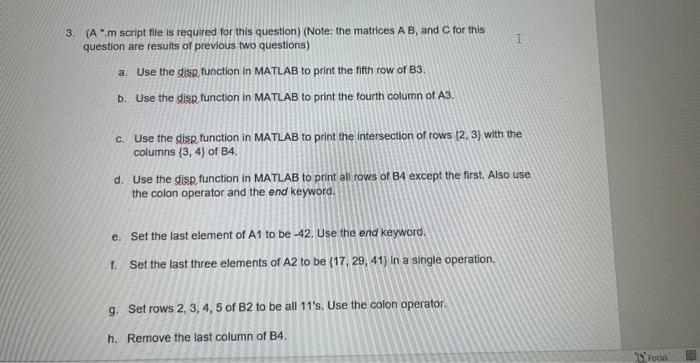
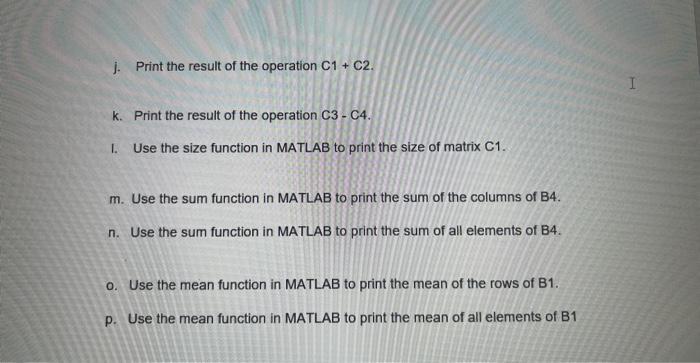
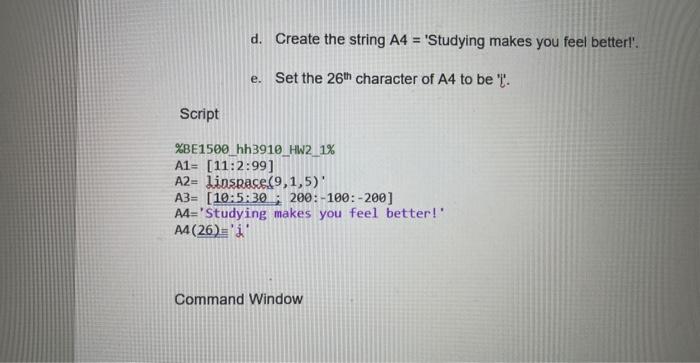
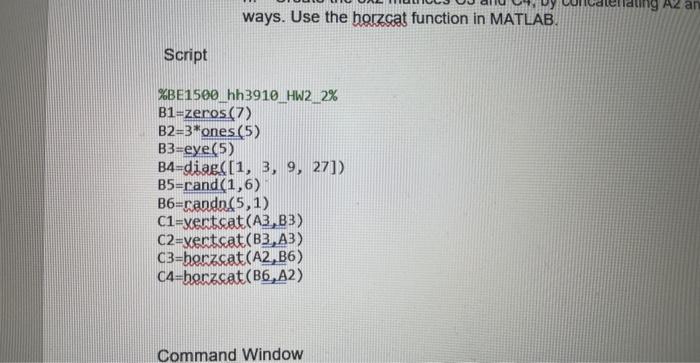
3. ( Am script file is required for this question) (Note: the matrices AB, and C for this question are results of previous two questions) a. Use the diss function in MATLAB to print the fith row of 83 . b. Use the disg function in MATLAB to print the fourth column of A3. c. Use the disg function in MATLAB to print the intersection of rows {2,3} with the columns {3,4} of B4. d. Use the disp function in MATLAB to print all rows of B4 except the first. Also use the colon operator and the end keyword. e. Set the last element of A1 to be 42. Use the end keyword. f. Set the last three elements of A2 to be {17,29,41} in a single operation. g. Set rows 2,3,4,5 of B2 to be all 11's. Use the colon operator. h. Remove the last column of B4. j. Print the result of the operation C1+C2. k. Print the result of the operation C3 - C4. I. Use the size function in MATLAB to print the size of matrix C1. m. Use the sum function in MATLAB to print the sum of the columns of B4. n. Use the sum function in MATLAB to print the sum of all elements of B4. o. Use the mean function in MATLAB to print the mean of the rows of B1. p. Use the mean function in MATLAB to print the mean of all elements of B1 d. Create the string A4 = 'Studying makes you feel betterl'. e. Set the 26th character of A4 to be ' l. Script \[ \begin{array}{l} \text { \%BE1500 hh3910_HW2 } 1 \% \\ A 1=[11: 2: 99] \\ A 2=1 \text { inspace }(9,1,5) \text { ' } \\ A 3=[10: 5: 30 ; 200:-100:-200] \\ A 4=\text { 'Studying makes you feel better!. } \\ A 4(26)={ }^{\prime} \text { ' }^{\prime} \end{array} \] Command Window ways. Use the horzcat function in MATLAB. Script Command Window
Step by Step Solution
There are 3 Steps involved in it

Get step-by-step solutions from verified subject matter experts