







Question: This is my Visual Basic windows form application code so far. My GUI is the first image and the directions are the second image. Public
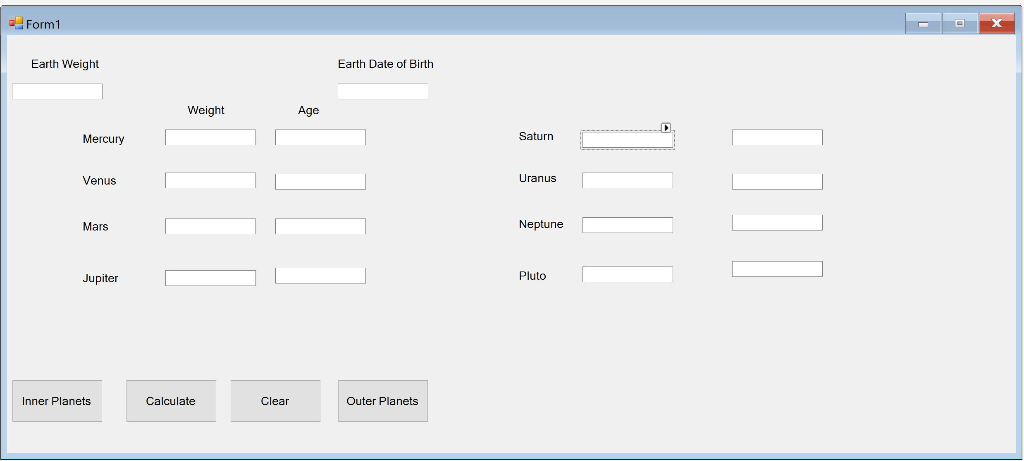
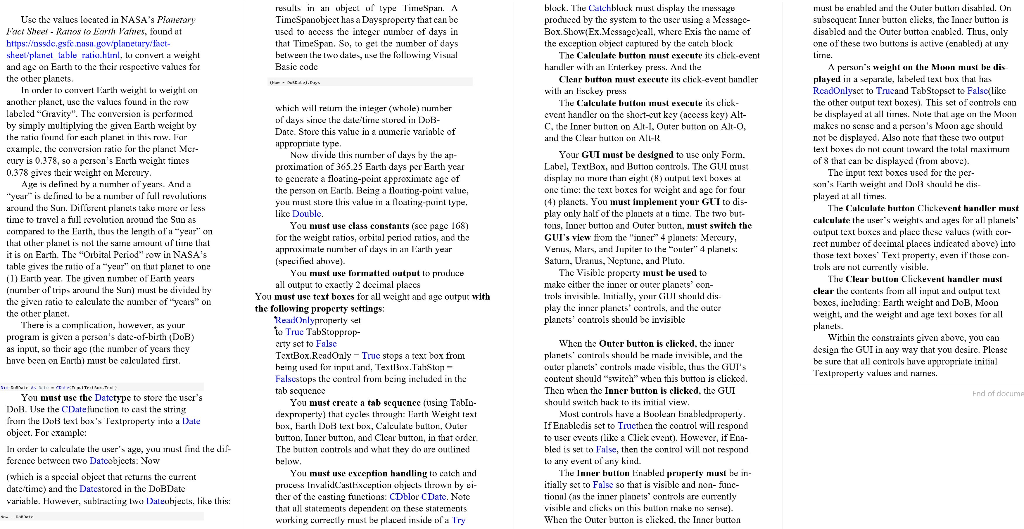
This is my Visual Basic windows form application code so far. My GUI is the first image and the directions are the second image.
Public Class Form1 Private Sub Form1_Load(sender As Object, e As EventArgs) Handles MyBase.Load
End Sub
Private Sub BtnCalculate_Click(sender As Object, e As EventArgs) Handles BtnCalculate.Click
Try DoBDate = CDate(TxtBoxEarthDoB.Text) Age = (Now - DoBDate).Days TextBox5.Text = (Age / 0.241 / 365.25).Tostring("n2") TextBox6.Text = (Age / 0.615 / 365.25).Tostring("n2") TextBox7.Text = (Age / 1.88 / 365.25).Tostring("n2") TextBox8.Text = (Age / 11.9 / 365.25).Tostring("n2")
' Textbox13.text = (Age / 29.4 / 365.25).Tostring("n2") ' TextBox14.Text = (Age / 83.7 / 365.25).Tostring("n2") ' TextBox15.Text = (Age / 163.7 / 365.25).Tostring("n2") ' TextBox16.Text = (Age / 247.9 / 365.25).Tostring("n2")
Weight = CDbl(TxtBoxEarthWeight.Text) / 10 TextBox1.Text = Weight = 0.378.ToString("n2") TextBox2.Text = Weight = 0.907.ToString("n2") TextBox3.Text = Weight = 0.377.ToString("n2") TextBox4.Text = Weight = 2.36.ToString("n2")
' TextBox9.Text = Weight = 0.916.ToString("n2") ' TextBox10.Text = Weight = 0.889.ToString("n2") ' TextBox11.Text = Weight = 1.12.ToString("n2") ' TextBox12.Text = Weight = 0.071.ToString("n2")
Catch ex As Exception MessageBox.Show(ex.Message) End Try
End Sub End Class
Form1 Earth Weight Earth Date of Birth Weight Age Mercury Saturn Venus Uranus Mars Neptune Jupiter Pluto Inner Planets Calculate Clear Outer Planets Use the valucs located ia NASA's Piary Box.ShowEx.vlessngccall, wherc Exis the name of belween he Iwodale ue Lie kollwing Visual Clenr hutton nust cxecute iclick-event hander played i a separale, labele exl bux that In uder lcvert arth weigh weighl e Thealculate uon ust execule i itk the other olput text boxes," This set ofcontrols cno C, be Inrer button o Alt-1, Outer buton o Alt-O, Your GUI must be designed to usc only Form. Label, TextBox, nud Buto ontrols, The GU uust of 8 that can be displaycd (fiom above. 141 planets. You must implement your GUT to dis- play oly half of the plaucts at n tine. Tbe two but- tons, Inper butto and Outer buton, must switch the GUI's view fi tc "r 4 plnnets Mercury, calculate the useweightadallplanels output tesl buxcs and placu Iles' valucs With cur- reet rumber o deal placcs indicated abovc into You nust use class coustants (soe page 168) comparei the Eth, ths the length ofa yeir"
Step by Step Solution
There are 3 Steps involved in it

Get step-by-step solutions from verified subject matter experts
 Study Help