







Question: This is Python 3 meant to be done on JetBrains PyCharm Community Edition 2017.3.3 Please help I have the files that are mentioned in the
This is Python 3 meant to be done on JetBrains PyCharm Community Edition 2017.3.3 Please help
I have the files that are mentioned in the PDF. I will email them to you if you can help me with this. Thank you so much. Contact me at rithikapydi@ g_mail.com
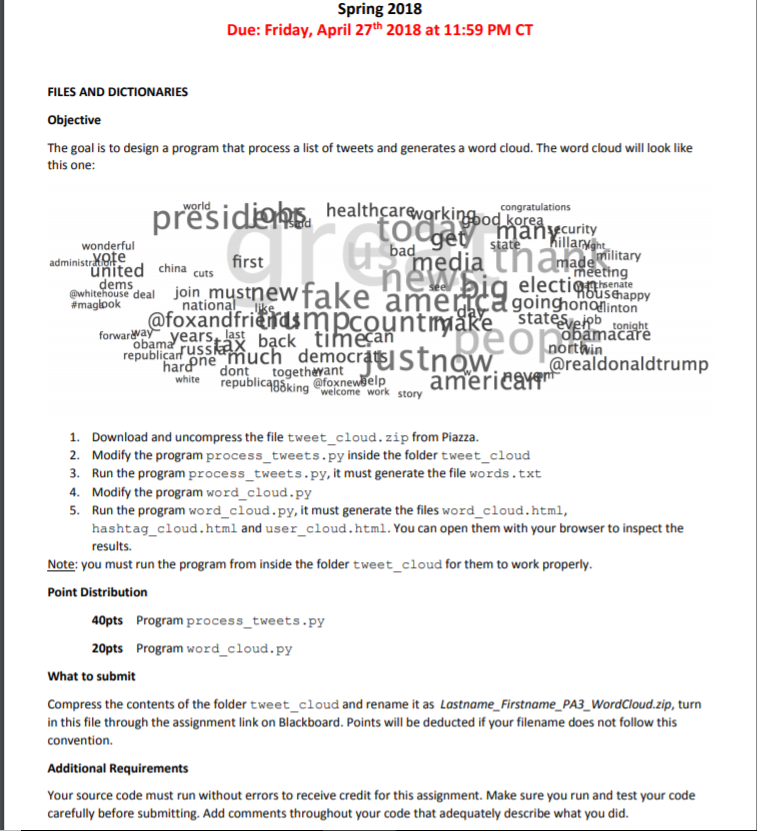
Spring 2018 Due: Friday, April 27th 2018 at 11:59 PM CT FILES AND DICTIONARIES Objective The goal is to design a program that process a list of tweets and generates a word cloud. The word cloud will look like this one: healthcarevorkingpod korea ecurity wonderful illa administrMote bad ilitary united china cuts ems hsenate ewhitchonse deal join mustnew #maglook ehappy goinghonointon national foxandfri Stat forwarwa harone much democr rtWin realdonaldtrump dont togethewant @fox ICAB8king welcome work story 1. 2. 3. 4. S. Download and uncompress the file tweet_cloud. zip from Piazza Modify the program process_tweets.py inside the folder tweet_cloud Run the program process_tweets.py, it must generate the file words.txt Modify the program word_cloud.py Run the program word_cloud.py, it must generate the files word_cloud.html hashtag_cloud.html and user_cloud.html.You can open them with your browser to inspect the results. Note: you must run the program from inside the folder tweet_cloud for them to work properly Point Distribution 40pts Program process tweets.py 20pts Program word cloud.py What to submit Compress the contents of the folder tweet_cloud and rename it as Lastname Firstname_PA3_WordCloud.zip, turn in this file through the assignment link on Blackboard. Points will be deducted if your filename does not follow this convention. Additional Requirements Your source code must run without errors to receive credit for this assignment. Make sure you run and test your code carefully before submitting. Add comments throughout your code that adequately describe what you did Spring 2018 Due: Friday, April 27th 2018 at 11:59 PM CT FILES AND DICTIONARIES Objective The goal is to design a program that process a list of tweets and generates a word cloud. The word cloud will look like this one: healthcarevorkingpod korea ecurity wonderful illa administrMote bad ilitary united china cuts ems hsenate ewhitchonse deal join mustnew #maglook ehappy goinghonointon national foxandfri Stat forwarwa harone much democr rtWin realdonaldtrump dont togethewant @fox ICAB8king welcome work story 1. 2. 3. 4. S. Download and uncompress the file tweet_cloud. zip from Piazza Modify the program process_tweets.py inside the folder tweet_cloud Run the program process_tweets.py, it must generate the file words.txt Modify the program word_cloud.py Run the program word_cloud.py, it must generate the files word_cloud.html hashtag_cloud.html and user_cloud.html.You can open them with your browser to inspect the results. Note: you must run the program from inside the folder tweet_cloud for them to work properly Point Distribution 40pts Program process tweets.py 20pts Program word cloud.py What to submit Compress the contents of the folder tweet_cloud and rename it as Lastname Firstname_PA3_WordCloud.zip, turn in this file through the assignment link on Blackboard. Points will be deducted if your filename does not follow this convention. Additional Requirements Your source code must run without errors to receive credit for this assignment. Make sure you run and test your code carefully before submitting. Add comments throughout your code that adequately describe what you did
Step by Step Solution
There are 3 Steps involved in it

Get step-by-step solutions from verified subject matter experts
 Study Help