







Question: this is related to web application development and should be done in notepad++. then/ Based on the following form: -Contact information First Name: Middle/Initial Last
this is related to web application development and should be done in notepad++.
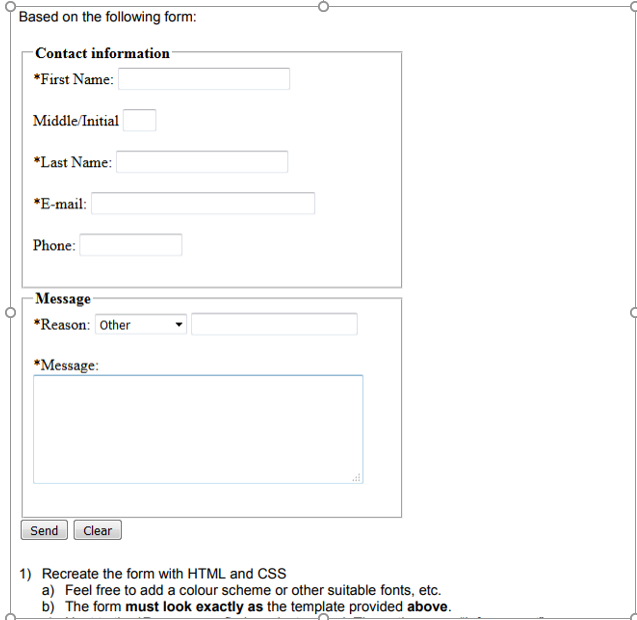
then/
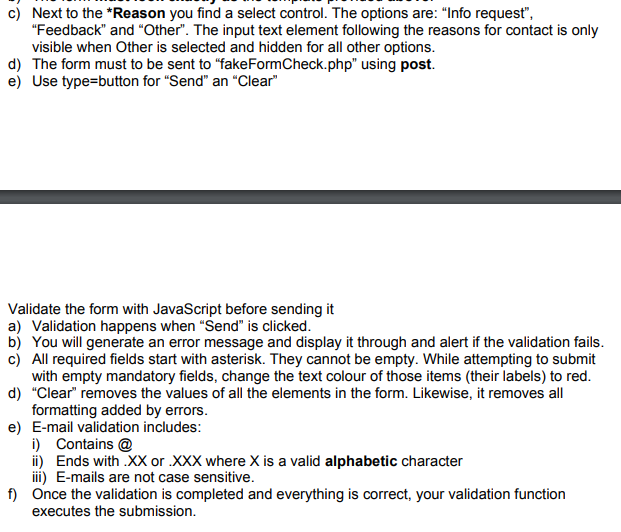
Based on the following form: -Contact information First Name: Middle/Initial Last Name E-mail: Phone: Message Reason: Other Message: Send Clear 1) Recreate the form with HTML and CSS a) Feel free to add a colour scheme or other suitable fonts, etc. b) The form must look exactly as the template provided above. c) Next to the Reason you find a select control. The options are: "Info reques", 0 5 "Feedback" and "Other". The input text element following the reasons for contact is only visible when Other is selected and hidden for all other options d) The form must to be sent to "fakeFormCheck.php" using post. e) Use type button for "Send" an "Clear" Validate the form with JavaScript before sending it a) Validation happens when "Send" is clicked b) You will generate an error message and display it through and alert if the validation fails c) All required fields start with asterisk. They cannot be empty. While attempting to submit 6 with empty mandatory fields, change the text colour of those items (their labels) to red d) "Clear" removes the values of all the elements in the form. Likewise, it removes all formatting added by errors e) E-mail validation includes i Contains @ i) Ends with XX or .XXX where X is a valid alphabetic character ii) E-mails are not case sensitive Once the validation is completed and everything is correct, your validation function executes the submission. 2 f)
Step by Step Solution
There are 3 Steps involved in it

Get step-by-step solutions from verified subject matter experts
 Study Help