







Question: This is the code for Lab5.m clc; clear; binaryStr = input('Enter the binary number: ','s'); decimal = binary2decimal(binaryStr); fprintf('The number in decimal is %g. ',decimal);
This is the code for Lab5.m
clc; clear; binaryStr = input('Enter the binary number: ','s'); decimal = binary2decimal(binaryStr); fprintf('The number in decimal is %g. ',decimal);
This is the code from HW 4
clc; clear; x = input('Enter the binary number: ','s'); decimal = 0; power=0; for i = length(x):-1:1 q=str2num(x(i)); decimal=decimal+q*2^power; power=power+1; end fprintf('The number in decimal is %d ',decimal);The program should be able to run in MatLab.
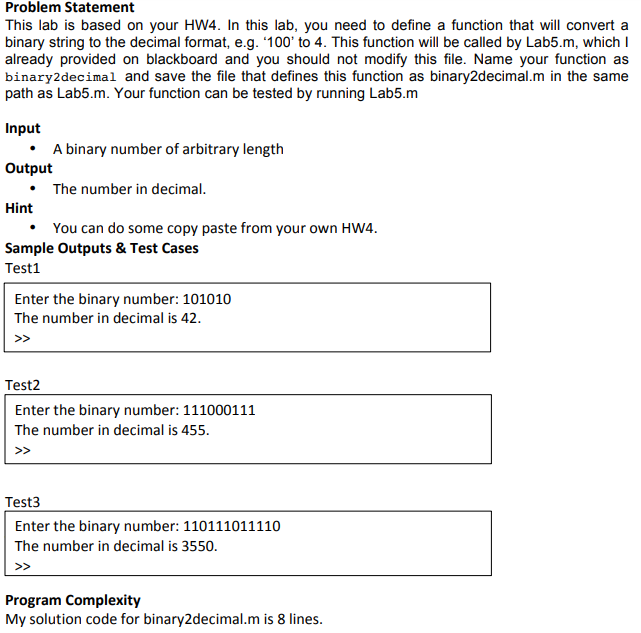
Problem Statement This lab is based on your HW4. In this lab, you need to define a function that will convert a binary string to the decimal format, e.g. 400 to 4. This function will be called by Lab5.m, which I already provided on blackboard and you should not modify this file. Name your function as binary2decimal and save the file that defines this function as binary2decimal.m in the same path as Lab5.m. Your function can be tested by running Lab5.m Input A binary number of arbitrary length The number in decimal You can do some copy paste from your own HW4 Output Hint Sample Outputs & Test Cases Test1 Enter the binary number: 101010 The number in decimal is 42 >7 Test2 Enter the binary number: 111000111 The number in decimal is 455 Test3 Enter the binary number: 110111011110 The number in decimal is 3550 >D Program Complexity My solution code for binary2decimal.m is 8 lines
Step by Step Solution
There are 3 Steps involved in it

Get step-by-step solutions from verified subject matter experts
 Study Help