







Question: This is the code from Assigment #2: import datetime import random print('Name is John Smith') print() print('Date is',datetime.date.today()) print() n = int(input('Enter the value of
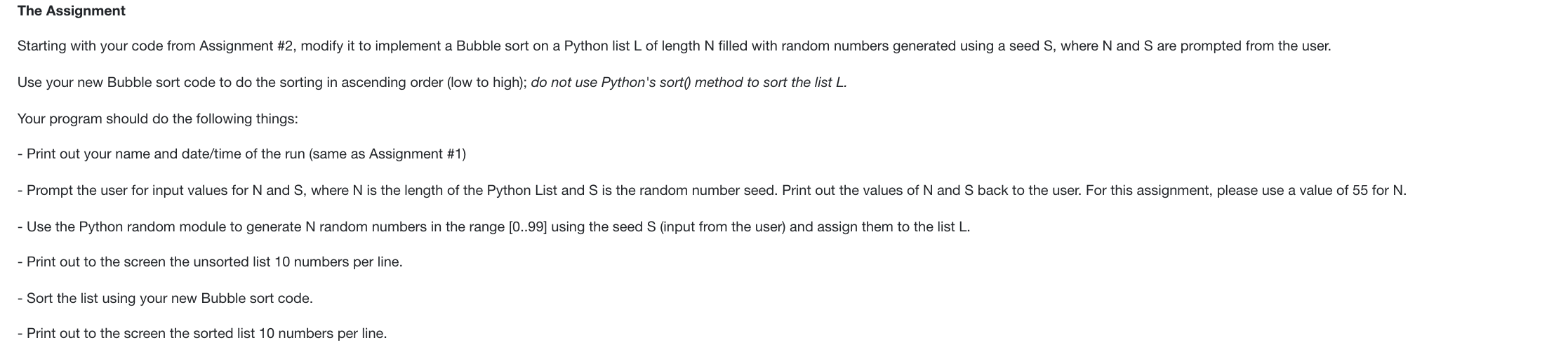
This is the code from Assigment #2:
import datetime import random print('Name is John Smith') print() print('Date is',datetime.date.today()) print() n = int(input('Enter the value of N : ')) s = int(input('Enter the value of seed : ')) random.seed(s) l = [random.randint(0,99) for i in range(n)] print() print('Before sorting the list : ') print() for i in range(n): if i%10 != 9: print(l[i], end=' ') else: print(l[i]) l.sort() print() print('After Sorting the list : ') print() for i in range(n): if i%10 != 9: print(l[i], end=' ') else: print(l[i])
The Assignment Starting with your code from Assignment #2, modify it to implement a Bubble sort on a Python list L of length N filled with random numbers generated using a seed S, where N and S are prompted from the user. Use your new Bubble sort code to do the sorting in ascending order (low to high); do not use Python's sort() method to sort the list L. Your program should do the following things: - Print out your name and date/time of the run (same as Assignment #1) - Prompt the user for input values for N and S, where N is the length of the Python List and S is the random number seed. Print out the values of N and S back to the user. For this assignment, please use a value of 55 for N. - Use the Python random module to generate N random numbers in the range [0..99] using the seed S (input from the user) and assign them to the list L. - Print out to the screen the unsorted list 10 numbers per line. - Sort the list using your new Bubble sort code. - Print out to the screen the sorted list 10 numbers per line
Step by Step Solution
There are 3 Steps involved in it

Get step-by-step solutions from verified subject matter experts
 Study Help