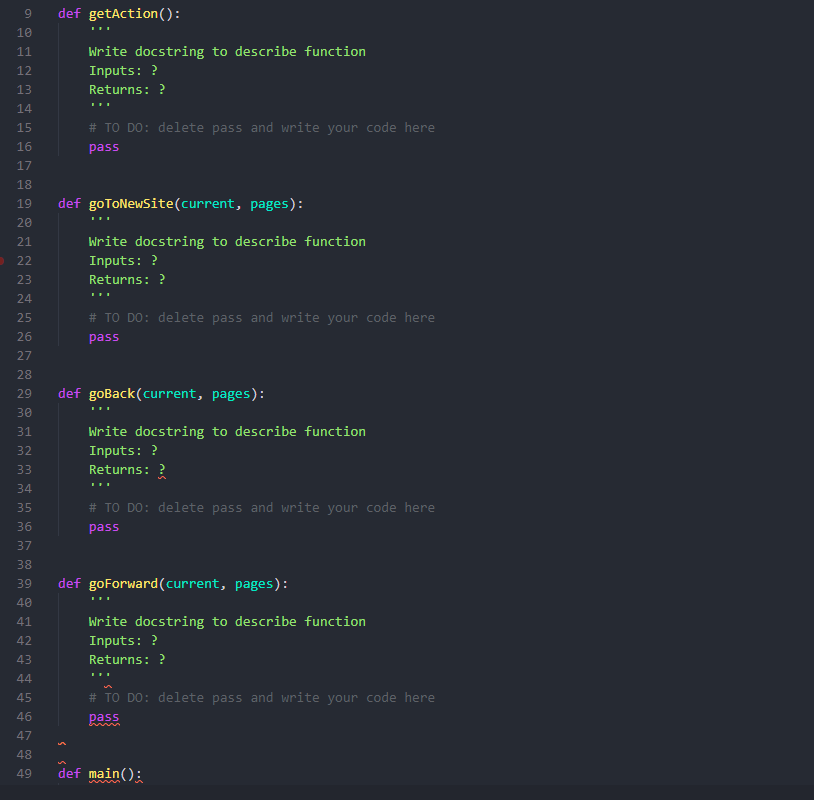
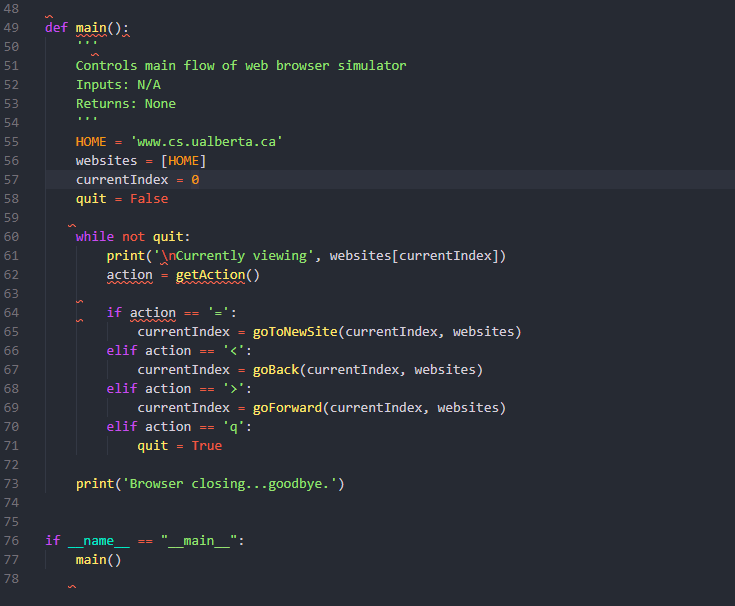
Question: This is the code I have so far: 2. Complete getAction(). This function prompts the user to enter either a = to enter a new
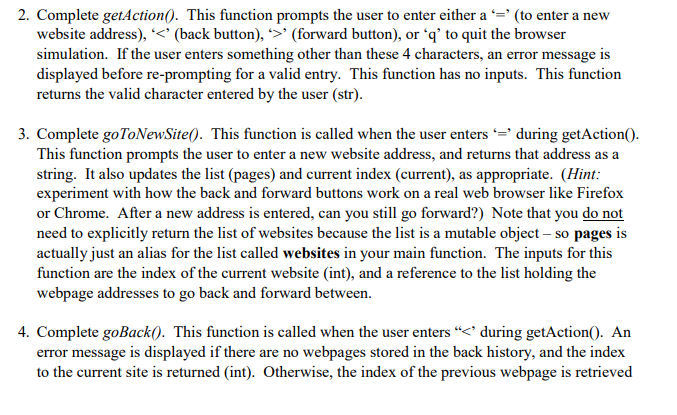
 This is the code I have so far: 2. Complete getAction().This function prompts the user to enter either a = to entera new website address), (forward button), or 'q' to quit the browser

This is the code I have so far:

simulation. If the user enters something other than these 4 characters, anerror message is displayed before re-prompting for a valid entry. This function

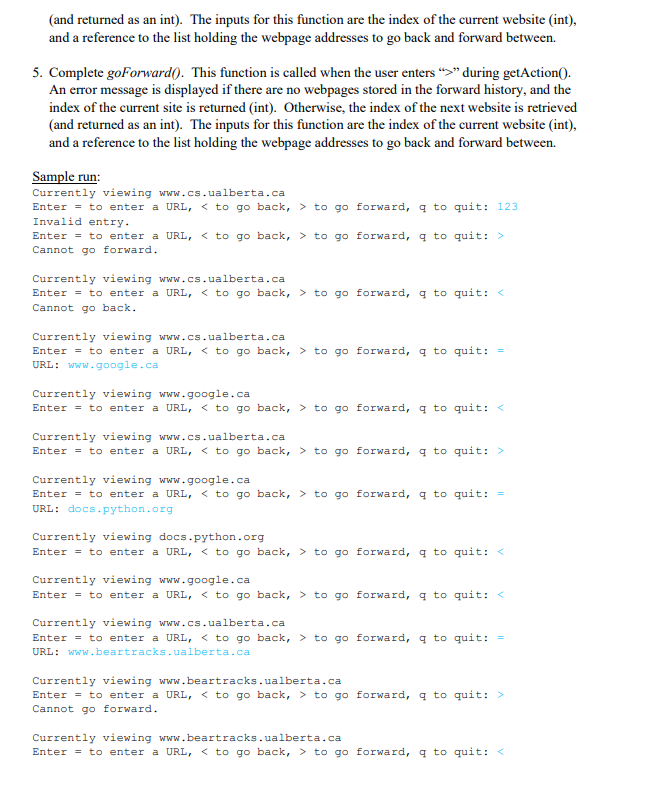
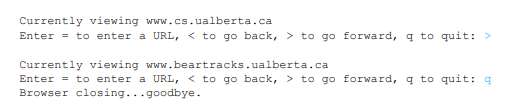
2. Complete getAction(). This function prompts the user to enter either a = to enter a new website address), (forward button), or 'q' to quit the browser simulation. If the user enters something other than these 4 characters, an error message is displayed before re-prompting for a valid entry. This function has no inputs. This function returns the valid character entered by the user (str). 3. Complete gotoNewSite(). This function is called when the user enters '=' during getAction(). This function prompts the user to enter a new website address, and returns that address as a string. It also updates the list (pages) and current index (current), as appropriate. (Hint: experiment with how the back and forward buttons work on a real web browser like Firefox or Chrome. After a new address is entered, can you still go forward?) Note that you do not need to explicitly return the list of websites because the list is a mutable object - so pages is actually just an alias for the list called websites in your main function. The inputs for this function are the index of the current website (int), and a reference to the list holding the webpage addresses to go back and forward between. 4. Complete goBack(). This function is called when the user enters " during getAction(). An error message is displayed if there are no webpages stored in the forward history, and the index of the current site is returned (int). Otherwise, the index of the next website is retrieved (and returned as an int). The inputs for this function are the index of the current website (int), and a reference to the list holding the webpage addresses to go back and forward between Sample run: Currently viewing www.cs.ualberta.ca Enter = to enter a URL, to go forward, q to quit: 123 Invalid entry. Enter = to enter a URL, to go forward, 9 to quit: > Cannot go forward. Currently viewing www.cs.ualberta.ca Enter = to enter a URL, to go forward, 9 to quit: Cannot go back. Currently viewing www.cs.ualberta.ca Enter = to enter a URL, to go forward, q to quit:= URL: www.google.ca Currently viewing www.google.ca Enter = to enter a URL, to go forward, a to quit: to go forward, a to quit: > Currently viewing www.google.ca Enter = to enter a URL, to go forward, 9 to quit: = URL: docs.python.org Currently viewing docs.python.org Enter = to enter a URL, to go forward, 9 to quit: Currently viewing www.google.ca Enter = to enter a URL, to go forward, 9 to quit: to go forward, a to quit: = URL: www.beartracks.ualberta.ca Currently viewing www.beartracks.ualberta.ca Enter = to enter a URL, to go forward, 9 to quit: > Cannot go forward. Currently viewing www.beartracks.ualberta.ca Enter = to enter a URL, to go forward, q to quit: to go forward, q to quit: > Currently viewing www.beartracks.ualberta.ca Enter = to enter a URL, to go forward, 9 to quit: 9 Browser closing...goodbye. def getAction(): Write docstring to describe function Inputs: ? Returns: ? # TO DO: delete pass and write your code here pass def goToNewSite(current, pages): Write docstring to describe function Inputs: ? Returns: ? # TO DO: delete pass and write your code here pass def goBack(current, pages): Write docstring to describe function Inputs: ? Returns: ? # TO DO: delete pass and write your code here pass def goForward(current, pages): Write docstring to describe function Inputs: ? Returns: ? # TO DO: delete pass and write your code here pass def main(); def main(): Controls main flow of web browser simulator Inputs: N/A Returns: None HOME = 'www.cs.ualberta.ca' websites = [HOME] currentIndex = 0 quit = False while not quit: print(" Currently viewing, websites[currentIndex]), action = getAction() if action == '=': currentIndex = gotoNewSite(currentIndex, websites), elif action == '': currentIndex - goForward(current Index, websites) elif action == 'q': quit = True print('Browser closing...goodbye.') 76 77 78 if __name__ == "_main_": main()
Step by Step Solution

There are 3 Steps involved in it

1 Expert Approved Answer
Step: 1 Unlock blur-text-image
Question Has Been Solved by an Expert!

Get step-by-step solutions from verified subject matter experts

Step: 2 Unlock
Step: 3 Unlock

Students Have Also Explored These Related Databases Questions!