







Question: This is the coding the blue: import java.util.Scanner; public class Employee { public int id; public String name; public double salary; public void Input() {
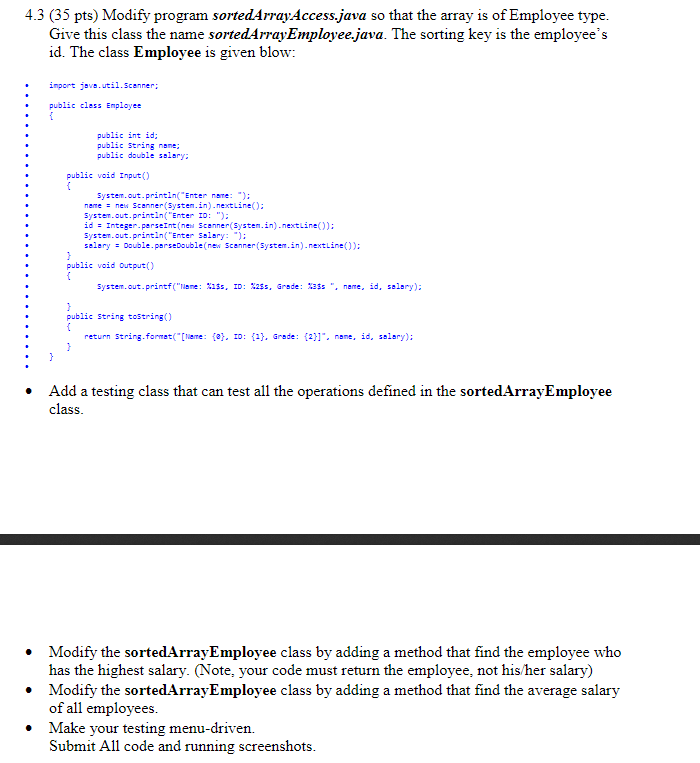
This is the coding the blue:
import java.util.Scanner; public class Employee { public int id; public String name; public double salary; public void Input() { System.out.println("Enter name: "); name = new Scanner(System.in).nextLine(); System.out.println("Enter ID: "); id = Integer.parseInt(new Scanner(System.in).nextLine()); System.out.println("Enter Salary: "); salary = Double.parseDouble(new Scanner(System.in).nextLine()); } public void Output() { System.out.printf("Name: %1$s, ID: %2$s, Grade: %3$s ", name, id, salary); } public String toString() { return String.format("[Name: {0}, ID: {1}, Grade: {2}]", name, id, salary);
} }
and this is sortedArrayAccess.java:
import java.util.*;
public class unsortedArrayAccess {
public static double[] arr; public int arraySize;
public unsortedArrayAccess(int scale) { arr = new double[scale]; arraySize = 0; }
public int search(double Key) { int i = 0; while ((i
public void append(double Item) { arr[arraySize] = Item; arraySize = arraySize + 1; }
public double remove() { if (arraySize == 0) { System.out.println("There is no item in the array!"); return -1; } double x = arr[arraySize - 1]; arraySize = arraySize - 1; return x; }
public void deletion(double Key) { int k = search(Key); if (k != -1) { for (int i = k; i
public void display() { if (arraySize == 0) { System.out.println("Array is empty!"); } else { for (int i = 0; i
System.out.println("array size is " + arraySize); } }
4.3 (35 pts) Modify program sortedArrayAccess.java so that the array is of Employee type. Give this class the name sortedArrayEmployee.java. The sorting key is the employee's id. The class Employee is given blow: import java.util.Scanner; public cless Employee public int id; public String none; public double salary: public void Input() System.out.println("Enter name: "); name = new Scanner(System.in).nextLine(); System.out.println("Enter ID: "); id = Integer.parseInt(nen Scanner(System.in.nextLine()); System.out.println("Enter Salary: "); solary = double perse Double(nex Scanner(System.in.nextLine()); public void Output() System.out.printf("Name: $1$, ID: 1255, Grade: 125", nene, id, salary); public String toString() return String.format("[Tiere: {@}, ID: (?). Grade: 21", nane, id, salary): Add a testing class that can test all the operations defined in the sortedArrayEmployee class. Modify the sortedArrayEmployee class by adding a method that find the employee who has the highest salary. (Note, your code must return the employee, not his/her salary) Modify the sortedArrayEmployee class by adding a method that find the average salary of all employees. Make your testing menu-driven. Submit All code and running screenshots. 4.3 (35 pts) Modify program sortedArrayAccess.java so that the array is of Employee type. Give this class the name sortedArrayEmployee.java. The sorting key is the employee's id. The class Employee is given blow: import java.util.Scanner; public cless Employee public int id; public String none; public double salary: public void Input() System.out.println("Enter name: "); name = new Scanner(System.in).nextLine(); System.out.println("Enter ID: "); id = Integer.parseInt(nen Scanner(System.in.nextLine()); System.out.println("Enter Salary: "); solary = double perse Double(nex Scanner(System.in.nextLine()); public void Output() System.out.printf("Name: $1$, ID: 1255, Grade: 125", nene, id, salary); public String toString() return String.format("[Tiere: {@}, ID: (?). Grade: 21", nane, id, salary): Add a testing class that can test all the operations defined in the sortedArrayEmployee class. Modify the sortedArrayEmployee class by adding a method that find the employee who has the highest salary. (Note, your code must return the employee, not his/her salary) Modify the sortedArrayEmployee class by adding a method that find the average salary of all employees. Make your testing menu-driven. Submit All code and running screenshots
Step by Step Solution
There are 3 Steps involved in it

Get step-by-step solutions from verified subject matter experts
 Study Help