







Question: This is the problem as screen shot below #Write a function called clean_data. clean_data takes one #parameter, a dictionary. The dictionary represents the #observed rainfall
This is the problem as screen shot below
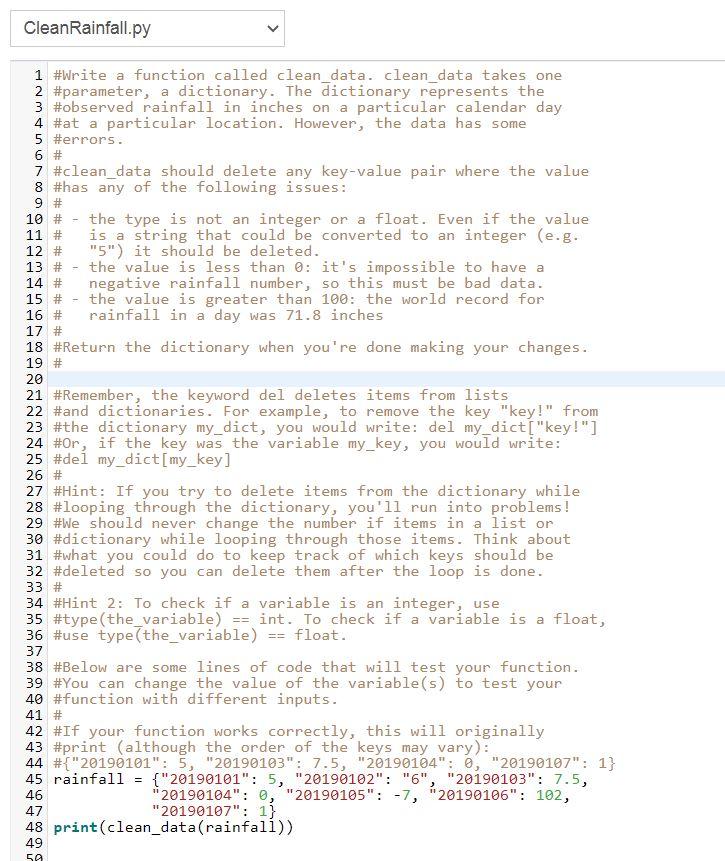
#Write a function called clean_data. clean_data takes one #parameter, a dictionary. The dictionary represents the #observed rainfall in inches on a particular calendar day #at a particular location. However, the data has some #errors. # #clean_data should delete any key-value pair where the value #has any of the following issues: # # - the type is not an integer or a float. Even if the value # is a string that could be converted to an integer (e.g. # "5") it should be deleted. # - the value is less than 0: it's impossible to have a # negative rainfall number, so this must be bad data. # - the value is greater than 100: the world record for # rainfall in a day was 71.8 inches # #Return the dictionary when you're done making your changes. # #Remember, the keyword del deletes items from lists #and dictionaries. For example, to remove the key "key!" from #the dictionary my_dict, you would write: del my_dict["key!"] #Or, if the key was the variable my_key, you would write: #del my_dict[my_key] # #Hint: If you try to delete items from the dictionary while #looping through the dictionary, you'll run into problems! #We should never change the number if items in a list or #dictionary while looping through those items. Think about #what you could do to keep track of which keys should be #deleted so you can delete them after the loop is done. # #Hint 2: To check if a variable is an integer, use #type(the_variable) == int. To check if a variable is a float, #use type(the_variable) == float.
#Below are some lines of code that will test your function. #You can change the value of the variable(s) to test your #function with different inputs. # #If your function works correctly, this will originally #print (although the order of the keys may vary): #{"20190101": 5, "20190103": 7.5, "20190104": 0, "20190107": 1} rainfall = {"20190101": 5, "20190102": "6", "20190103": 7.5, "20190104": 0, "20190105": -7, "20190106": 102, "20190107": 1} print(clean_data(rainfall))
Question is, Why is my answer not working? Where is the problem ?
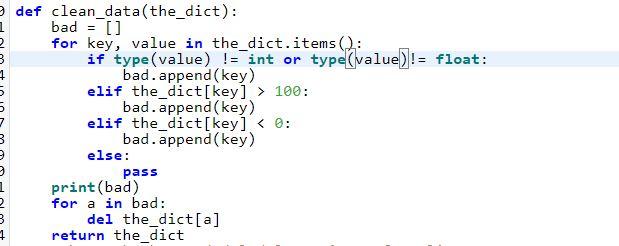
Clean Rainfall.py 9 # 10 # 11 # 13 # 14 # 15 # 1 #Write a function called clean_data. clean_data takes one 2 #parameter, a dictionary. The dictionary represents the 3 #observed rainfall in inches on a particular calendar day 4 #at a particular location. However, the data has some 5 #errors. 6 # 7 #clean_data should delete any key-value pair where the value 8 #has any of the following issues: the type is not an integer or a float. Even if the value is a string that could be converted to an integer (e.g. 12 # "5") it should be deleted. the value is less than 0: it's impossible to have a negative rainfall number, so this must be bad data. the value is greater than 100: the world record for 16 # rainfall in a day was 71.8 inches 17 # 18 #Return the dictionary when you're done making your changes. 19 # 20 21 #Remember, the keyword del deletes items from lists 22 #and dictionaries. For example, to remove the key "key!" from 23 #the dictionary my_dict, you would write: del my_dict["key!"] 24 #Or, if the key was the variable my_key, you would write: 25 #del my_dict[my_key] 27 #Hint: If you try to delete items from the dictionary while 28 #looping through the dictionary, you'll run into problems! 29 #We should never change the number if items in a list or 30 #dictionary while looping through those items. Think about 31 #what you could do to keep track of which keys should be 32 #deleted so you can delete them after the loop is done. 33 # 34 #Hint 2: To check if a variable is an integer, use 35 #type (the_variable) int. To check if a variable is a float, 36 #use type(the_variable) float. 37 38 #Below are some lines of code that will test your function. 39 #You can change the value of the variable(s) to test your 40 #function with different inputs. 41 # 42 #If your function works correctly, this will originally 43 #print (although the order of the keys may vary): 44 #{"20190101": 5, "20190103": 7.5, "20190164": 0, "20190107": 1} 45 rainfall = {"20190101": 5, "20190102": "6", "20190103": 7.5, 46 20190104": 0, "20190105": -7, "20190106": 102, "20190107": 1}. 48 print(clean_data(rainfall)) 49 26 # 47 59 1 def clean_data(the_dict): bad = [] for key, value in the_dict.items(): if type (value) != int or type(value)!= float: bad.append(key) elif the_dict[key] > 100: bad.append(key) elif the_dict[key]
Step by Step Solution
There are 3 Steps involved in it

Get step-by-step solutions from verified subject matter experts
 Study Help