







Question: This Is the relationship Need to write a SQL Query F,G,and H in a SQL Assignment This is a simplified version of the Access Workbench
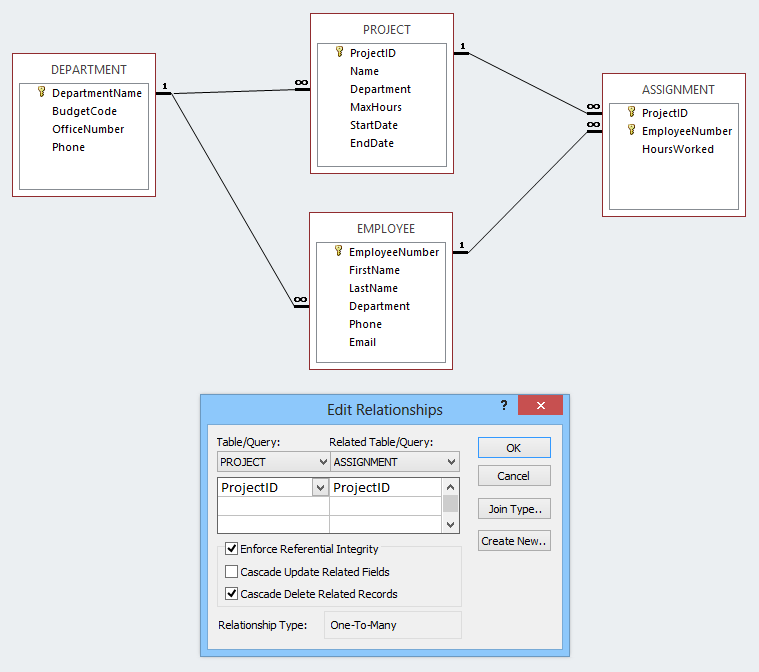 This Is the relationship
Need to write a SQL Query F,G,and H in a SQL Assignment
This is a simplified version of the Access Workbench Exercise in the textbook. Follow along in the textbook for more detailed descriptions and pictures, but only the columns and data shown in this assignment are needed.
Use your WPC database to create, run, and save queries using Microsoft Access SQL
SQL Queries: Using Microsoft Access SQL, create and run queries to answer the questions that follow. Save each query using the query name format SQLQuery-#, where the # sign is replaced by the letter of the question.
Hint: If the same column name is contained in two different tables, Microsoft Access requires the table name to be specified with the column name, for example: EMPLOYEE.EmployeeNumber
F. Who are the employees assigned to each project? Show ProjectID, ProjectName, Department (from the PROJECT table), EmployeeNumber, LastName, FirstName, and Phone. Create, run, and save this SQL query as SQLQuery-F.
G. Who are the employees assigned to each project? Show ProjectID, ProjectName, Department (from the PROJECT table), Department Phone, EmployeeNumber, LastName, FirstName, and Employee Phone. Sort by ProjectID, in ascending order. Create, run, and save this SQL query as SQLQuery-G.
H. Who are the employees assigned to projects run by the marketing department? Show ProjectID, ProjectName, Department (from the PROJECT table), Department Phone, EmployeeNumber, LastName, FirstName, and Employee Phone. Sort by ProjectID, in ascending order. Create, run, and save this SQL query as SQLQuery-H.
PROJECT ProjectID Name Department MaxHours StartDate EndDate DEPARTMENT ASSIGNMENT DepartmentName BudgetCode OfficeNumber Phone ProjectID EmployeeNumber HoursWorked EMPLOYEE EmployeeNumber FirstName LastName Department Phone Email Edit Relationships Table/Query: Related Table/Query: OK PROJECT ASSIGNMENT Cancel ProjectID Project!D Join Type Create New Enforce Referential Integrity Cascade Update Related Fields Cascade Delete Related Records Relationship Type: One-To-Many
Step by Step Solution
There are 3 Steps involved in it

Get step-by-step solutions from verified subject matter experts
 Study Help