







Question: This is the spreadsheet:5%_PUMS_record_layout.xls Hi, the output that i'm getting is (2, 8), but I need it to be (1,8) when I print SERIALNO, I
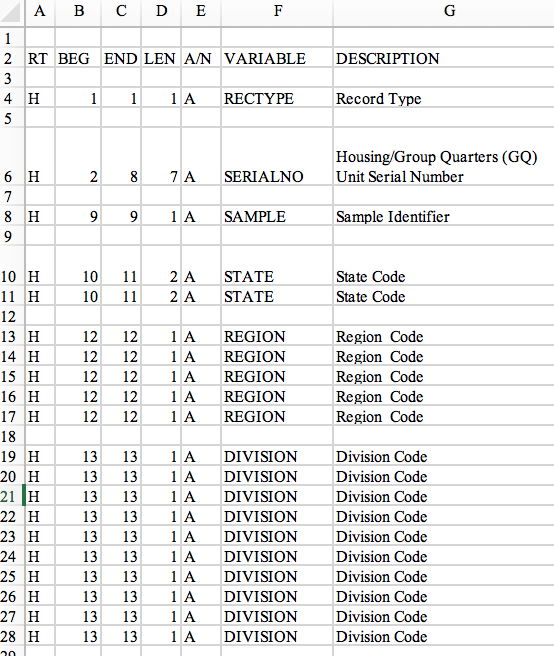
This is the spreadsheet:5%_PUMS_record_layout.xls
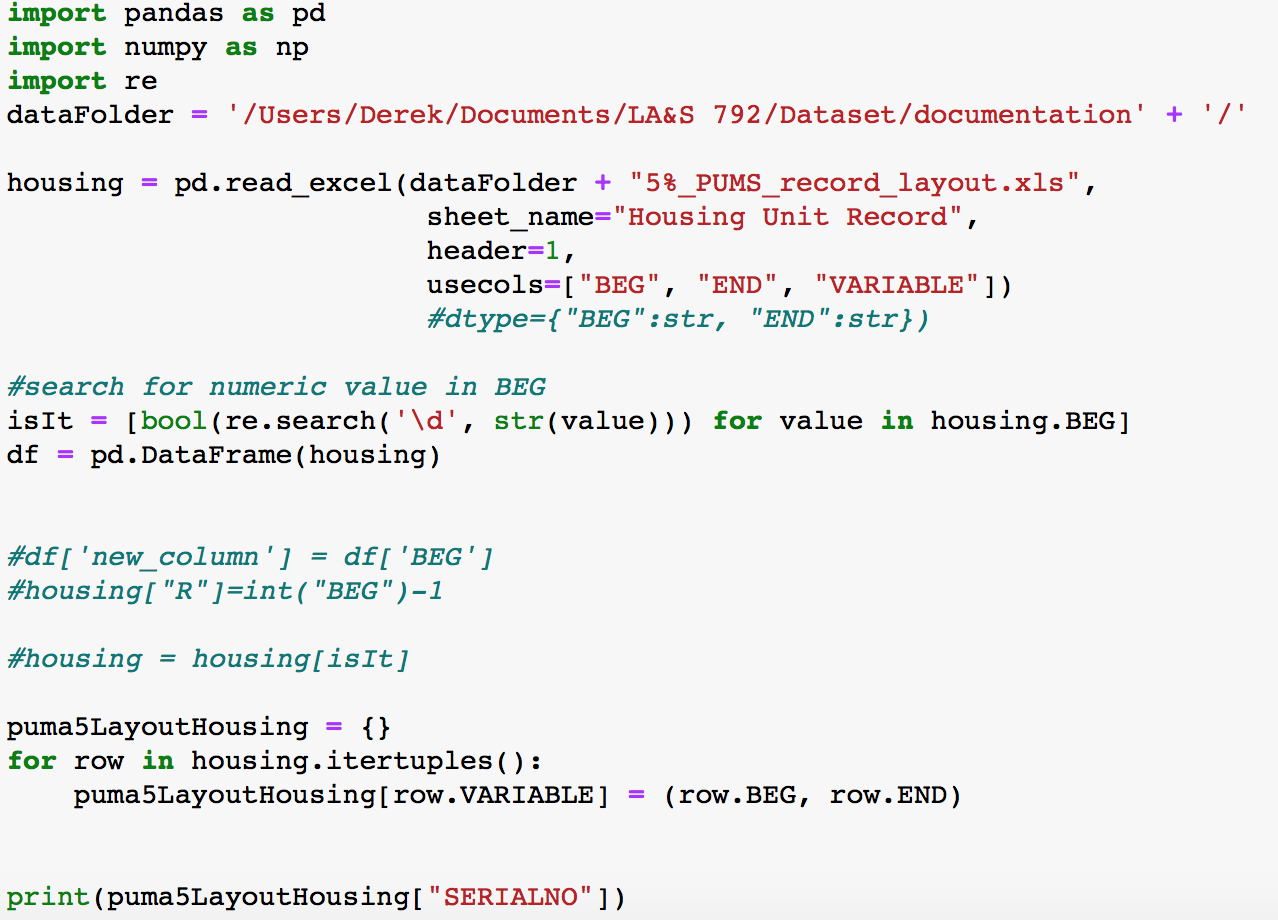
Hi, the output that i'm getting is (2, 8), but I need it to be (1,8) when I print SERIALNO, I was trying to subtract value of 1 for column BEG, but I keep getting errors. Could you provide codes for it? or any suggestion? Thanks
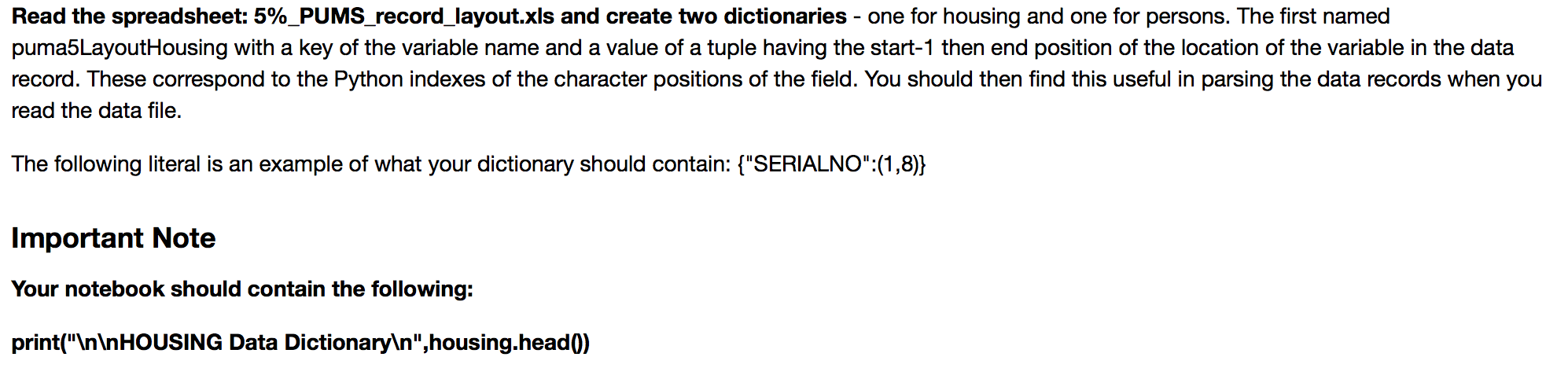
Read the spreadsheet: 5%_PUMS_record_layout.xls and create two dictionaries - one for housing and one for persons. The first named puma5LayoutHousing with a key of the variable name and a value of a tuple having the start-1 then end position of the location of the variable in the data record. These correspond to the Python indexes of the character positions of the field. You should then find this useful in parsing the data records when you read the data file. The following literal is an example of what your dictionary should contain: {"SERIALNO":(1,8)} Important Note Your notebook should contain the following: print(" HOUSING Data Dictionary ", housing.head()) A B C D E 2 RT BEG END LEN A/N VARIABLE DESCRIPTION 4 H 1 1 1A RECTYPE Record Type 6 H 2 8 7A SERIALNO Housing Group Quarters (GQ) Unit Serial Number 8 H 9 91A SAMPLE Sample Identifier 10 11 2A STATE 10 11 2 A STATE State Code State Code 10 H 11 H 12 13 H 14 H 15 H 16 H 17 H 12 12 12 12 12 1A 1A 1A 1A 1A REGION REGION REGION REGION REGION Region Code Region Code Region Code Region Code Region Code 12 12 18 13 13 13 13 13 19 H 20 H 21 H 22 H 23 H 24 H 25 H 26 H 27 H 28 H 1A 1A 1A 1A 1A 1A 1A 1A 1A 1A DIVISION DIVISION DIVISION DIVISION DIVISION DIVISION DIVISION DIVISION DIVISION DIVISION Division Code Division Code Division Code Division Code Division Code Division Code Division Code Division Code Division Code Division Code 13 13 13 13 1313 13 13 13 13 an import pandas as pd import numpy as np import re dataFolder = '/Users/Derek/Documents/LA&S 792/Dataset/documentation' + '/'. housing = pd.read_excel (dataFolder + "58_PUMS_record_layout.xls", sheet_name="Housing Unit Record", header=1, usecols=["BEG", "END", "VARIABLE"]). #dtype={ "BEG":str, "END":str}) #search for numeric value in BEG isIt = [bool(re.search('id', str(value))) for value in housing.BEG] df = pd. DataFrame (housing) #df[ 'new_column'] = df [ 'BEG'] #housing["R"]=int("BEG")-1 #housing = housing[isit] puma5LayoutHousing = {} for row in housing.itertuples(): puma 5 LayoutHousing[row. VARIABLE] = (row.BEG, row.END) print (puma5LayoutHousing[ "SERIALNO" ]). Read the spreadsheet: 5%_PUMS_record_layout.xls and create two dictionaries - one for housing and one for persons. The first named puma5LayoutHousing with a key of the variable name and a value of a tuple having the start-1 then end position of the location of the variable in the data record. These correspond to the Python indexes of the character positions of the field. You should then find this useful in parsing the data records when you read the data file. The following literal is an example of what your dictionary should contain: {"SERIALNO":(1,8)} Important Note Your notebook should contain the following: print(" HOUSING Data Dictionary ", housing.head()) A B C D E 2 RT BEG END LEN A/N VARIABLE DESCRIPTION 4 H 1 1 1A RECTYPE Record Type 6 H 2 8 7A SERIALNO Housing Group Quarters (GQ) Unit Serial Number 8 H 9 91A SAMPLE Sample Identifier 10 11 2A STATE 10 11 2 A STATE State Code State Code 10 H 11 H 12 13 H 14 H 15 H 16 H 17 H 12 12 12 12 12 1A 1A 1A 1A 1A REGION REGION REGION REGION REGION Region Code Region Code Region Code Region Code Region Code 12 12 18 13 13 13 13 13 19 H 20 H 21 H 22 H 23 H 24 H 25 H 26 H 27 H 28 H 1A 1A 1A 1A 1A 1A 1A 1A 1A 1A DIVISION DIVISION DIVISION DIVISION DIVISION DIVISION DIVISION DIVISION DIVISION DIVISION Division Code Division Code Division Code Division Code Division Code Division Code Division Code Division Code Division Code Division Code 13 13 13 13 1313 13 13 13 13 an import pandas as pd import numpy as np import re dataFolder = '/Users/Derek/Documents/LA&S 792/Dataset/documentation' + '/'. housing = pd.read_excel (dataFolder + "58_PUMS_record_layout.xls", sheet_name="Housing Unit Record", header=1, usecols=["BEG", "END", "VARIABLE"]). #dtype={ "BEG":str, "END":str}) #search for numeric value in BEG isIt = [bool(re.search('id', str(value))) for value in housing.BEG] df = pd. DataFrame (housing) #df[ 'new_column'] = df [ 'BEG'] #housing["R"]=int("BEG")-1 #housing = housing[isit] puma5LayoutHousing = {} for row in housing.itertuples(): puma 5 LayoutHousing[row. VARIABLE] = (row.BEG, row.END) print (puma5LayoutHousing[ "SERIALNO" ])
Step by Step Solution
There are 3 Steps involved in it

Get step-by-step solutions from verified subject matter experts
 Study Help