







Question: Does anyone know about this of doing Assembly language codes and pseudocode? Who knows how to putting it on with Visual Studio of those problems
Does anyone know about this of doing Assembly language codes and pseudocode? Who knows how to putting it on with Visual Studio of those problems that I show?
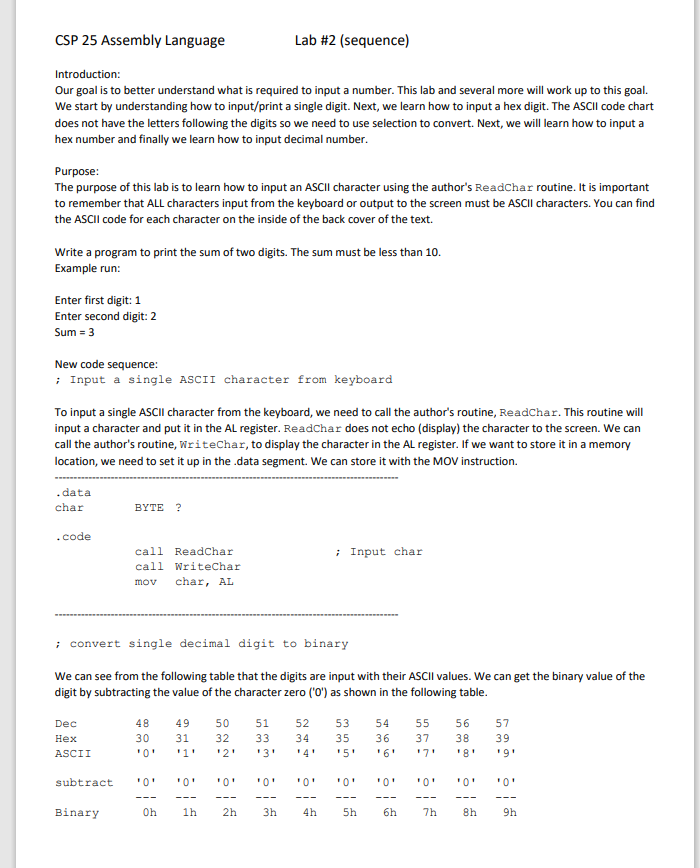
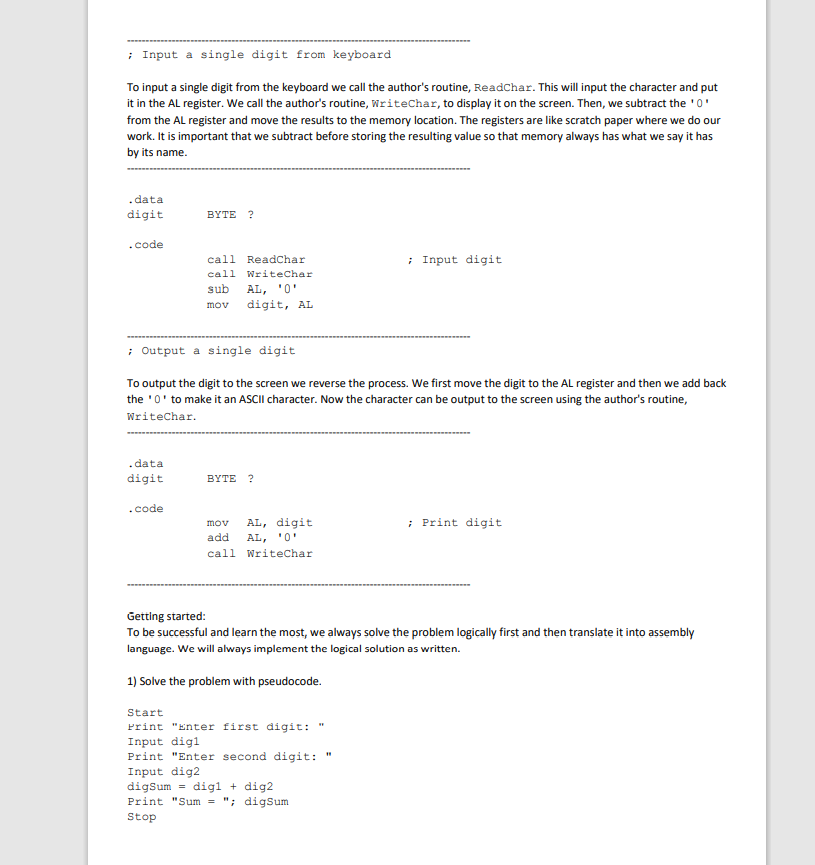
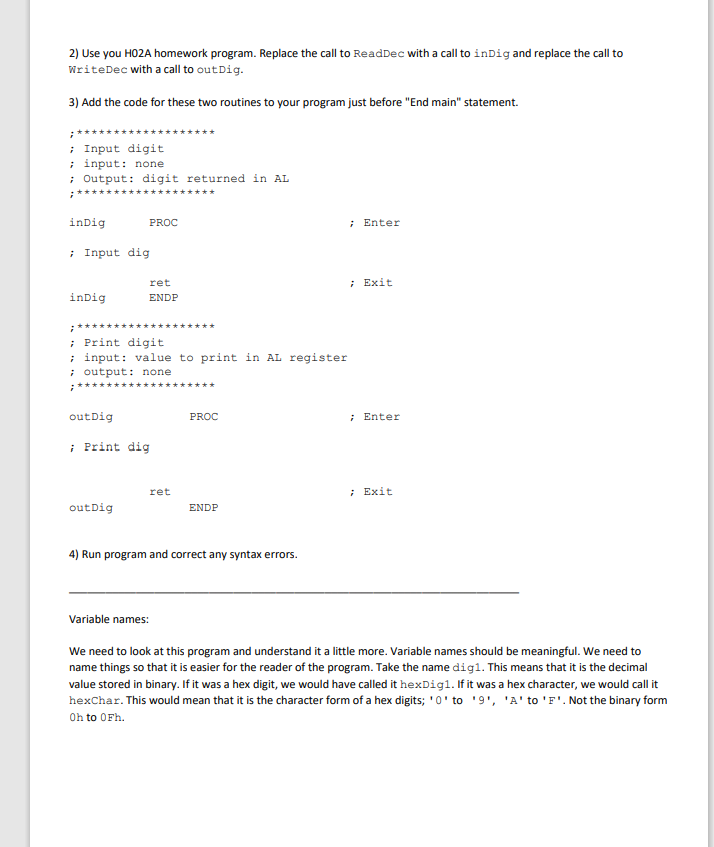
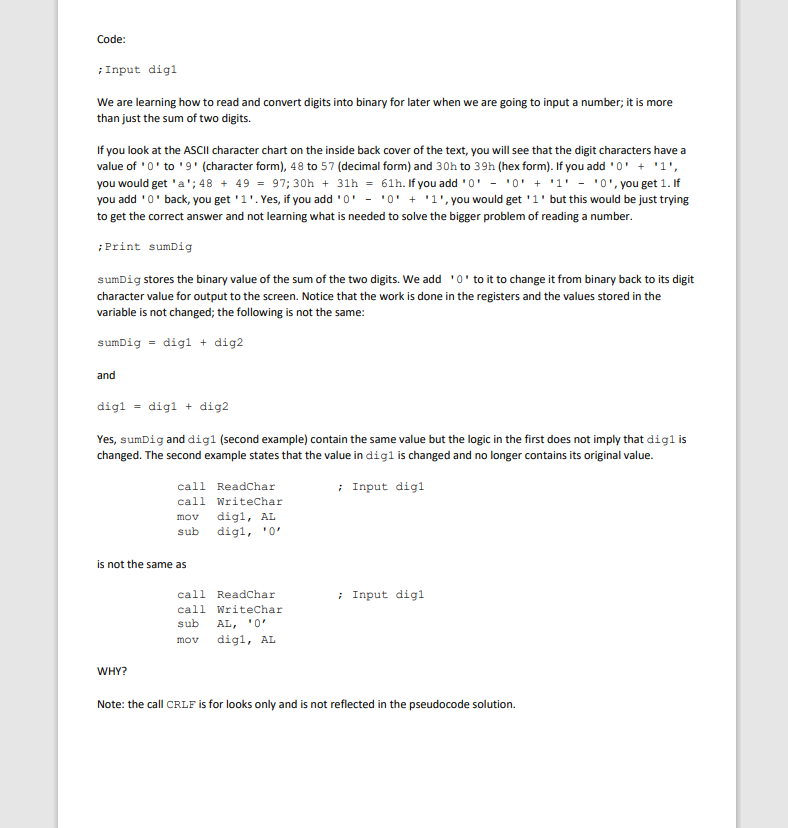
CSP 25 Assembly Language Lab #2 (sequence) Introduction: Our goal is to better understand what is required to input a number. This lab and several more will work up to this goal. We start by understanding how to input/print a single digit. Next, we learn how to input a hex digit. The ASCII code chart does not have the letters following the digits so we need to use selection to convert. Next, we will learn how to input a hex number and finally we learn how to input decimal number. Purpose: The purpose of this lab is to learn how to input an ASCII character using the author's ReadChar routine. It is important to remember that ALL characters input from the keyboard or output to the screen must be ASCII characters. You can find the ASCII code for each character on the inside of the back cover of the text. Write a program to print the sum of two digits. The sum must be less than 10. Example run: Enter first digit: 1 Enter second digit: 2 Sum = 3 New code sequence: ; Input a single ASCII character from keyboard To input a single ASCII character from the keyboard, we need to call the author's routine, ReadChar. This routine will input a character and put it in the AL register. Readchar does not echo (display) the character to the screen. We can call the author's routine, WriteChar, to display the character in the AL register. If we want to store it in a memory location, we need to set it up in the data segment. We can store it with the MOV instruction .data char BYTE ? .code ; Input char call Readchar call Writechar mov char, AL ; convert single decimal digit to binary We can see from the following table that the digits are input with their ASCII values. We can get the binary value of the digit by subtracting the value of the character zero ('0') as shown in the following table. 50 56 Dec Hex ASCII 48 30 '0' 49 31 '1' 51 33 "31 32 52 34 14 53 35 15 54 36 6 55 37 38 57 39 19. '2' '8' subtract "0 10 0 '0' ' '0' ' ' 10 "0 Binary Oh 1h 2h 3h 4h 5h 6h 7h 8h 9h ; Input a single digit from keyboard To input a single digit from the keyboard we call the author's routine, ReadChar. This will input the character and put it in the AL register. We call the author's routine, Writechar, to display it on the screen. Then, we subtract the 'o' from the AL register and move the results to the memory location. The registers are like scratch paper where we do our work. It is important that we subtract before storing the resulting value so that memory always has what we say it has by its name. .data digit BYTE ? .code ; Input digit call Readchar call Writechar sub AL, '0' mov digit, AL ; Output a single digit To output the digit to the screen we reverse the process. We first move the digit to the AL register and then we add back the 'O' to make it an ASCII character. Now the character can be output to the screen using the author's routine, Writechar. .data digit BYTE ? .code ; Print digit mov AL, digit add AL, '0' call Writechar Getting started: To be successful and learn the most, we always solve the problem logically first and then translate it into assembly language. We will always implement the logical solution as written. 1) Solve the problem with pseudocode. Start Print "Enter first digit: Input digi Print "Enter second digit: " Input dig2 digSum = digi + dig2 Print "Sum = "; digSum Stop 2) Use you H02A homework program. Replace the call to ReadDec with a call to indig and replace the call to WriteDec with a call to out Dig. 3) Add the code for these two routines to your program just before "End main" statement. ; Input digit ; input: none ; Output: digit returned in AL indig PROC ; Enter ; Input dig ; Exit indig ret ENDP ; Print digit ; input: value to print in AL register ; output: none out Dig PROC ; Enter i Print dig ret ; Exit out Dig ENDP 4) Run program and correct any syntax errors. Variable names: We need to look at this program and understand it a little more. Variable names should be meaningful. We need to name things so that it is easier for the reader of the program. Take the name digl. This means that it is the decimal value stored in binary. If it was a hex digit, we would have called it hexDigi. If it was a hex character, we would call it hexChar. This would mean that it is the character form of a hex digits; 'O' to '9', 'A' to 'F'. Not the binary form Oh to OFh. Code: Input digi We are learning how to read and convert digits into binary for later when we are going to input a number; it is more than just the sum of two digits. If you look at the ASCII character chart on the inside back cover of the text, you will see that the digit characters have a value of 'O' to '9' (character form), 48 to 57 (decimal form) and 30h to 39h (hex form). If you add 'O' + '1', you would get 'a'; 48 + 49 = 97; 30h + 31h = 61h. If you add 'O' - 'O' + 'l' - '0', you get 1. If you add 'O' back, you get 'l'. Yes, if you add 'O' -'0' + '1', you would get 'l' but this would be just trying to get the correct answer and not learning what is needed to solve the bigger problem of reading a number Print sumDig sumDig stores the binary value of the sum of the two digits. We add 'O' to it to change it from binary back to its digit character value for output to the screen. Notice that the work is done in the registers and the values stored in the variable is not changed; the following is not the same: sumDig = digi + dig2 and digi = digi + dig2 Yes, sumDig and digi (second example) contain the same value but the logic in the first does not imply that digiis changed. The second example states that the value in digi is changed and no longer contains its original value. ; Input digi call Readchar call Writechar mov digi, AL sub digi, '0' is not the same as ; Input digi call Readchar call Writechar sub AL, '0' mov digi, AL WHY? Note: the call CRLF is for looks only and is not reflected in the pseudocode solution. Search Sol Solut SC PI Solution... Properties Ah 100 % No issues found Ln: 1 Ch: 1 TABS CRLF Error List 4 x Entire Solution X 0 Errors O Warnings O Messages Build Only Search Error List Code Description Project File Line Error list Output CSP 25 Assembly Language Lab #2 (sequence) Introduction: Our goal is to better understand what is required to input a number. This lab and several more will work up to this goal. We start by understanding how to input/print a single digit. Next, we learn how to input a hex digit. The ASCII code chart does not have the letters following the digits so we need to use selection to convert. Next, we will learn how to input a hex number and finally we learn how to input decimal number. Purpose: The purpose of this lab is to learn how to input an ASCII character using the author's ReadChar routine. It is important to remember that ALL characters input from the keyboard or output to the screen must be ASCII characters. You can find the ASCII code for each character on the inside of the back cover of the text. Write a program to print the sum of two digits. The sum must be less than 10. Example run: Enter first digit: 1 Enter second digit: 2 Sum = 3 New code sequence: ; Input a single ASCII character from keyboard To input a single ASCII character from the keyboard, we need to call the author's routine, ReadChar. This routine will input a character and put it in the AL register. Readchar does not echo (display) the character to the screen. We can call the author's routine, WriteChar, to display the character in the AL register. If we want to store it in a memory location, we need to set it up in the data segment. We can store it with the MOV instruction .data char BYTE ? .code ; Input char call Readchar call Writechar mov char, AL ; convert single decimal digit to binary We can see from the following table that the digits are input with their ASCII values. We can get the binary value of the digit by subtracting the value of the character zero ('0') as shown in the following table. 50 56 Dec Hex ASCII 48 30 '0' 49 31 '1' 51 33 "31 32 52 34 14 53 35 15 54 36 6 55 37 38 57 39 19. '2' '8' subtract "0 10 0 '0' ' '0' ' ' 10 "0 Binary Oh 1h 2h 3h 4h 5h 6h 7h 8h 9h ; Input a single digit from keyboard To input a single digit from the keyboard we call the author's routine, ReadChar. This will input the character and put it in the AL register. We call the author's routine, Writechar, to display it on the screen. Then, we subtract the 'o' from the AL register and move the results to the memory location. The registers are like scratch paper where we do our work. It is important that we subtract before storing the resulting value so that memory always has what we say it has by its name. .data digit BYTE ? .code ; Input digit call Readchar call Writechar sub AL, '0' mov digit, AL ; Output a single digit To output the digit to the screen we reverse the process. We first move the digit to the AL register and then we add back the 'O' to make it an ASCII character. Now the character can be output to the screen using the author's routine, Writechar. .data digit BYTE ? .code ; Print digit mov AL, digit add AL, '0' call Writechar Getting started: To be successful and learn the most, we always solve the problem logically first and then translate it into assembly language. We will always implement the logical solution as written. 1) Solve the problem with pseudocode. Start Print "Enter first digit: Input digi Print "Enter second digit: " Input dig2 digSum = digi + dig2 Print "Sum = "; digSum Stop 2) Use you H02A homework program. Replace the call to ReadDec with a call to indig and replace the call to WriteDec with a call to out Dig. 3) Add the code for these two routines to your program just before "End main" statement. ; Input digit ; input: none ; Output: digit returned in AL indig PROC ; Enter ; Input dig ; Exit indig ret ENDP ; Print digit ; input: value to print in AL register ; output: none out Dig PROC ; Enter i Print dig ret ; Exit out Dig ENDP 4) Run program and correct any syntax errors. Variable names: We need to look at this program and understand it a little more. Variable names should be meaningful. We need to name things so that it is easier for the reader of the program. Take the name digl. This means that it is the decimal value stored in binary. If it was a hex digit, we would have called it hexDigi. If it was a hex character, we would call it hexChar. This would mean that it is the character form of a hex digits; 'O' to '9', 'A' to 'F'. Not the binary form Oh to OFh. Code: Input digi We are learning how to read and convert digits into binary for later when we are going to input a number; it is more than just the sum of two digits. If you look at the ASCII character chart on the inside back cover of the text, you will see that the digit characters have a value of 'O' to '9' (character form), 48 to 57 (decimal form) and 30h to 39h (hex form). If you add 'O' + '1', you would get 'a'; 48 + 49 = 97; 30h + 31h = 61h. If you add 'O' - 'O' + 'l' - '0', you get 1. If you add 'O' back, you get 'l'. Yes, if you add 'O' -'0' + '1', you would get 'l' but this would be just trying to get the correct answer and not learning what is needed to solve the bigger problem of reading a number Print sumDig sumDig stores the binary value of the sum of the two digits. We add 'O' to it to change it from binary back to its digit character value for output to the screen. Notice that the work is done in the registers and the values stored in the variable is not changed; the following is not the same: sumDig = digi + dig2 and digi = digi + dig2 Yes, sumDig and digi (second example) contain the same value but the logic in the first does not imply that digiis changed. The second example states that the value in digi is changed and no longer contains its original value. ; Input digi call Readchar call Writechar mov digi, AL sub digi, '0' is not the same as ; Input digi call Readchar call Writechar sub AL, '0' mov digi, AL WHY? Note: the call CRLF is for looks only and is not reflected in the pseudocode solution. Search Sol Solut SC PI Solution... Properties Ah 100 % No issues found Ln: 1 Ch: 1 TABS CRLF Error List 4 x Entire Solution X 0 Errors O Warnings O Messages Build Only Search Error List Code Description Project File Line Error list Output
Step by Step Solution
There are 3 Steps involved in it

Get step-by-step solutions from verified subject matter experts
 Study Help