



Question: This is to be done in LC3 Assembly Language. I need to convert a decimal value between 511 and -511 into binary, any other value
This is to be done in LC3 Assembly Language.
I need to convert a decimal value between 511 and -511 into binary, any other value is invalid and should be stated as such and if it is valid, then it prints the value out in binary. If a value does not start with a + or - at the start, then it is also invalid. When a value is rejected, the program loops back and asks for a new number. The program stops printing after printing the value in 16 bit form with spaces in between each bit.
This is what my ouput should look like:
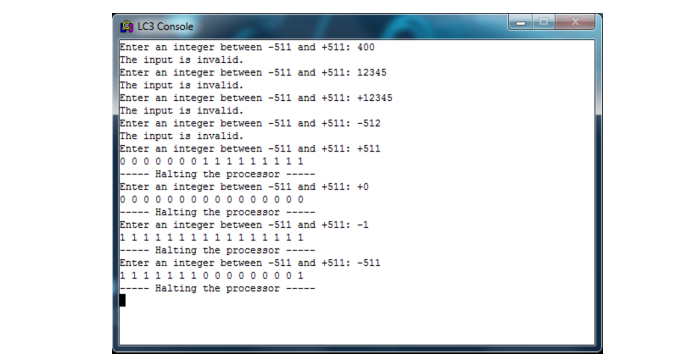
L LC3 Console Enter an integer between -511 and +511: 400 The input is invalid. Enter an integer between -511 and +511 12345 The input is invalid. Enter an integer between-511 and +511: +12345 The input is invalid. Enter an integer between -511 and +511:-512 The input is invalid. Enter an integer between -511 and +511: +511 Halting the processor Enter an integer between -511 and +511: +0 Halting the processor- Enter an integer between -511 and +511: -1 Halting the processor Enter an integer between -511 and +511:-511 111111 10 00000001 Halting the processor - L LC3 Console Enter an integer between -511 and +511: 400 The input is invalid. Enter an integer between -511 and +511 12345 The input is invalid. Enter an integer between-511 and +511: +12345 The input is invalid. Enter an integer between -511 and +511:-512 The input is invalid. Enter an integer between -511 and +511: +511 Halting the processor Enter an integer between -511 and +511: +0 Halting the processor- Enter an integer between -511 and +511: -1 Halting the processor Enter an integer between -511 and +511:-511 111111 10 00000001 Halting the processor
Step by Step Solution
There are 3 Steps involved in it

Get step-by-step solutions from verified subject matter experts