







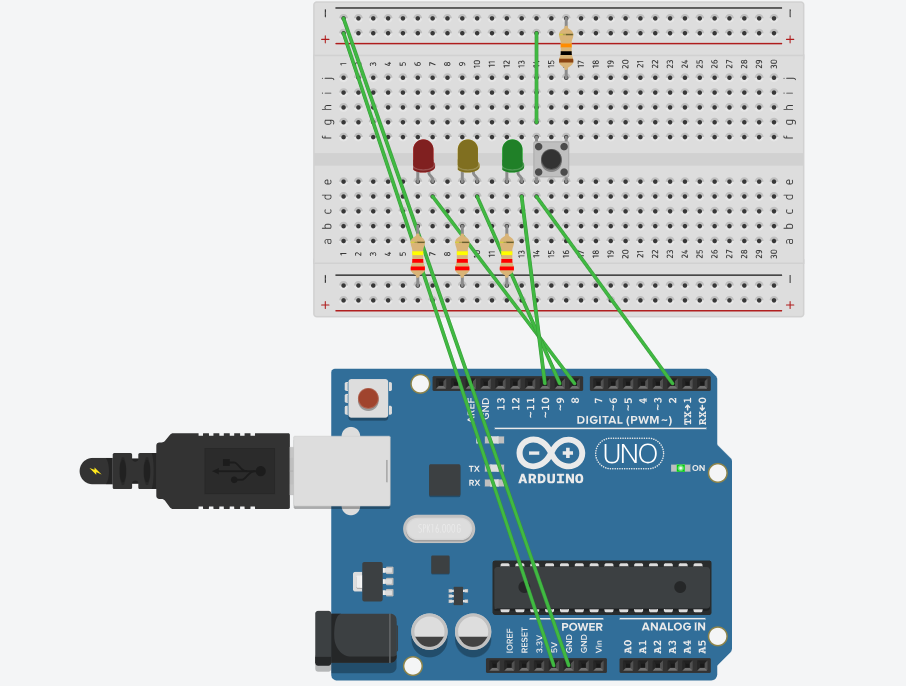
Question: this is what i did id my set up wrong? or is the code wrong? Program a system with three lights. The user presses start
this is what i did id my set up wrong? or is the code wrong?
Program a system with three lights. The user presses start and the first light comes on and stays on ten seconds later the second light comes on and stays on ten seconds later the third light comes on and stays on After more seconds with all lights on everything shuts off. If the user presses stop at any time, everything shuts off.
const int buttonPin ; Push button pin
const int led; LED pin
const int led; LED pin
const int led; LED pin
bool isRunning false; To track if the sequence is active
bool buttonPressed false; To check if the button was pressed
void setup
pinModebuttonPin INPUT;
pinModeled OUTPUT;
pinModeled OUTPUT;
pinModeled OUTPUT;
void loop
if digitalReadbuttonPin HIGH && buttonPressed
buttonPressed true;
isRunning isRunning; Toggle isRunning on each button press
if isRunning
startSequence;
else
stopSequence;
Reset buttonPressed when button is released
if digitalReadbuttonPin LOW
buttonPressed false;
void startSequence
digitalWriteled HIGH;
delay; Wait for seconds
if isRunning return; Check if we should stop
digitalWriteled HIGH;
delay; Wait for seconds
if isRunning return; Check if we should stop
digitalWriteled HIGH;
delay; Wait for seconds
if isRunning return; Check if we should stop
delay; Keep all LEDs on for seconds
stopSequence; Turn off all LEDs after the full sequence
void stopSequence
digitalWriteled LOW;
digitalWriteled LOW;
digitalWriteled LOW;
isRunning false; Reset running state
Step by Step Solution
There are 3 Steps involved in it
1 Expert Approved Answer
Step: 1 Unlock

Question Has Been Solved by an Expert!
Get step-by-step solutions from verified subject matter experts
Step: 2 Unlock
Step: 3 Unlock
 Study Help