







Question: This is written in Python.... Thank you! CS 177 - Programming with Multimedia Objects - Spring 2021 Programming Exercise 2-1 Unit programming exercises are designed
This is written in Python....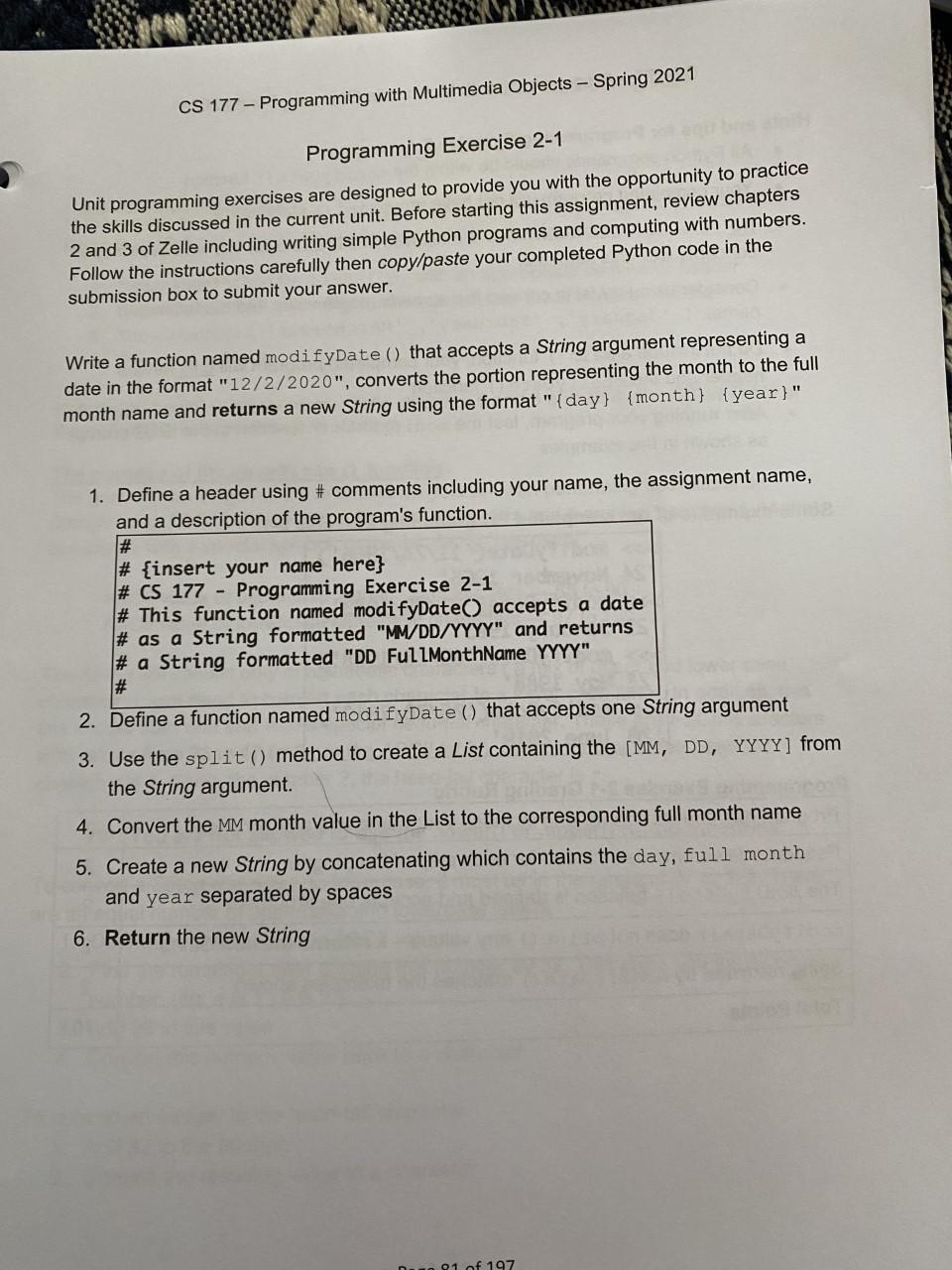
Thank you!
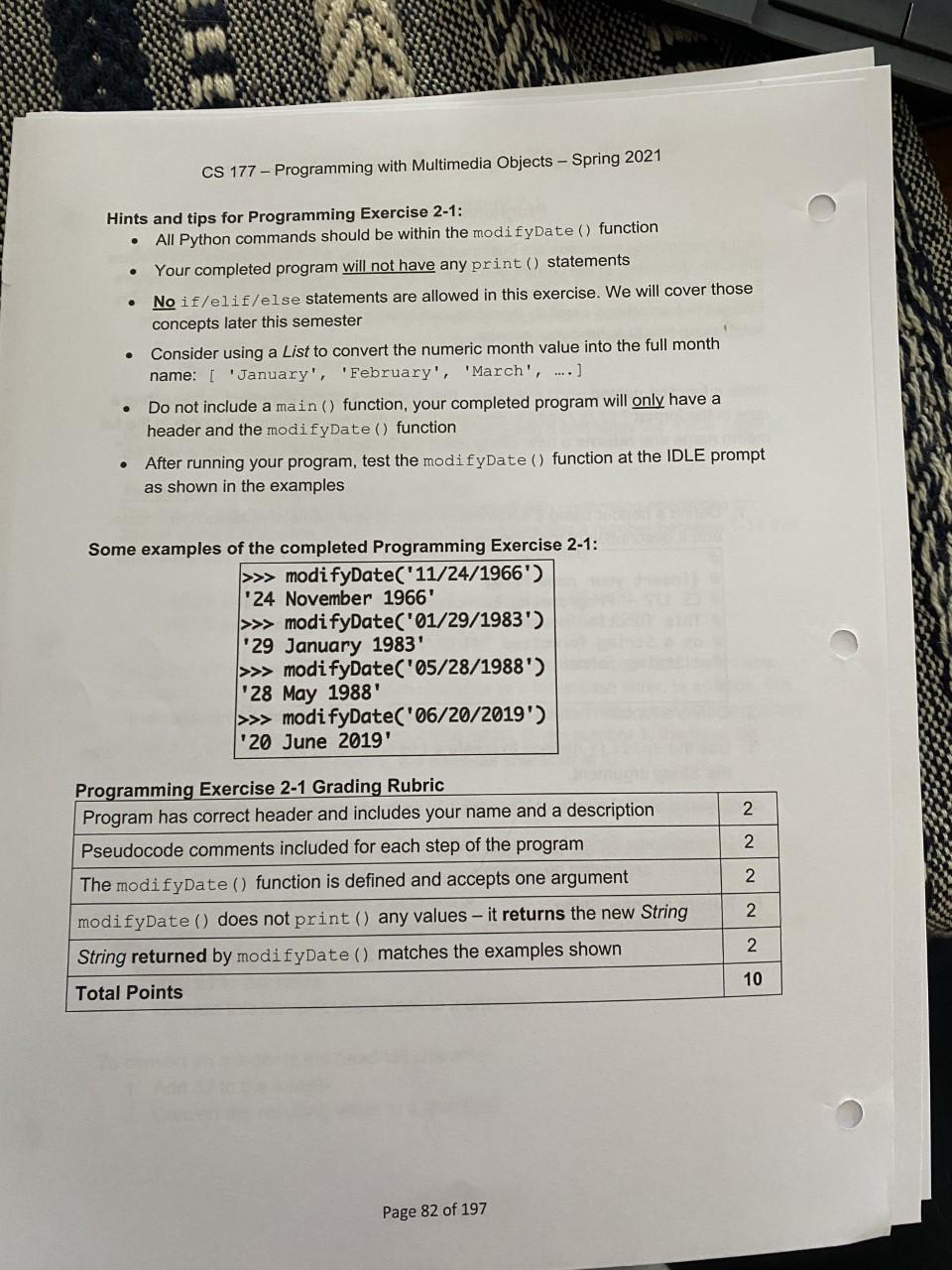
CS 177 - Programming with Multimedia Objects - Spring 2021 Programming Exercise 2-1 Unit programming exercises are designed to provide you with the opportunity to practice the skills discussed in the current unit. Before starting this assignment, review chapters 2 and 3 of Zelle including writing simple Python programs and computing with numbers. Follow the instructions carefully then copy/paste your completed Python code in the submission box to submit your answer. Write a function named modifyDate() that accepts a String argument representing a date in the format "12/2/2020", converts the portion representing the month to the full month name and returns a new String using the format" (day) {month} {year}" 1. Define a header using # comments including your name, the assignment name, and a description of the program's function. # # {insert your name here} # CS 177 - Programming Exercise 2-1 # This function named modifyDate() accepts a date # as a String formatted "MM/DD/YYYY" and returns # a String formatted "DD FullMonthName YYYY" # 2. Define a function named modifyDate() that accepts one String argument 3. Use the split() method to create a List containing the [MM, DD, YYYY] from the String argument. 4. Convert the MM month value in the List to the corresponding full month name 5. Create a new String by concatenating which contains the day, full month and year separated by spaces 6. Return the new String 91 of 197 CS 177 - Programming with Multimedia Objects - Spring 2021 Hints and tips for Programming Exercise 2-1: All Python commands should be within the modifyDate() function Your completed program will not have any print() statements No if/elif/else statements are allowed in this exercise. We will cover those concepts later this semester Consider using a List to convert the numeric month value into the full month name: [ 'January', 'February', 'March', ....] Do not include a main () function, your completed program will only have a header and the modifyDate() function After running your program, test the modifyDate() function at the IDLE prompt as shown in the examples . Some examples of the completed Programming Exercise 2-1: >>> modifyDate("11/24/1966') '24 November 1966' >>> modifyDate("01/29/1983') '29 January 1983' >>> modifyDate("05/28/1988') 28 May 1988' >>> modifyDate('06/20/2019') 20 June 2019' 2 2 2 Programming Exercise 2-1 Grading Rubric Program has correct header and includes your name and a description Pseudocode comments included for each step of the program The modifyDate() function is defined and accepts one argument modifyDate() does not print () any values - it returns the new String String returned by modifyDate () matches the examples shown Total Points 2 2 10 Page 82 of 197
Step by Step Solution
There are 3 Steps involved in it

Get step-by-step solutions from verified subject matter experts
 Study Help