







Question: This needs to be coded in Python. I need to create a payroll program for a store. The ownere has given you the following requirements:
This needs to be coded in Python.
I need to create a payroll program for a store. The ownere has given you the following requirements: the store employs six (6) people. The owner doesn't expect significant growth in his company, but to be on the safe side he would like the program to handle a maximum of ten (10) employees.
All of the employee data (name, address, etc.) is kept in a text file on your disk. Your program will read this employee data from the file and use that data to calculate the payroll for company employees. The program will have to calculate the payroll deductions for each employee and their net pay.
If you encounter errors while reading a data file, print an error message to the console, and close the file. Your program should not exit, since you might choose another file with correct data.
Suppose that your programming team has come up with a design for this program. In this design the data for each employee on the payroll will be held in an object of the Employee class.
The Employee Class
An Employee has the following attributes:
employee number
name
street address
hourly wage
hours worked this week
an employee object will need the following methods:
A constructor for the employee class that takes arguments to initialize all of the above mentioned attributes.
A method, calc_salary(), that calculates and returns an employee's net pay as a double. An employee's gross pay is calculated by multiplying the hours worked by their hourly wage. Be sure to give time-and-a-half for overtime (anything over 40 hours). To compute the net pay, deduct 20% for Federal income tax, and 7.5% for state income tax.
Every employee on the payroll will need to be represented in the program by its own employee object. A convenient way to handle this will be to create a list of employee objects.
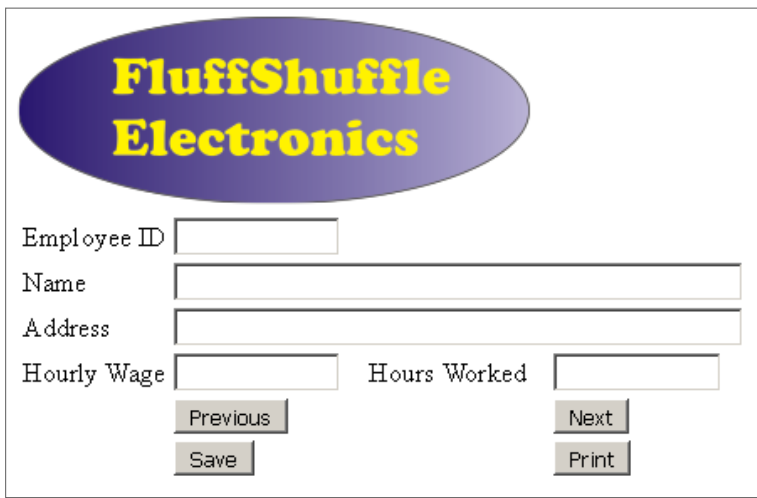
The GUI should look similar to the one below. You may want to add a Previous button (not shown) in order to scroll backward through the data.
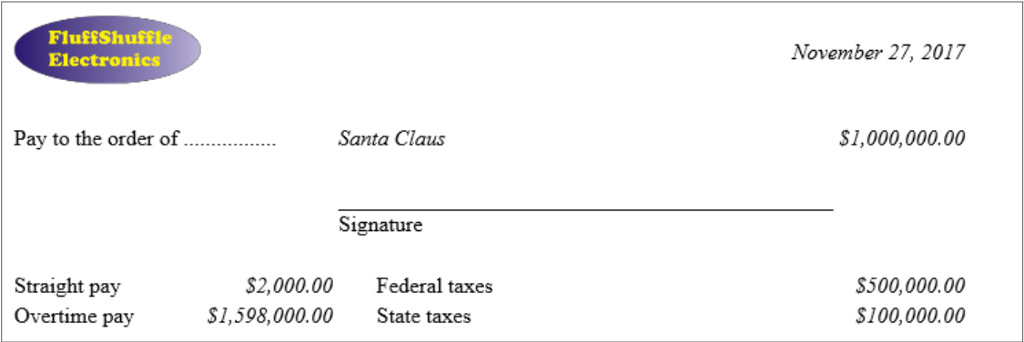
When the "Print" button is clicked, you should display a paycheck which looks. It does not need the logo
FluffShuffle Electronics Employee ID Name Address Hourly Wage Hours Worked Next Previous Save Print FluffShuffle Electronics Employee ID Name Address Hourly Wage Hours Worked Next Previous Save Print
Step by Step Solution
There are 3 Steps involved in it

Get step-by-step solutions from verified subject matter experts
 Study Help