







Question: This needs to be converted to sql using cmd 3:11 PM moodle.latech.edu AT&T Department Number Table Name: DEPARTMENT Xxx Attribute Department Name VARCHARI15 Department Number
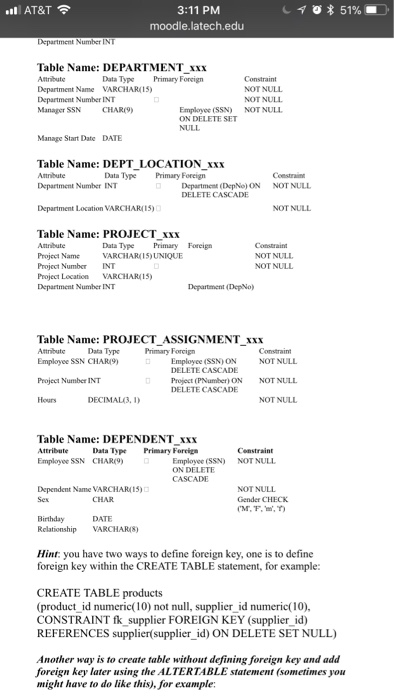
3:11 PM moodle.latech.edu AT&T Department Number Table Name: DEPARTMENT Xxx Attribute Department Name VARCHARI15 Department Number INT Manager SSN CHAR) Data Type Primary Foreign Constraint NOT NULL NOT NULL Employee (SSN) NOT NULI ON DELETE SET NULL Manage Start Date DATE Table Name: DEPT_LOCATION xxx Department Number INT Department Location VARCHAR(15) Data Type Primary Foreign Coestrain NOT NULL Department (DepNo) ON DELETE CASCADE NOT NULL Table Name: PROJECT XxX Atrnbute Project Name Project Number INT Project Location VARCHAR15) Department Number INT Data Type Primary Foreign VARCHARIS)UNIQUE NOT NULL NOT NULL Department (DepNo) Table Name: PROJECT ASSIGNMENT xxx Attribute Data Typ Primary Forcign Employee SSN CHAR9 Project Number INT Hours Employee (SSN)ON DELETE CASCADE Project (PNumber) ON DELETE CASCADE NOT NULL NOT NULL NOT NULL DECIMAL3, 1) Table Name: DEPENDENT Xxx Data Type Primary Forcig Censtraint Employee (SSN) NOT NUL ON DELETE CASCADE Employee SSN CHAR9) Dependent Name VARCHAR( 15)" Sex NOT NULL Gender CHECK DATE Relationship VARCHARIS) Hint: you have two ways to define foreign key, one is to define foreign key within the CREATE TABLE statement, for example: CREATE TABLE products (product id numeric(10 ot , supplier id numeric(10) CONSTRAINT fk supplier FOREIGN KEY (supplier id) REFERENCES supplier(supplier id) ON DELETE SET NULL) Another way is to create table without defining foreign key and add foreign key later using the ALTERTABLE statement (sometimes you might have to do like this), for example
Step by Step Solution
There are 3 Steps involved in it

Get step-by-step solutions from verified subject matter experts
 Study Help