







Question: this needs to be done on microsoft access, I am a beginner for this and need urgent help, pls and thank you When you complete
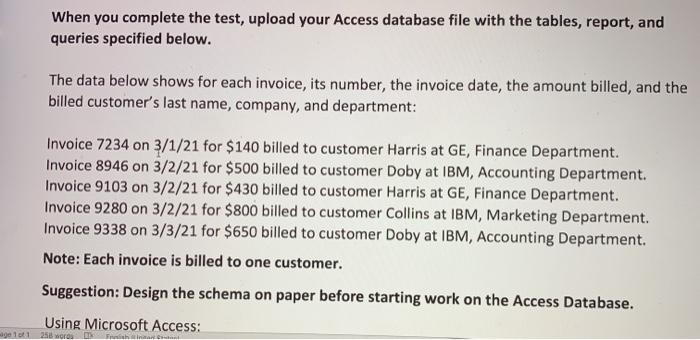
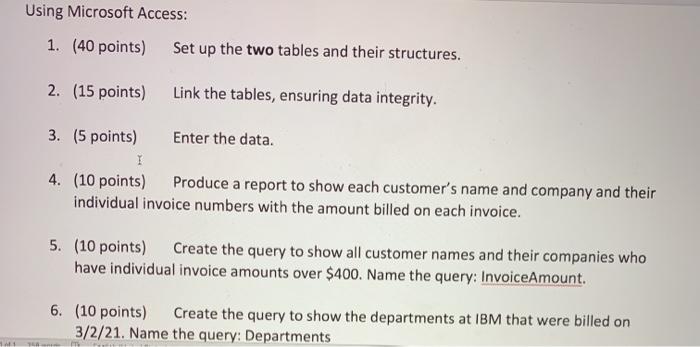

When you complete the test, upload your Access database file with the tables, report, and queries specified below. The data below shows for each invoice, its number, the invoice date, the amount billed, and the billed customer's last name, company, and department: Invoice 7234 on 3/1/21 for $140 billed to customer Harris at GE, Finance Department. Invoice 8946 on 3/2/21 for $500 billed to customer Doby at IBM, Accounting Department. Invoice 9103 on 3/2/21 for $430 billed to customer Harris at GE, Finance Department. Invoice 9280 on 3/2/21 for $800 billed to customer Collins at IBM, Marketing Department. Invoice 9338 on 3/3/21 for $650 billed to customer Doby at IBM, Accounting Department. Note: Each invoice is billed to one customer. Suggestion: Design the schema on paper before starting work on the Access Database. Using Microsoft Access: ge 101 258 Flight Using Microsoft Access: 1. (40 points) Set up the two tables and their structures. 2. (15 points) Link the tables, ensuring data integrity. 3. (5 points) Enter the data. I 4. (10 points) Produce a report to show each customer's name and company and their individual invoice numbers with the amount billed on each invoice. 5. (10 points) Create the query to show all customer names and their companies who have individual invoice amounts over $400. Name the query: InvoiceAmount. 6. (10 points) Create the query to show the departments at IBM that were billed on 3/2/21. Name the query: Departments 11 7. (10 points) Create the query to show the total amount billed to each company. Name the query: Total. When you complete the test, upload your Access database file with the tables, report, and queries specified below. The data below shows for each invoice, its number, the invoice date, the amount billed, and the billed customer's last name, company, and department: Invoice 7234 on 3/1/21 for $140 billed to customer Harris at GE, Finance Department. Invoice 8946 on 3/2/21 for $500 billed to customer Doby at IBM, Accounting Department. Invoice 9103 on 3/2/21 for $430 billed to customer Harris at GE, Finance Department. Invoice 9280 on 3/2/21 for $800 billed to customer Collins at IBM, Marketing Department. Invoice 9338 on 3/3/21 for $650 billed to customer Doby at IBM, Accounting Department. Note: Each invoice is billed to one customer. Suggestion: Design the schema on paper before starting work on the Access Database. Using Microsoft Access: ge 101 258 Flight Using Microsoft Access: 1. (40 points) Set up the two tables and their structures. 2. (15 points) Link the tables, ensuring data integrity. 3. (5 points) Enter the data. I 4. (10 points) Produce a report to show each customer's name and company and their individual invoice numbers with the amount billed on each invoice. 5. (10 points) Create the query to show all customer names and their companies who have individual invoice amounts over $400. Name the query: InvoiceAmount. 6. (10 points) Create the query to show the departments at IBM that were billed on 3/2/21. Name the query: Departments 11 7. (10 points) Create the query to show the total amount billed to each company. Name the query: Total
Step by Step Solution
There are 3 Steps involved in it

Get step-by-step solutions from verified subject matter experts
 Study Help