







Question: This needs to be written in Visual Basic as a Windows Form Application. Please show Form1.Designer.vb and Form1vb code. Information Systems - Homework 7 In
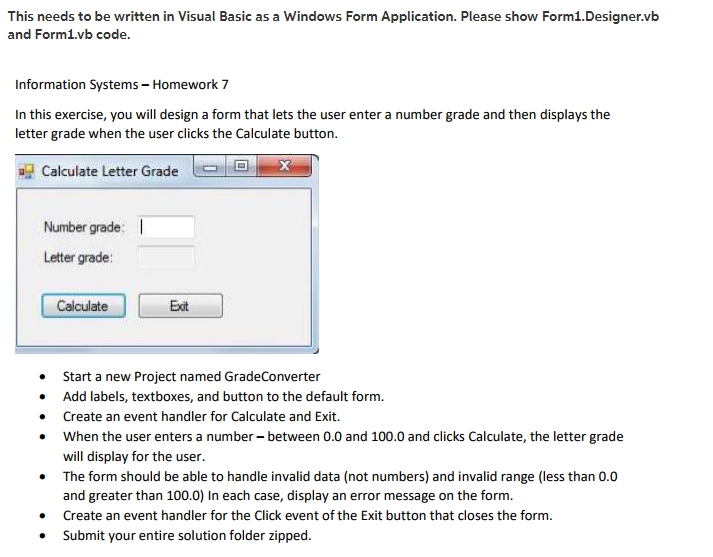
This needs to be written in Visual Basic as a Windows Form Application. Please show Form1.Designer.vb and Form1vb code. Information Systems - Homework 7 In this exercise, you will design a form that lets the user enter a number grade and then displays the letter grade when the user clicks the Calculate button. aj Calculate Letter Grade Number grade: I Letter grade: Calculate Ext Start a new Project named GradeConverter Add labels, textboxes, and button to the default form. Create an event handler for Calculate and Exit. When the user enters a number- between 0.0 and 100.0 and clicks Calculate, the letter grade will display for the user The form should be able to handle invalid data (not numbers) and invalid range (less than 0.0 and greater than 100.0) In each case, display an error message on the form. Create an event handler for the Click event of the Exit button that closes the form. Submit your entire solution folder zipped
Step by Step Solution
There are 3 Steps involved in it

Get step-by-step solutions from verified subject matter experts
 Study Help