







Question: This one is python stuff and use Visual studio code! Module 6 - Problem Set No. 10 Problem 5 Learning to Write and Read IMPORTANT
 This one is python stuff and use Visual studio code!
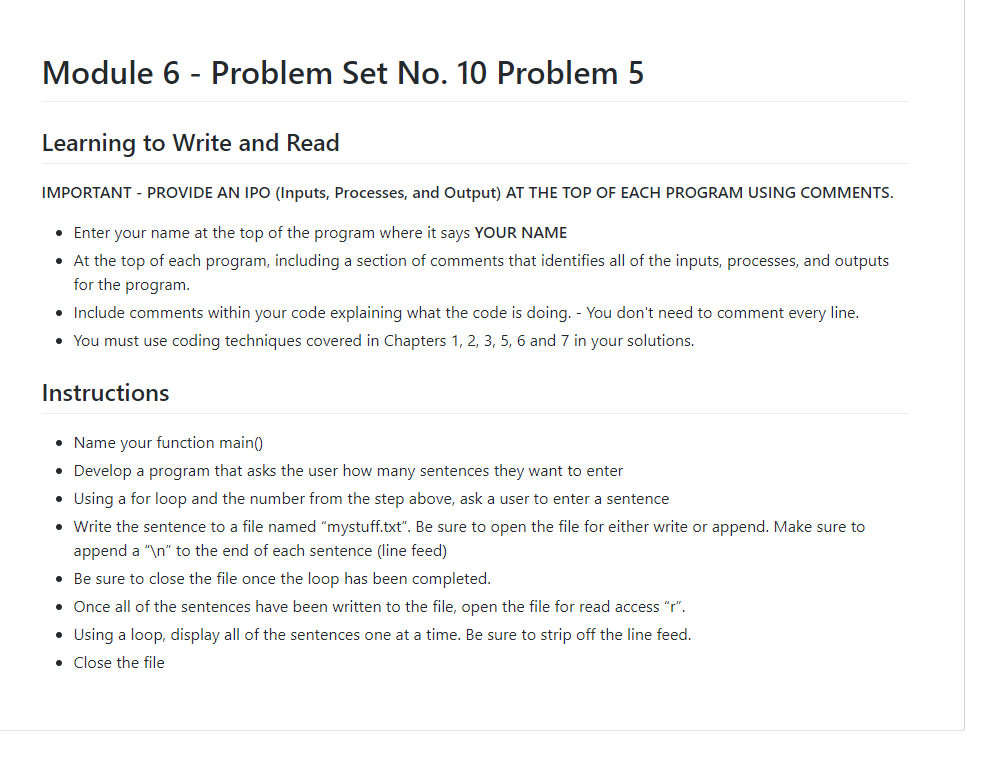
Module 6 - Problem Set No. 10 Problem 5 Learning to Write and Read IMPORTANT - PROVIDE AN IPO (Inputs, Processes, and Output) AT THE TOP OF EACH PROGRAM USING COMMENTS. Enter your name at the top of the program where it says YOUR NAME At the top of each program, including a section of comments that identifies all of the inputs, processes, and outputs for the program. Include comments within your code explaining what the code is doing. - You don't need to comment every line. You must use coding techniques covered in Chapters 1, 2, 3, 5, 6 and 7 in your solutions. Instructions Name your function main() Develop a program that asks the user how many sentences they want to enter Using a for loop and the number from the step above, ask a user to enter a sentence Write the sentence to a file named "mystuff.txt". Be sure to open the file for either write or append. Make sure to append a " " to the end of each sentence (line feed) Be sure to close the file once the loop has been completed. Once all of the sentences have been written to the file, open the file for read access "r". Using a loop, display all of the sentences one at a time. Be sure to strip off the line feed. Close the file Module 6 - Problem Set No. 10 Problem 5 Learning to Write and Read IMPORTANT - PROVIDE AN IPO (Inputs, Processes, and Output) AT THE TOP OF EACH PROGRAM USING COMMENTS. Enter your name at the top of the program where it says YOUR NAME At the top of each program, including a section of comments that identifies all of the inputs, processes, and outputs for the program. Include comments within your code explaining what the code is doing. - You don't need to comment every line. You must use coding techniques covered in Chapters 1, 2, 3, 5, 6 and 7 in your solutions. Instructions Name your function main() Develop a program that asks the user how many sentences they want to enter Using a for loop and the number from the step above, ask a user to enter a sentence Write the sentence to a file named "mystuff.txt". Be sure to open the file for either write or append. Make sure to append a " " to the end of each sentence (line feed) Be sure to close the file once the loop has been completed. Once all of the sentences have been written to the file, open the file for read access "r". Using a loop, display all of the sentences one at a time. Be sure to strip off the line feed. Close the file
Step by Step Solution
There are 3 Steps involved in it

Get step-by-step solutions from verified subject matter experts
 Study Help