







Question: This program practices recursion to make circles. Initial Form: The initial form uses a BorderPane as shown. Center Pane: Use a Pane container with some
This program practices recursion to make circles.
Initial Form:
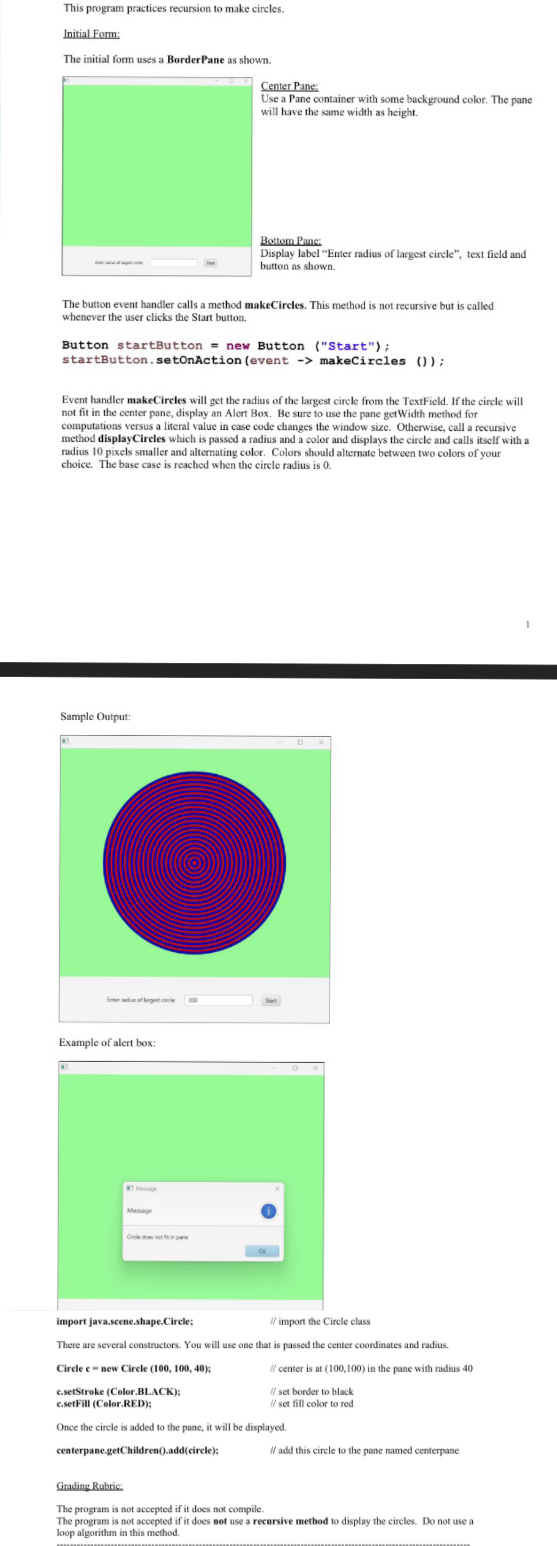
The initial form uses a BorderPane as shown.
Center Pane:
Use a Pane container with some background color. The pane will have the same width as height.
Bottom Pane
Display label "Enter radius of largest circle", text field and button as shown.
The button event handler calls a method makeCircles. This method is not recursive but is called whenever the user clicks the Start button.
Button startButton new Button Start;
startButton. setonAction event makeCircles ;
Event handler makeCireles will get the radius of the largest circle from the TextField If the circle will not fit in the center pane, display an Alert Box. Be sure to use the pane getWidth method for computations versus a literal value in case code changes the window size. Otherwise, call a recursiye method displayCireles which is passed a radius and a color and displays the circle and calls itself with a radius pixels smaller and altemating color. Colors should alternate between two colors of your choice. The base case is reached when the circle radius is
Sample Output:
Example of alert box:
import javascene.shape.Circle;
import the Circle class
There are several constructors. You will use one that is passed the center coordinates and radius.
Circle c new Circle ;
center is at in the pane with radius
csetStroke CelorBLACK;
set border to black
csetFill ColorRED;
i set fill color to red
Once the circle is added to the pane, it will be displayed.
centerpane.getChildren addcircle;
add this circle to the pane named centerpane
Grading Rubric:
The program is not aceepted if it does not compile.
The program is not accepted if it does not use a recursive method to display the circles. Do not use a loop algorithm in this method.
Step by Step Solution
There are 3 Steps involved in it
1 Expert Approved Answer
Step: 1 Unlock

Question Has Been Solved by an Expert!
Get step-by-step solutions from verified subject matter experts
Step: 2 Unlock
Step: 3 Unlock
 Study Help