







Question: This programming project involves writing a program to manage a student database. The interface to the program should be a GUI that looks similar to
This programming project involves writing a program to manage a student database. The interface to the program should be a GUI that looks similar to the following:
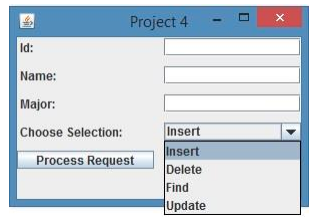
A combo box should allow the user to select one of the four database actions shown. The database should be implemented as a HashMap, with the ID field as the key and a student record consisting of a name and major as the value. The operation should be performed when the user clicks the Process Request button. If the user attempts to insert a key that is already in the database an error message should be displayed using a JOptionPane message dialog box. If the user attempts to delete, find or update a record that is not in the database, a message should also be displayed. After each successful operation is completed a JOptionPane window should be displayed confirming the success. In the case of a successful Find request, a window should pop up containing the student's ID, name, major and current GPA. When the user selects the Update request, the following JOptionPane windows should be displayed to gather information about a course that has just been completed:
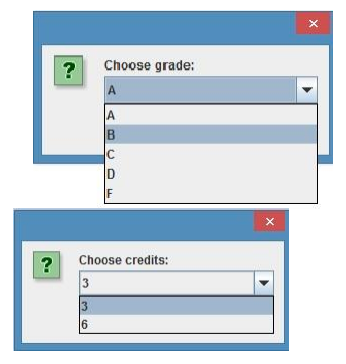
This program must consist of two classes. 1. The first class should define the GUI and handle the database interactions. 2. The second class named Student, should define the student record. It must have instance variables for the student name, major and two variables that are used to compute the GPA. A variable that contains the total number of credits completed and a second variable that contains the total quality points, which are the numeric value of the grade received in a course times the number of credit hours. It should not contain the student ID. The class should have the following three methods: a. A constructor that is used when new student records are created. It should accept the name and major as parameters and initialize the fields that are used to compute the GPA to zero. b. The second method courseCompleted should accept the course grade and credit hours and update the variables used to compute the GPA. It will be called when an Update request is made. c. The third method should override toString and return a labeled string containing the student name, major and GPA. Finally when a student has not yet completed any course, the GPA should be displayed as 4.0. The google recommended Java style guide, provided as link in the week 2 content, should be used to format and document your code. Specifically, the following style guide attributes should be addressed: Header comments include filename, author, date and brief purpose of the program. In-line comments used to describe major functionality of the code. Meaningful variable names and prompts applied. Class names are written in UpperCamelCase. Variable names are written in lowerCamelCase. Constant names are in written in All Capitals. Braces use K&R style. In addition the following design constraints should be followed: Declare all instance variables private Avoid the duplication of code Also any exceptions thrown by nonnumeric inputs should be properly handled
Grading Rubric: The following grading rubric will be used to determine your grade: Attribute Meets Does not meet GUI Class 40 points Defines the GUI. Provides a combo box to allow the user to select one of the four database actions including insert, update, delete and find. The database is implemented as a HashMap, with the ID field as the key and a student record consisting of a name and major as the value. The operation is performed when the user clicks the Process Request button. If the user attempts to insert a key that is already in the database an error message is displayed using a JOptionPane message dialog box. If the user attempts to delete, find or update a record that is not in the database, a message is displayed. 0 points Does not defines the GUI. Does not provide a combo box to allow the user to select one of the four database actions including insert, update, delete and find. The database is not implemented as a HashMap, with the ID field as the key and a student record consisting of a name and major as the value. The operation is not performed when the user clicks the Process Request button. If the user attempts to insert a key that is already in the database an error message is not displayed using a JOptionPane message dialog box. If the user attempts to delete, find or update a record that is 4 After each successful operation is completed a JOptionPane window is displayed confirming the success. In the case of a successful Find request, a window pops-up containing the student's ID, name, major and current GPA. When the user selects the Update request, a JOptionPane windows is displayed to gather information about a course that has just been completed including the grade and number of credits. not in the database, a message is not displayed. After each successful operation is completed a JOptionPane window is not displayed confirming the success. In the case of a successful Find request, a window does not pop-up containing the student's ID, name, major and current GPA. When the user selects the Update request, a JOptionPane window is not be displayed to gather information about a course that has just been completed including the grade and number of credits. Student class 40 points Defines the student record. Contains instance variables for the student name, major and two variables that are used to compute the GPA. Contains a variable representing the total number of credits completed Contains a variable representing the total quality points, which are the numeric value of the grade received in a course times the number of credit hours. The class should not should contain the student ID. Contains a constructor that is used when new student records are created. It should accept the name and major as parameters 0 points Does not define the student record. Does not contains instance variables for the student name, major and two variables that are used to compute the GPA. Does not contain a variable representing the total number of credits completed Does not contain a variable representing the total quality points, which are the numeric value of the grade received in a course times the number of credit hours. The class contains the student ID. Does not contains a constructor that is used when new student 5 and initialize the fields that are used to compute the GPA to zero. Contains a method courseCompleted that accepts the course grade and credit hours and update the variables used to compute the GPA. courseComplete is called when an Update request is made. Contains an overridden toString method that returns a labeled string containing the student name, major and GPA. Calculates and displays a GPA of 4.0 for students who have not yet completed any course. records are created. It should accept the name and major as parameters and initialize the fields that are used to compute the GPA to zero. Does not contains a method courseCompleted that accepts the course grade and credit hours and update the variables used to compute the GPA. courseComplete is not called when an Update request is made. Does not contains an overridden toString method that returns a labeled string containing the student name, major and GPA. Does not calculate or display a GPA of 4.0 for students who have not yet completed any course. Test Cases 10 points Test cases are supplied in the form of table with columns indicating the input values, expected output, actual output and if the test case passed or failed. Enough scenarios selected to completely test the program. Test cases were included in the supporting word or PDF documentation. 0 points No test cases were provided. Documentation and Style guide 10 points Screen captures were provided and labeled for compiling your 0 points No documentation included. 6 code, and running each of your test cases. Header comments include filename, author, date and brief purpose of the program. In-line comments used to describe major functionality of the code. Meaningful variable names and prompts applied. Class names are written in UpperCamelCase. Variable names are written in lowerCamelCase. Constant names are in written in All Capitals. Braces use K&R style. Declare all instance variables private. Avoids the duplication of code. Any exceptions thrown by nonnumeric inputs are properly
Project 4- Id: Name: Major: Insert nsert Delete Find Update Process Request
Step by Step Solution
There are 3 Steps involved in it

Get step-by-step solutions from verified subject matter experts
 Study Help