







Question: This question deals with using the Java documentation for a class. Use the class documented here (right click and open link in new tab) to
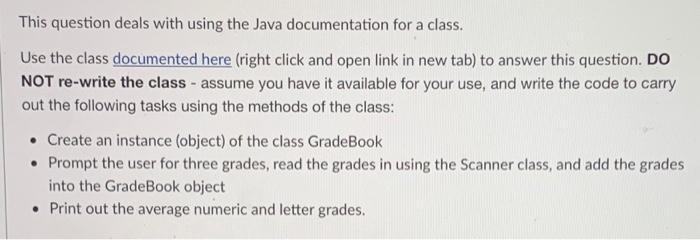
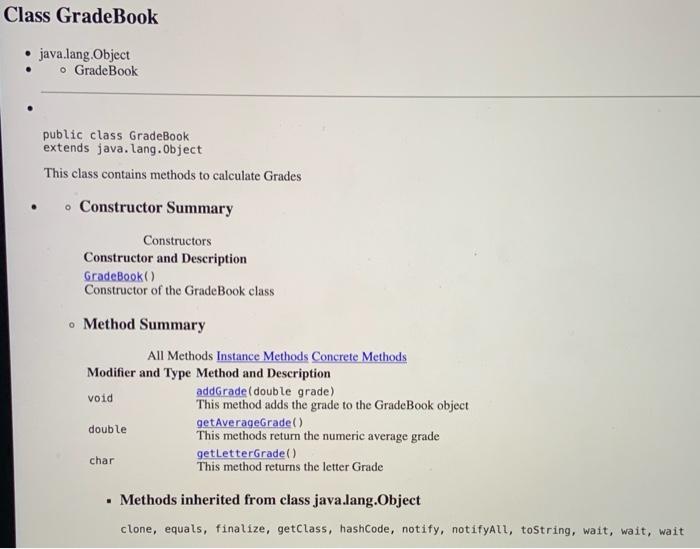
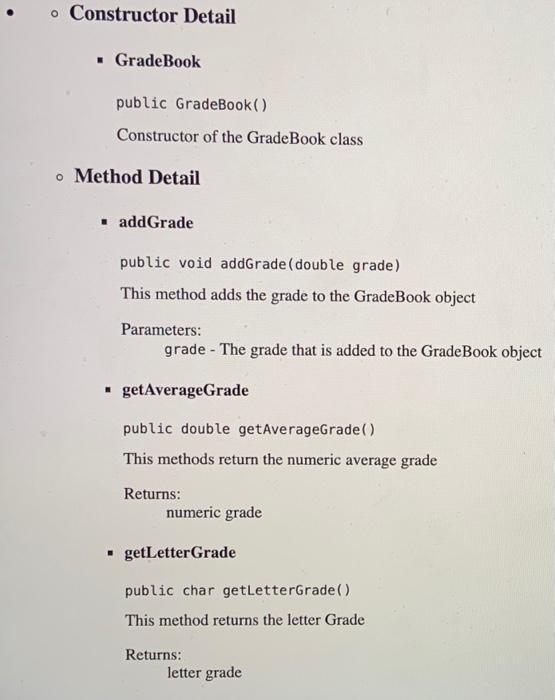
This question deals with using the Java documentation for a class. Use the class documented here (right click and open link in new tab) to answer this question. DO NOT re-write the class - assume you have it available for your use, and write the code to carry out the following tasks using the methods of the class: Create an instance (object) of the class GradeBook Prompt the user for three grades, read the grades in using the Scanner class, and add the grades into the GradeBook object Print out the average numeric and letter grades. Class Grade Book java.lang.Object o GradeBook public class GradeBook extends java.lang.Object This class contains methods to calculate Grades e Constructor Summary . Constructors Constructor and Description GradeBook Constructor of the GradeBook class Method Summary All Methods Instance Methods Concrete Methods Modifier and Type Method and Description void addGrade( double grade) This method adds the grade to the GradeBook object getAverageGrade() double This methods return the numeric average grade char getLetterGrade() This method returns the letter Grade Methods inherited from class java.lang.Object clone, equals, finalize, getClass, hashCode, notify, notifyAll, toString, wait, wait, wait o Constructor Detail Grade Book public GradeBook() Constructor of the GradeBook class o Method Detail addGrade public void addGrade (double grade) This method adds the grade to the GradeBook object Parameters: grade - The grade that is added to the GradeBook object getAverageGrade public double getAverageGrade() This methods return the numeric average grade Returns: numeric grade .getLetterGrade public char getLetterGrade) This method returns the letter Grade Returns: letter grade
Step by Step Solution
There are 3 Steps involved in it

Get step-by-step solutions from verified subject matter experts
 Study Help