







Question: This question has 3 parts, I only need help with the last part which is FIND THE FASTEST CAR . When I add the cars
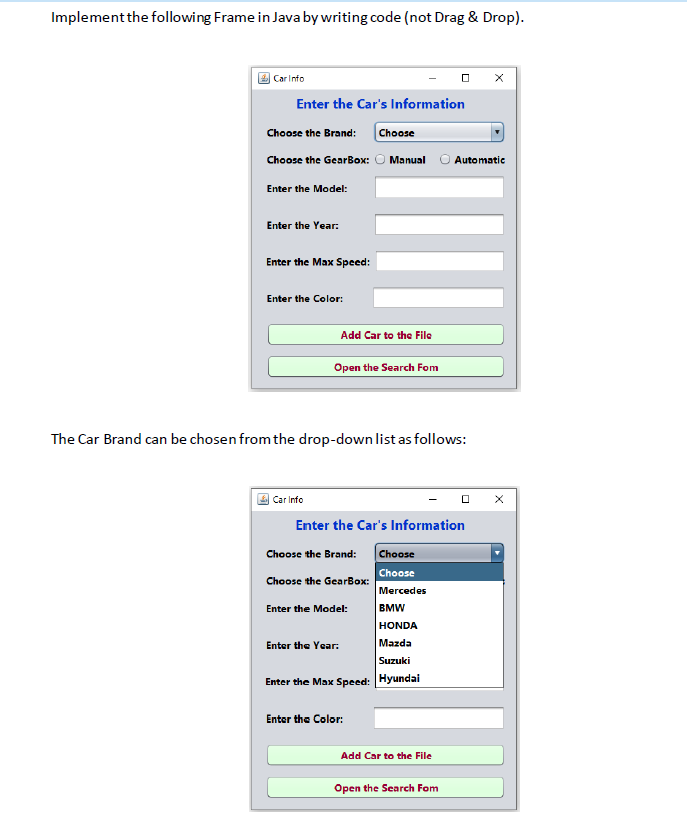
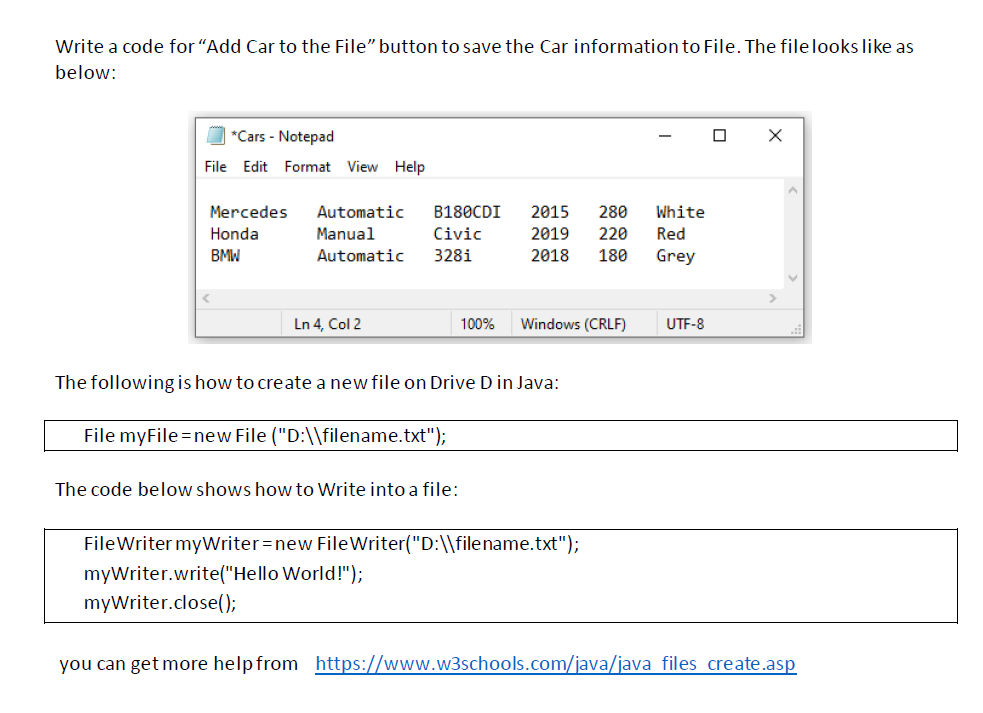
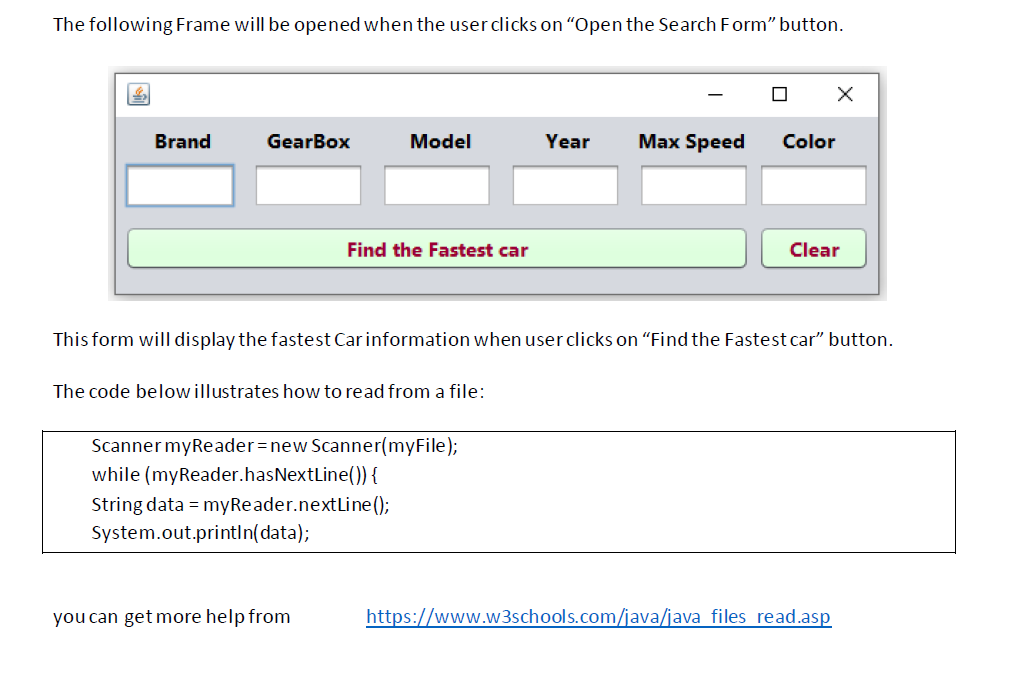 This question has 3 parts, I only need help with the last part which is "FIND THE FASTEST CAR" . When I add the cars to the file and then press FIND THE FASTEST CAR button to show the fastest car in the empty TextFields , it only shows the last car that I added even if it's the slowest. So no comparison is being made, I have this problem so please help me. . I will write down my code . Part2 adding to file.
if (e.getSource() == b1) //"Add Car to the File" { File myFile = new File("D:\\filename.txt"); try { FileWriter myWriter = new FileWriter("D:\\filename.txt"); myWriter.write(brand + " " + gear + " " + model + " " + year + " " + maxSpeed + " " + color + " "); myWriter.close(); JOptionPane.showMessageDialog(Cars.this, "Car information has been saved!"); } catch (IOException ex) { JOptionPane.showMessageDialog(Cars.this, "There's an Error!"); } } else if (e.getSource()==b2) //"Open the Search Form" { CarInfo f2 = new CarInfo(); } Part3 reading from fileif (e.getSource()==b1) //"Find the Fastest car" { String brand = (String) Cars.cb1.getSelectedItem(); this.t1.setText(brand); String gear = "Manual"; if (Cars.r1.isSelected()) { gear = "Automatic"; } this.t2.setText(gear); if(Cars.t1 == null) { JOptionPane.showMessageDialog(null,"Enter a Model!"); } else{ String model = Cars.t1.getText(); this.t3.setText(model);} if(Cars.t2 == null) { JOptionPane.showMessageDialog(null,"Enter a Year!"); } else{ String year = Cars.t2.getText(); this.t4.setText(year);} if(Cars.t3 == null) { JOptionPane.showMessageDialog(null,"Enter a Max Speed!"); } else{ String maxSpeed = Cars.t3.getText(); this.t5.setText(maxSpeed);} if(Cars.t4 == null) { JOptionPane.showMessageDialog(null,"Enter a Color"); } else{ String color = Cars.t4.getText(); this.t6.setText(color);} Scanner myReader = new Scanner("D:\\filename.txt"); while (myReader.hasNextLine()) { String data = myReader.nextLine(); System.out.println(data); } myReader.close(); } Implement the following Frame in Java by writing code (not Drag \& Drop). The Car Brand can be chosen from the drop-down list as follows: Write a code for "Add Car to the File" button to save the Car information to File. The file looks like as below: The following is how to create a new file on Drive D in Java: File myFile= new File ("D: \\ filename.txt"); The code below shows how to Write into a file: The following Frame will be opened when the user clicks on "Open the Search Form" button. This form will display the fastest Car information when user clicks on "Find the Fastest car" button. The code below illustrates how to read from a file: Scanner myReader = new Scanner(myFile); while (myReader.hasNextLine()) \{ String data = myReader. nextLine(); System.out.println(data); you can get more help from
Step by Step Solution
There are 3 Steps involved in it

Get step-by-step solutions from verified subject matter experts
 Study Help