







Question: This question is from Visual C# 2012 How to program Please be detailed if possible on the steps for the windows form app the one
This question is from Visual C# 2012 How to program
Please be detailed if possible on the steps for the windows form app the one I saw posted already on chegg did not work for me or I did something wrong lol
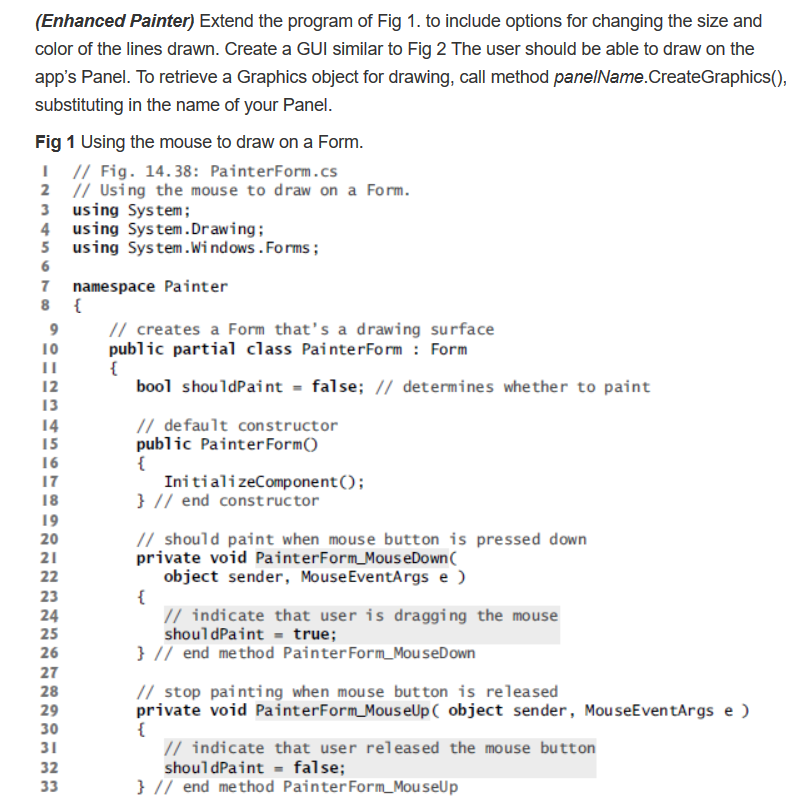
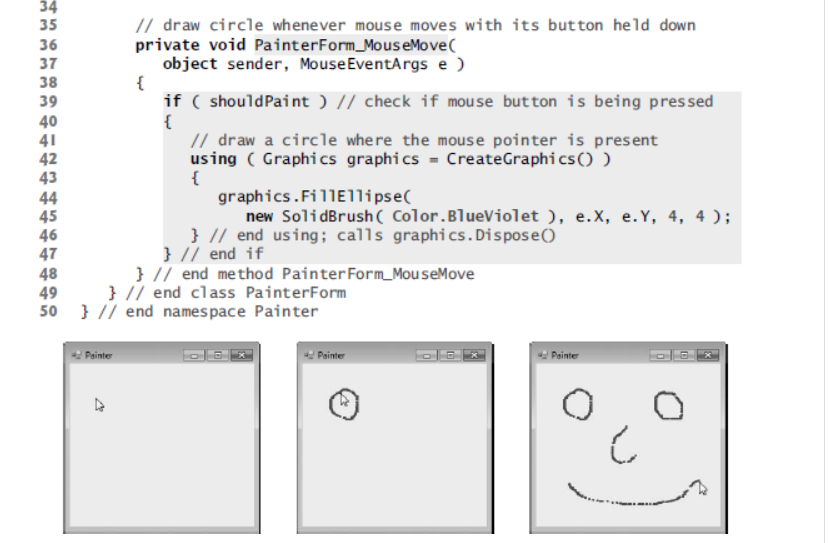
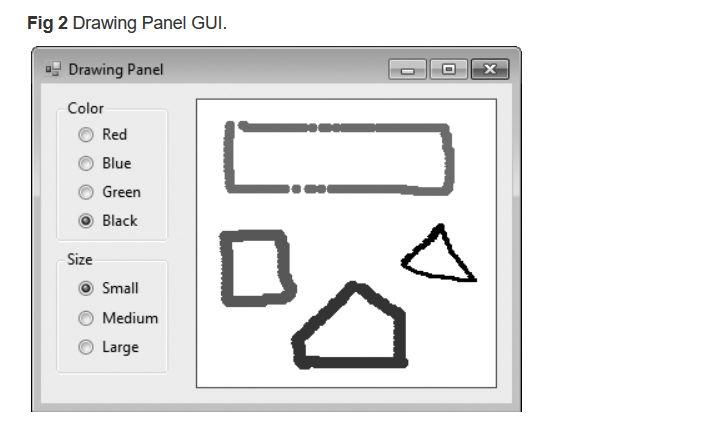
(Enhanced Painter) Extend the program of Fig 1. to include options for changing the size and color of the lines drawn. Create a GUI similar to Fig 2 The user should be able to draw on the app's Panel. To retrieve a Graphics object for drawing, call method panelName.CreateGraphics() substituting in the name of your Panel Fig 1 Using the mouse to draw on a Form I /Fig. 14.38: PainterForm.cs 2 II Using the mouse to draw on a Form. 3 using System 4 using System.Drawing 5 using System.Windows .Forms; 7 namespace Painter // creates a Form that's a drawing surface public partial class PainterFormForm 10 bool shou1dPaint false; // determines whether to paint 12 13 14 15 1 6 17 18 19 20 21 // de fau1t constructor public PainterFormO Initiali zeComponentO; // end constructor // should paint when mouse button is pressed down private void PainterForm MouseDown( object sender, MouseEventArgs e 23 24 25 26 27 28 29 30 // indicate that user is dragging the mouse shoul dPaint true // end method Painter Form MouseDown // stop painting when mouse button is released private void PainterForm MouseUp C object sender, MouseEventArgs e indicate that user released the mouse button shouldPaint false; 32 // end method PainterForm MouseUp (Enhanced Painter) Extend the program of Fig 1. to include options for changing the size and color of the lines drawn. Create a GUI similar to Fig 2 The user should be able to draw on the app's Panel. To retrieve a Graphics object for drawing, call method panelName.CreateGraphics() substituting in the name of your Panel Fig 1 Using the mouse to draw on a Form I /Fig. 14.38: PainterForm.cs 2 II Using the mouse to draw on a Form. 3 using System 4 using System.Drawing 5 using System.Windows .Forms; 7 namespace Painter // creates a Form that's a drawing surface public partial class PainterFormForm 10 bool shou1dPaint false; // determines whether to paint 12 13 14 15 1 6 17 18 19 20 21 // de fau1t constructor public PainterFormO Initiali zeComponentO; // end constructor // should paint when mouse button is pressed down private void PainterForm MouseDown( object sender, MouseEventArgs e 23 24 25 26 27 28 29 30 // indicate that user is dragging the mouse shoul dPaint true // end method Painter Form MouseDown // stop painting when mouse button is released private void PainterForm MouseUp C object sender, MouseEventArgs e indicate that user released the mouse button shouldPaint false; 32 // end method PainterForm MouseUp
Step by Step Solution
There are 3 Steps involved in it

Get step-by-step solutions from verified subject matter experts
 Study Help