







Question: This requires solution in MS Excel. 2 Apply the Droplet theme. Apply the Title cell style to the cell B2. Apply the Yellow Orange theme
This requires solution in MS Excel.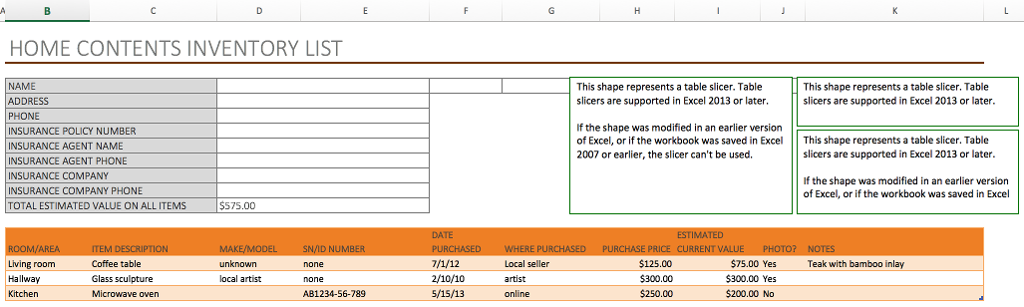
| 2 |
| |
| 3 | Unlock the ranges B15:K17 and D4:D12. | |
| 4 | Record a macro named Sort. Ensure the macro sorts the Inventory list in ascending order based on the dates listed in column F. | |
| 5 | Create a form control button beginning in the top-left corner of cell F4 and ending in the top-left corner of cell G7. Assign the Sort macro. Edit the button text to display the word Sort. | |
| 6 | Use the VBA Editor to create a new module. Type the following VBA code to create a custom depreciation function (be sure to include the blank lines after the first line and before the last line). Save and exit the VBA Editor. Function Depreciation (Value, Rate) Depreciation = Value * Rate End Function | |
| 7 | Insert two rows above row 12. Enter the Row heading DEPRECIATION RATE in cell B12, and DEPRECIATION in cell B13. | |
| 8 | Use the Depreciation function in cell D13 to calculate depreciation based on the Total Estimated Value on All Items (cell D14) and the Depreciation Rate (D12). | |
| 9 | Clear the contents in the range B17:K19. | |
| 10 | Create a new worksheet named Code to the right of the HOME CONTENTS INVENTORY LIST. | |
| 11 | Open the VBA Editor and display the module containing the sort code. Copy the code beginning with the text Sub Sort () and ending with the first instance of the text End Sub. Paste the contents in cell B2 of the Code worksheet. Do not close the VBA Editor. | |
| 12 | Open the VBA Editor and display the module containing the DEPRECIATION function. Copy the code beginning with the text Function Depreciation(Value, Rate) and ending with the first instance of the text End Function. Paste the contents in cell B23 of the Code worksheet. Close the VBA Editor. |
HOME CONTENTS INVENTORY LIST NAME ADDRESS PHONE INSURANCE POLICY NUMBER INSURANCE AGENT NAME INSURANCE AGENT PHONE INSURANCE COMPANY INSURANCE COMPANY PHONE TOTAL ESTIMATED VALUE ON ALL ITEMS This shape represents a table slicer. Table slicers are supported in Excel 2013 or later This shape represents a table slicer. Table slicers are supported in Excel 2013 or later If the shape was modified in an earlier version of Excel, or if the workbook was saved in Excel This shape represents a table slicer. Table 2007 or earlier, the slicer can't be used. slicers are supported in Excel 2013 or later If the shape was modified in an earlier version of Excel, or if the workbook was saved in Excel S75.00 Living room Hallway Kitchen Coffee table Glass sculpture Microwave oven $125.00 5300.00 $250.00 $75.00 Yes $300.00 Yes $200.00 No Local seller Teak with bamboo inlay local artist 2/10/10 5/15/13 artst AB1234-56-789 HOME CONTENTS INVENTORY LIST NAME ADDRESS PHONE INSURANCE POLICY NUMBER INSURANCE AGENT NAME INSURANCE AGENT PHONE INSURANCE COMPANY INSURANCE COMPANY PHONE TOTAL ESTIMATED VALUE ON ALL ITEMS This shape represents a table slicer. Table slicers are supported in Excel 2013 or later This shape represents a table slicer. Table slicers are supported in Excel 2013 or later If the shape was modified in an earlier version of Excel, or if the workbook was saved in Excel This shape represents a table slicer. Table 2007 or earlier, the slicer can't be used. slicers are supported in Excel 2013 or later If the shape was modified in an earlier version of Excel, or if the workbook was saved in Excel S75.00 Living room Hallway Kitchen Coffee table Glass sculpture Microwave oven $125.00 5300.00 $250.00 $75.00 Yes $300.00 Yes $200.00 No Local seller Teak with bamboo inlay local artist 2/10/10 5/15/13 artst AB1234-56-789
Step by Step Solution
There are 3 Steps involved in it

Get step-by-step solutions from verified subject matter experts
 Study Help