







Question: This will be the 5 time posting this question, the formulas for Excel are not working, I really need help because I need the correct
This will be the 5 time posting this question, the formulas for Excel are not working, I really need help because I need the correct formulas that will complete the assessment please
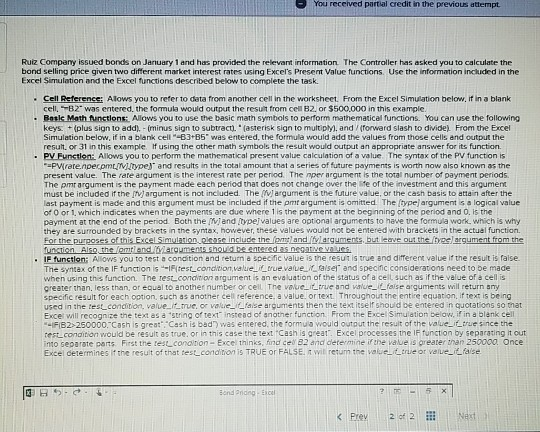
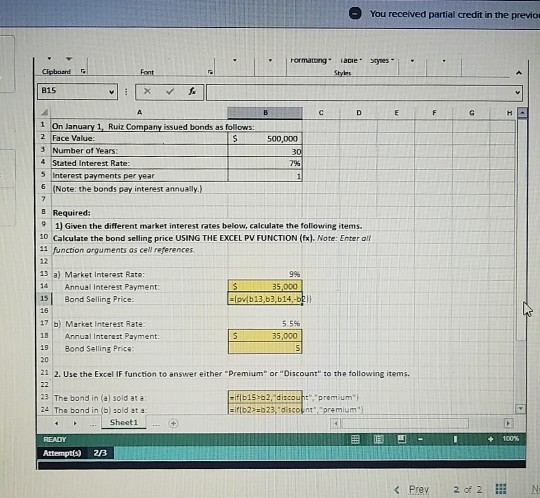
You received partial credit in the previous attempt Ruiz Company issued bonds on January 1 and has provided the relevant information The Controller has asked you to calculate the bond selling price given two different market interest rates using Excel's Present Value functions. Use the information included in the Excel Simulation and the Excel functions described below to complete the task Cell Reference Alows you to refer to data from another cell in the worksheet From the Excel Simulation below, if in a blank cell, B2 was entered the formula would output the result from cell B2or $500,000 in this example, Rotic Math functions. Allows you to use the basic math symbols to perform mathematical functions. You can use the following keys: + plus sign to add). - minus sign to subtract.asterisk sign to multipM. and forward slash to divide). From the Excel Simulation below, if in a blank cell-B3+B5" was entered the formula would add the values from those cells and output the result or 31 in this example I using the other math symbols the result would output an appropriate answer for its function. PV Function: Allows you to perform the mathematical present value calculation of a value. The syntax of the PV function is -=PWrare.npecomi.lvtype and results in the total amount that a series of future payments is worth now also known as the present value. The rate atqument is the interest rate per period. The per argument is the total number of payment periods. The pmr argument is the payment made each period that does not change over the fe of the investment and this argument must be included if the argument is not included. The argument is the future value, or the cash basis to attain after the last payment is made and this argument must be included if the pm argument is omitted The type argument sa logical value od 0 or 1, which indicates when the payments are due where is the payment at the beginning of the period and 0. is the payment at the end of the period. Both the and type values are optional arguments to have the formula work, which is why they are surrounded by brackets in the syntax, however, these values would not be entered with brackets in the actual function. For the purposes of this Excel Simulation please include them and larguments, but leave out the type argument from the function Also the lam and argument should be entered as negative values . IF function: Allows you to testa condition and return a specific value is the resulis true and different value if the result is false The syntax of the IF function is if test condon, value true value raise and specinc considerations need to be made when using this function. The rest condition argument is an evaluation of the status of a cell such as if the value of a cell is greater than, less than or equal to another number of cell The value true and value fose arguments will return any Specific result for each option, such as another cell reference, a value or text. Throughout the entire equation, if text is being used in the test condition value true, or value false arguments then the text itself should be entered in Guotations so that Exce will recognize the text as a string of text instead of another function. From the Excel Simulation below. it in a blank cell -FB2>250000,"Cash is great", "Cash is bad was entered the formua would output the result of the value it true since the reste condition would be result as true, or in this case the text Cash is great Excel processes the function by separating it out into separate parts. First the les condition - Exce thinks, inde 82 and determine if the value is greater than 250000 Once Excel determines if the result of that test condition is TRUE OR FALSE, it will retum the value true or value it false BB9.. Prev2 of 2 - You received partial credit in the previo Formatong acie syte B15 500,000 1 On January 1, Ruiz Company issued bonds as follows: 2 Face Value: 3 Number of Years: 4 Stated Interest Rate 5 Interest payments per year 6 (Note: the bonds pay interest annually) Required: 1) Given the different market interest rates below, calculate the following items. 10 Calculate the bond selling price USING THE EXCEL PV FUNCTION (fx). Note: Enter all 12 function arguments as cel references 14 13 a) Market Interest Rate: Annual Interest Payment: 15 Bond Selling Price: S 35.000 =pvb13,63,614,-bel 17 b) Market Interest Rate 18 Annual interest Payment: 19 Bond Selling Price: 35,000 21 2. Use the Excel IF function to answer either "Premium" or "Discount to the following items. 23 The bond in (a) sold at a 24 The band in (b) sold at Sheet1 if b1562, discount", "premium =if 62>=623,"discount premium E - Att 2B
Step by Step Solution
There are 3 Steps involved in it

Get step-by-step solutions from verified subject matter experts
 Study Help