



Question: Tho The idea of this project is to basically create a menu description of a cylinder, which was chosen by me and my teammate. With
Tho 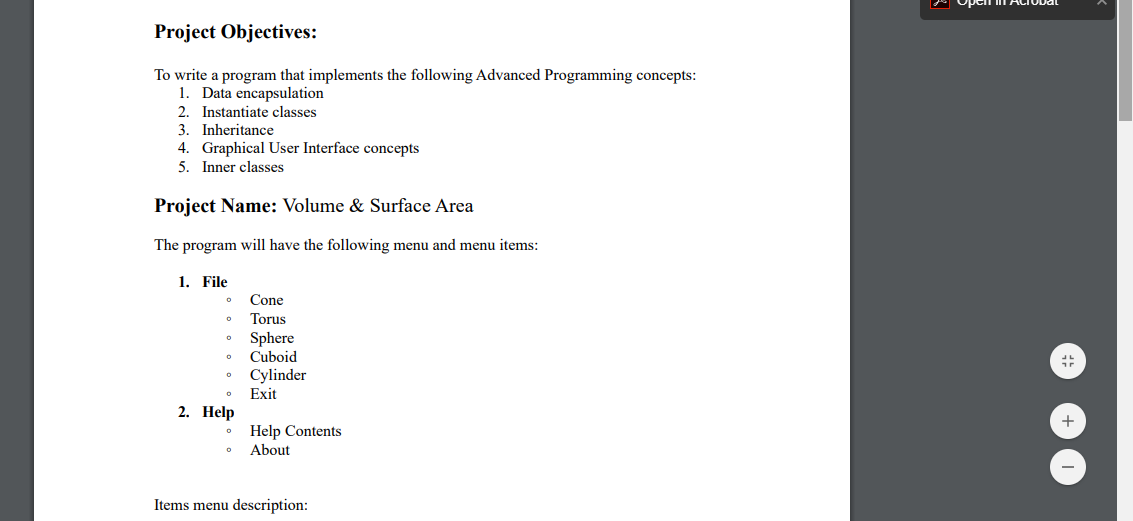
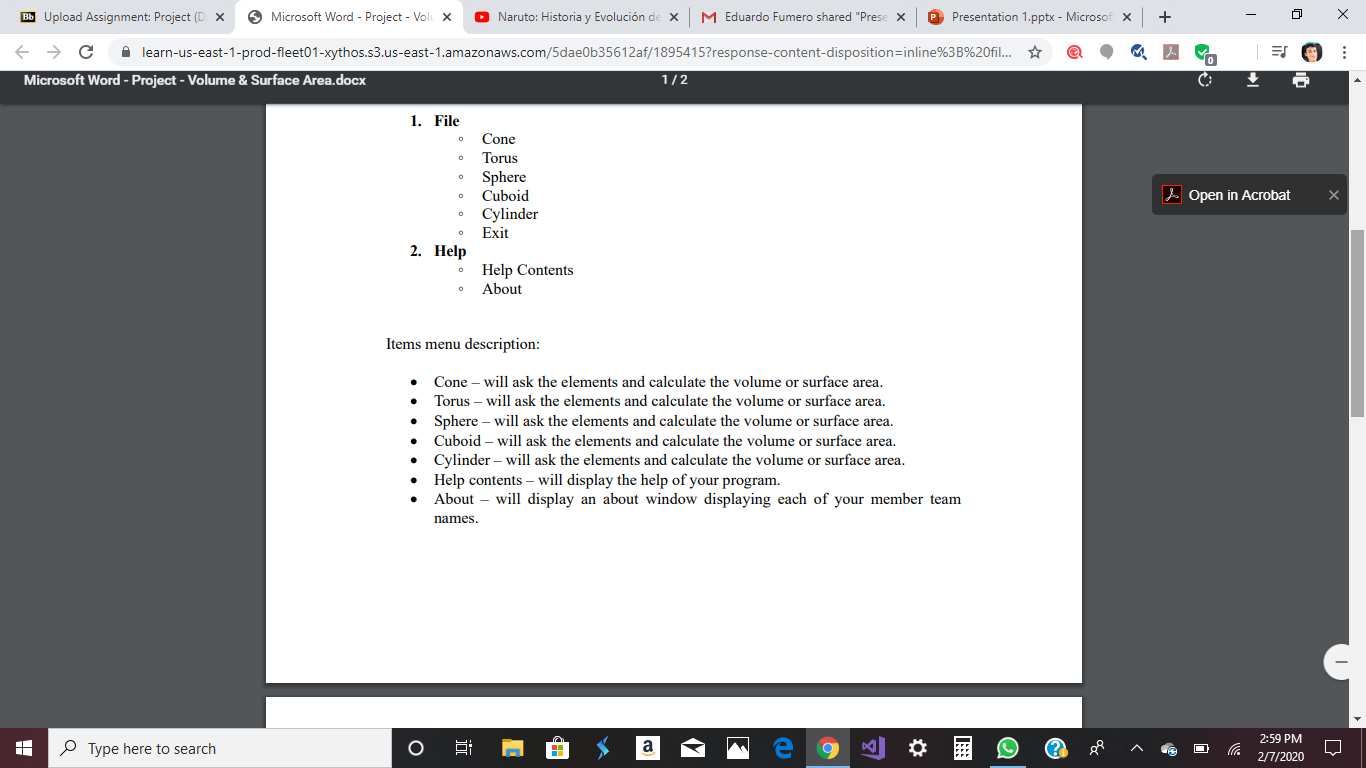
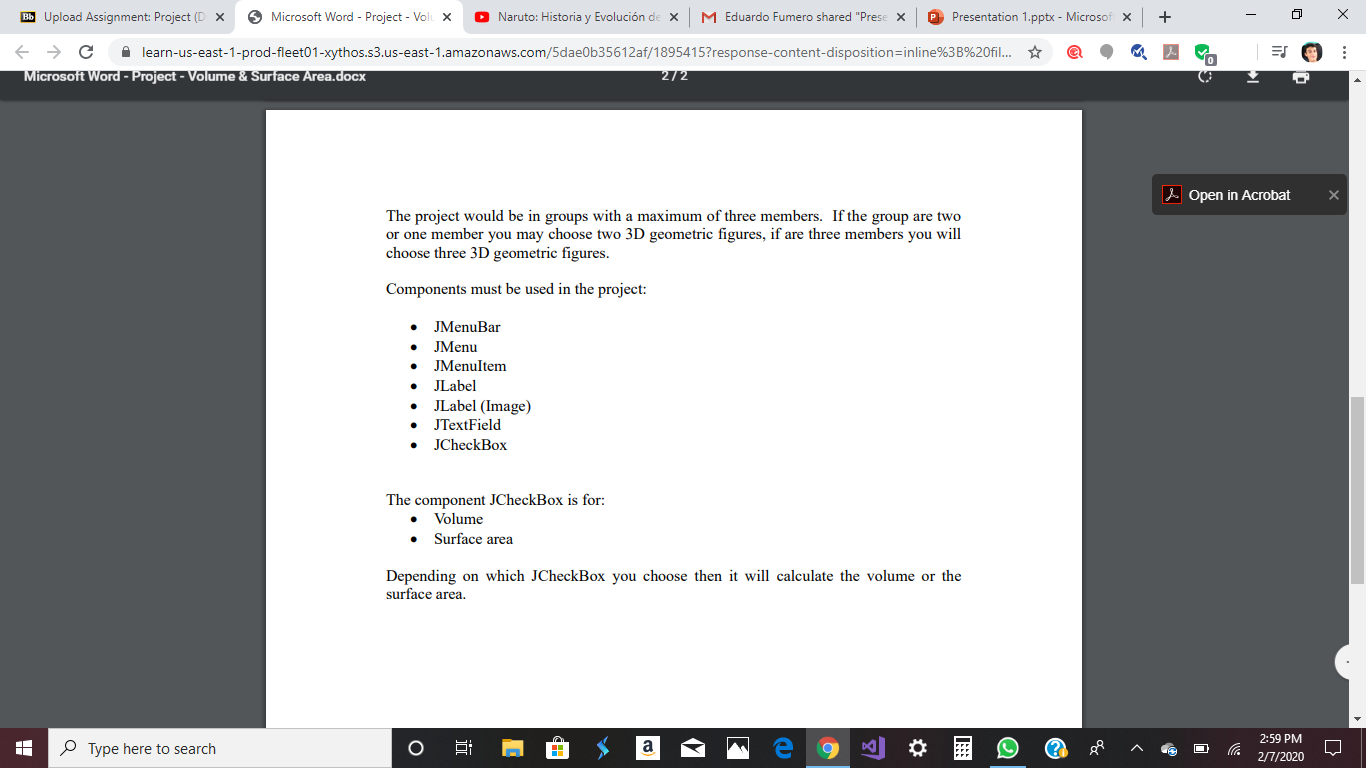
The idea of this project is to basically create a menu description of a "cylinder", which was chosen by me and my teammate. With the cylinder, we must make a program that wil calculate the volume and surface area of a cylinder. Below is the way we want the project to look like:
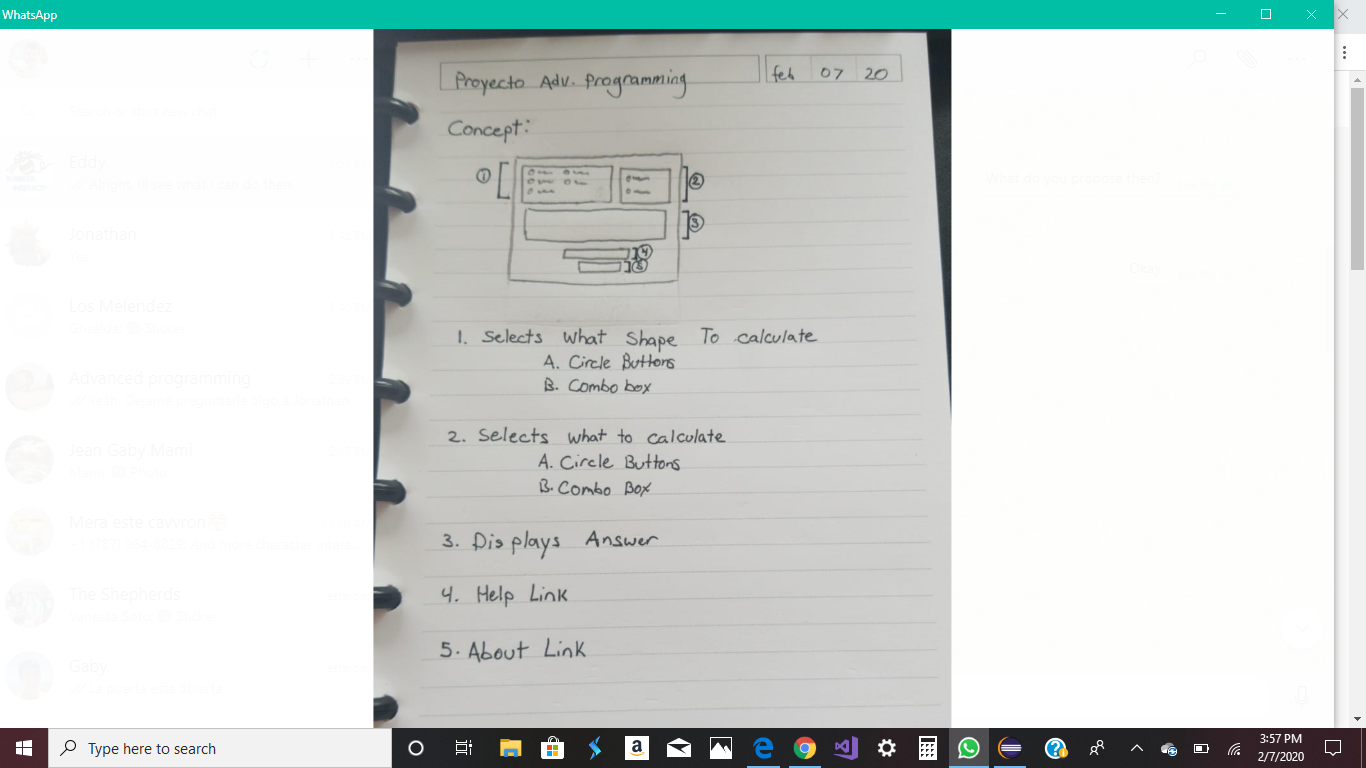
In the first part we want a combo box and in the second we want the circle buttons. This must be done in eclipse using the Java language
Opel ALIUDal Project Objectives: To write a program that implements the following Advanced Programming concepts: 1. Data encapsulation 2. Instantiate classes 3. Inheritance 4. Graphical User Interface concepts 5. Inner classes Project Name: Volume & Surface Area The program will have the following menu and menu items: 1. File Cone Torus Sphere Cuboid Cylinder Exit 2. Help Help Contents About Items menu description: Bb Upload Assignment: Project (DX Microsoft Word - Project - Vol X Naruto: Historia y Evolucin de x M Eduardo Fumero shared "Prese x Presentation 1.pptx - Microsof x + - 0 X . E C l earn-us-east-1-prod-fleet01-xythos.s3.us-east-1.amazonaws.com/5dae0b35612af/1895415?response-content-disposition=inline%3B%20fil.. Microsoft Word - Project - Volume & Surface Area.docx 1/2 1. File Cone Torus Sphere Cuboid Cylinder Exit Open in Acrobat X 0 2. Help Help Contents About o Items menu description: Cone - will ask the elements and calculate the volume or surface area. Torus - will ask the elements and calculate the volume or surface area. Sphere - will ask the elements and calculate the volume or surface area. Cuboid - will ask the elements and calculate the volume or surface area. Cylinder - will ask the elements and calculate the volume or surface area. Help contents - will display the help of your program. About will display an about window displaying each of your member team names. Type here to search O X @ $ a me 9 2 A 259200 Bb Upload Assignment: Project (DX Microsoft Word - Project - Vol X Naruto: Historia y Evolucin de x M Eduardo Fumero shared "Prese x Presentation 1.pptx - Microsof x + - 0 X . C l earn-us-east-1-prod-fleet01-xythos.s3.us-east-1.amazonaws.com/5dae0b35612af/1895415?response-content-disposition=inline%3B%20fil... Microsoft Word - Project - Volume & Surface Area.docx 272 Open in Acrobat X The project would be in groups with a maximum of three members. If the group are two or one member you may choose two 3D geometric figures, if are three members you will choose three 3D geometric figures. Components must be used in the project: JMenuBar JMenu JMenuItem JLabel JLabel (Image) JTextField JCheckBox The component JCheckBox is for: Volume Surface area Depending on which JCheckBox you choose then it will calculate the volume or the surface area. Type here to search WhatsApp - 0 x feho ox 20 | Proyecto Adv. Programming Concept: To calculate 1. Selects What Shape - A. Circle Buttons BB. Combo box 2. Selects what to calculate A. Circle Buttons B. Combo Box 3. Displays Answer 4. Help Link 5. About Link Type here to search Opel ALIUDal Project Objectives: To write a program that implements the following Advanced Programming concepts: 1. Data encapsulation 2. Instantiate classes 3. Inheritance 4. Graphical User Interface concepts 5. Inner classes Project Name: Volume & Surface Area The program will have the following menu and menu items: 1. File Cone Torus Sphere Cuboid Cylinder Exit 2. Help Help Contents About Items menu description: Bb Upload Assignment: Project (DX Microsoft Word - Project - Vol X Naruto: Historia y Evolucin de x M Eduardo Fumero shared "Prese x Presentation 1.pptx - Microsof x + - 0 X . E C l earn-us-east-1-prod-fleet01-xythos.s3.us-east-1.amazonaws.com/5dae0b35612af/1895415?response-content-disposition=inline%3B%20fil.. Microsoft Word - Project - Volume & Surface Area.docx 1/2 1. File Cone Torus Sphere Cuboid Cylinder Exit Open in Acrobat X 0 2. Help Help Contents About o Items menu description: Cone - will ask the elements and calculate the volume or surface area. Torus - will ask the elements and calculate the volume or surface area. Sphere - will ask the elements and calculate the volume or surface area. Cuboid - will ask the elements and calculate the volume or surface area. Cylinder - will ask the elements and calculate the volume or surface area. Help contents - will display the help of your program. About will display an about window displaying each of your member team names. Type here to search O X @ $ a me 9 2 A 259200 Bb Upload Assignment: Project (DX Microsoft Word - Project - Vol X Naruto: Historia y Evolucin de x M Eduardo Fumero shared "Prese x Presentation 1.pptx - Microsof x + - 0 X . C l earn-us-east-1-prod-fleet01-xythos.s3.us-east-1.amazonaws.com/5dae0b35612af/1895415?response-content-disposition=inline%3B%20fil... Microsoft Word - Project - Volume & Surface Area.docx 272 Open in Acrobat X The project would be in groups with a maximum of three members. If the group are two or one member you may choose two 3D geometric figures, if are three members you will choose three 3D geometric figures. Components must be used in the project: JMenuBar JMenu JMenuItem JLabel JLabel (Image) JTextField JCheckBox The component JCheckBox is for: Volume Surface area Depending on which JCheckBox you choose then it will calculate the volume or the surface area. Type here to search WhatsApp - 0 x feho ox 20 | Proyecto Adv. Programming Concept: To calculate 1. Selects What Shape - A. Circle Buttons BB. Combo box 2. Selects what to calculate A. Circle Buttons B. Combo Box 3. Displays Answer 4. Help Link 5. About Link Type here to search
Step by Step Solution
There are 3 Steps involved in it

Get step-by-step solutions from verified subject matter experts