





Question: THREES 3 4 5 6 7 8 9 10 Complete the steps below using cell references to given data or previous calculations. In some cases,
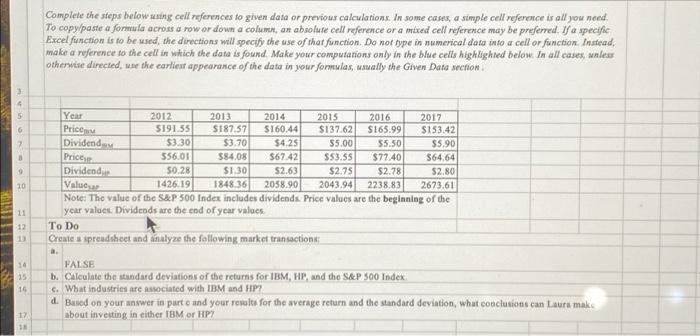
THREES 3 4 5 6 7 8 9 10 Complete the steps below using cell references to given data or previous calculations. In some cases, a simple cell reference is all you need. To copy/paste a formula across a row or down a column, an absolute cell reference or a mixed cell reference may be preferred. If a specific Excel function is to be used, the directions will specify the use of that function. Do not type in numerical data into a cell or function. Instead, make a reference to the cell in which the data is found. Make your computations only in the blue cells highlighted below. In all cases, unless otherwise directed, use the earliest appearance of the data in your formulas, usually the Given Data section. Year PriceBM Dividend BM 17 18 2012 $191.55 $3.30 $56.01 $0.28 1426.19 2058.90 2043.94 2238.83 2673.61 Values&P Note: The value of the S&P 500 Index includes dividends. Price values are the beginning of the year values. Dividends are the end of year values. To Do PriceHP Dividend 2013 $187.57 $3.70 $84.08 $1.30 1848.36 2014 $160.44 $4.25 $67.42 $2.63 2015 $137.62 $5.00 $53.55 $2.75 11 12 13 Create a spreadsheet and analyze the following market transactions: a. 2016 $165.99 $5.50 $77.40 $2.78 2017 $153.42 $5.90 $64.64 $2.80 14 FALSE 15 b. Calculate the standard deviations of the returns for IBM, HP, and the S&P 500 Index. 16 c. What industries are associated with IBM and HP? d. Based on your answer in part c and your results for the average return and the standard deviation, what conclusions can Laura make about investing in either IBM or HP?
 THREES 3 4 5 6 7 8 9 10 Complete the

Complete the steps below auing cell references to given data or previous calculations. In some cases, a simple cell reference is all you need. Excel function is to be used, the directions will specify the use of that function. Do not type in numerical data into a cell or function. Instead, make a reference to the cell in which the data is found. Make your computations only in the blue cells hightighted below. In all cases, unlers othervise directed, we the carliext appearance of the data in your formulas, unally the Given Data section. Note: The value of the SEP 500 Index includes dividends. Price values are the beginning of the year values. Dividends are the end of year values. Complete the steps below auing cell references to given data or previous calculations. In some cases, a simple cell reference is all you need. Excel function is to be used, the directions will specify the use of that function. Do not type in numerical data into a cell or function. Instead, make a reference to the cell in which the data is found. Make your computations only in the blue cells hightighted below. In all cases, unlers othervise directed, we the carliext appearance of the data in your formulas, unally the Given Data section. Note: The value of the SEP 500 Index includes dividends. Price values are the beginning of the year values. Dividends are the end of year values

Step by Step Solution

There are 3 Steps involved in it

1 Expert Approved Answer
Step: 1 Unlock blur-text-image
Question Has Been Solved by an Expert!

Get step-by-step solutions from verified subject matter experts

Step: 2 Unlock
Step: 3 Unlock

Students Have Also Explored These Related Finance Questions!