





Question: Thymio II robot example_code # You may need to import some classes of the controller module. Ex: # from controller import Robot, Motor from controller
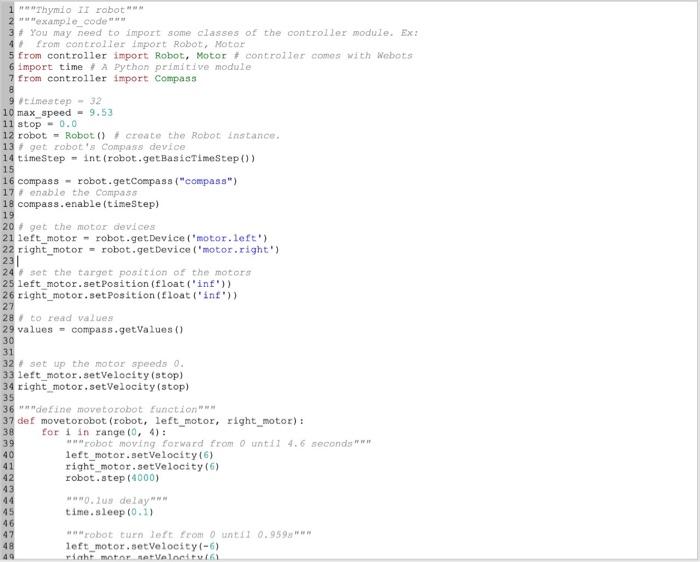
"""Thymio II robot"""
"""example_code"""
# You may need to import some classes of the controller module. Ex:
# from controller import Robot, Motor
from controller import Robot, Motor # controller comes with Webots
import time # A Python primitive module
from controller import Compass
#timestep = 32
max_speed = 9.53
stop = 0.0
robot = Robot() # create the Robot instance.
# get robot's Compass device
timeStep = int(robot.getBasicTimeStep())
compass = robot.getCompass("compass")
# enable the Compass
compass.enable(timeStep)
# get the motor devices
left_motor = robot.getDevice('motor.left')
right_motor = robot.getDevice('motor.right')
# set the target position of the motors
left_motor.setPosition(float('inf'))
right_motor.setPosition(float('inf'))
# to read values
values = compass.getValues()
# set up the motor speeds 0.
left_motor.setVelocity(stop)
right_motor.setVelocity(stop)
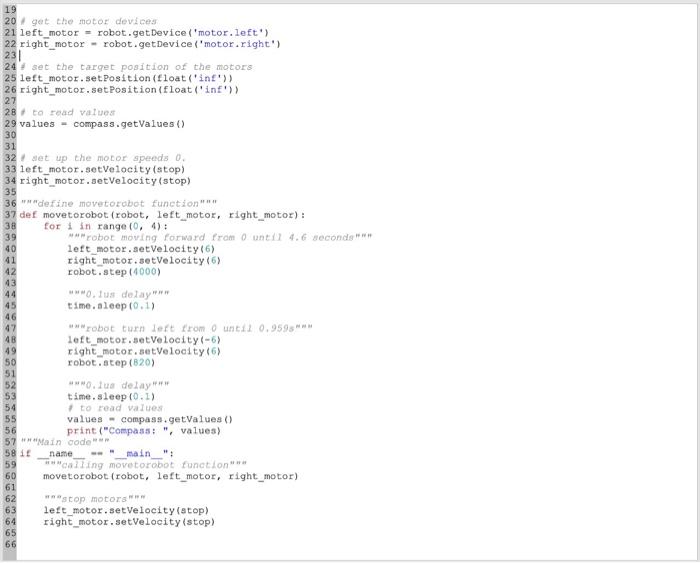
"""define movetorobot function"""
def movetorobot(robot, left_motor, right_motor):
for i in range(0, 4):
"""robot moving forward from 0 until 4.6 seconds"""
left_motor.setVelocity(6)
right_motor.setVelocity(6)
robot.step(4000)
"""0.1us delay"""
time.sleep(0.1)
"""robot turn left from 0 until 0.959s"""
left_motor.setVelocity(-6)
right_motor.setVelocity(6)
robot.step(820)
"""0.1us delay"""
time.sleep(0.1)
# to read values
values = compass.getValues()
print("Compass: ", values)
"""Main code"""
if __name__ == "__main__":
"""calling movetorobot function"""
movetorobot(robot, left_motor, right_motor)
"""stop motors"""
left_motor.setVelocity(stop)
right_motor.setVelocity(stop)
 """Thymio II robot""" """example_code""" # You may need to import some
classes of the controller module. Ex: # from controller import Robot, Motor
from controller import Robot, Motor # controller comes with Webots import time

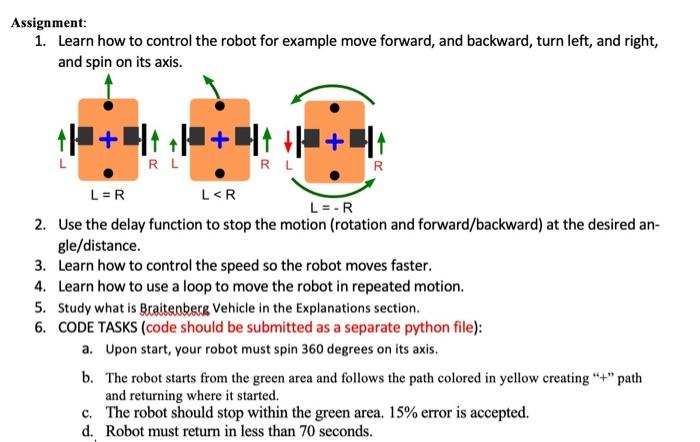
Assignment: 1. Learn how to control the robot for example move forward, and backward, turn left, and right, and spin on its axis. 2. Use the delay function to stop the motion (rotation and forward/backward) at the desired angle/distance. 3. Learn how to control the speed so the robot moves faster. 4. Learn how to use a loop to move the robot in repeated motion. 5. Study what is Braitenberg Vehicle in the Explanations section. 6. CODE TASKS (code should be submitted as a separate python file): a. Upon start, your robot must spin 360 degrees on its axis. b. The robot starts from the green area and follows the path colored in yellow creating "+" path and returning where it started. c. The robot should stop within the green area. 15% error is accepted. d. Robot must return in less than 70 seconds

Step by Step Solution

There are 3 Steps involved in it

1 Expert Approved Answer
Step: 1 Unlock blur-text-image
Question Has Been Solved by an Expert!

Get step-by-step solutions from verified subject matter experts

Step: 2 Unlock
Step: 3 Unlock

Students Have Also Explored These Related Databases Questions!