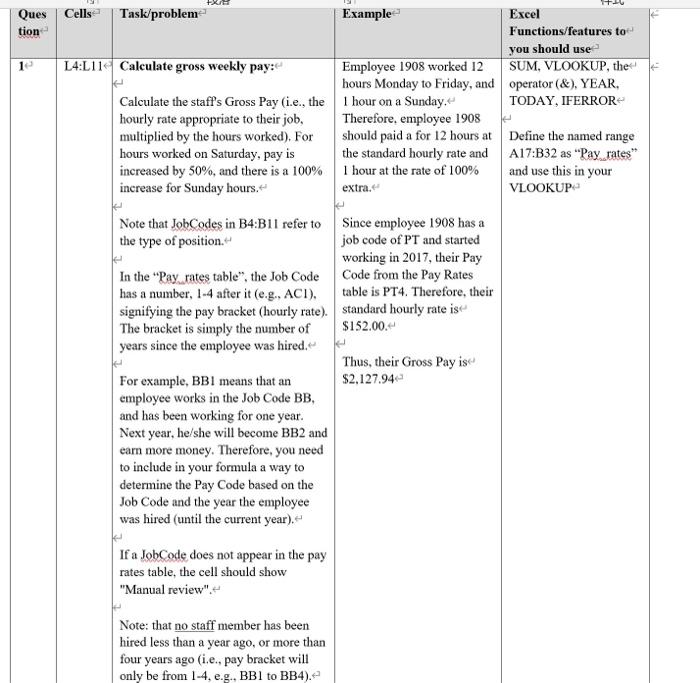
Question: tion 1 Ques Cells Task/problem Example Excel Functions/features to you should use L4:L11 Calculate gross weekly pay: Employee 1908 worked 12 SUM, VLOOKUP, the hours
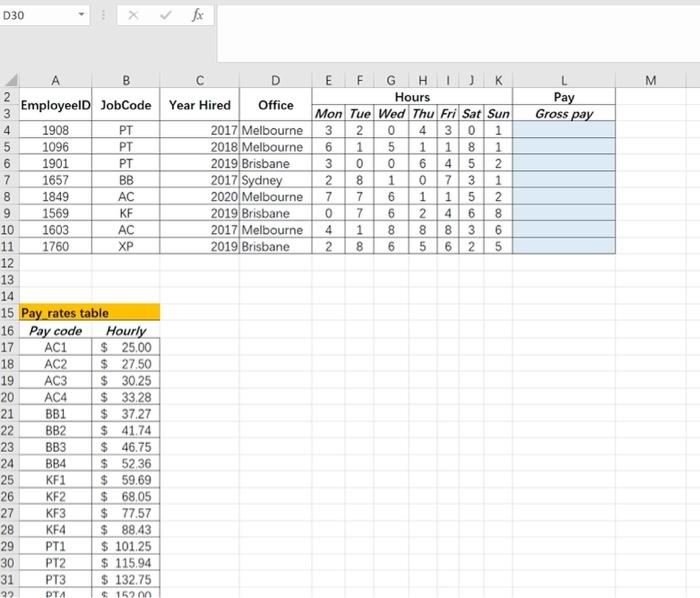
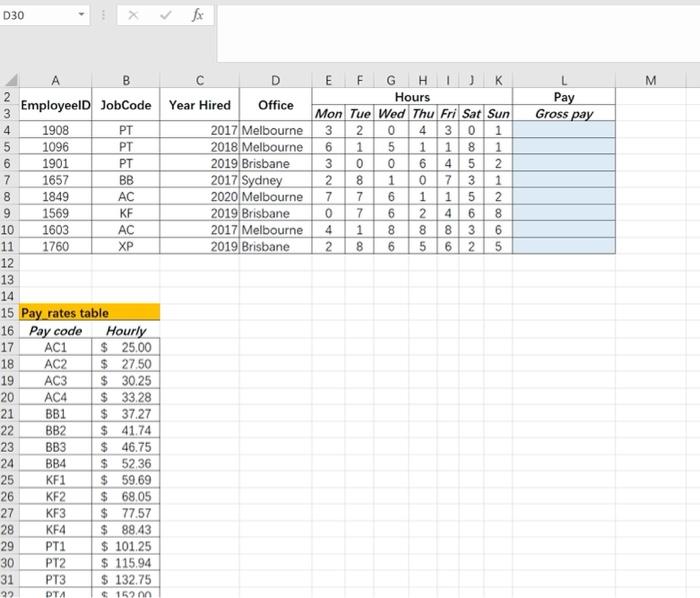
tion 1 Ques Cells Task/problem Example Excel Functions/features to you should use L4:L11 Calculate gross weekly pay: Employee 1908 worked 12 SUM, VLOOKUP, the hours Monday to Friday, and operator (&), YEAR, Calculate the staff's Gross Pay (i.e., the 1 hour on a Sunday. TODAY, IFERROR hourly rate appropriate to their job, Therefore, employee 1908 multiplied by the hours worked). For should paid a for 12 hours at Define the named range hours worked on Saturday, pay is the standard hourly rate and A17:B32 as "Pay rates increased by 50%, and there is a 100% 1 hour at the rate of 100% and use this in your increase for Sunday hours. extra. VLOOKUP Note that JobCodes in B4:B11 refer to Since employee 1908 has a the type of position. job code of PT and started working in 2017, their Pay In the "Pay rates table", the Job Code Code from the Pay Rates has a number, 1-4 after it (e.g., ACI). table is PT4. Therefore, their signifying the pay bracket (hourly rate) standard hourly rate ise The bracket is simply the number of $152.00. years since the employee was hired. Thus, their Gross Pay is For example, BBI means that an $2,127.94 employee works in the Job Code BB, and has been working for one year. Next year, he/she will become BB2 and earn more money. Therefore, you need to include in your formula a way to determine the Pay Code based on the Job Code and the year the employee was hired (until the current year). If a JobCode does not appear in the pay rates table, the cell should show "Manual review". Note: that no staff member has been hired less than a year ago, or more than four years ago (i.e., pay bracket will only be from 1-4, e.g., BB1 to BB4). D30 fx M Pay Gross pay Ono BB NAO XP B D E F G H 2 Employeeld JobCode Year Hired Office Hours 3 Mon Tue Wed Thu Fri Sat Sun 4 1908 PT 2017 Melbourne 3 2 4 301 5 1096 PT 2018 Melbourne 6 1 5 1 1 8 1 6 1901 PT 2019 Brisbane 3 0 6 4 5 2 7 1657 2017 Sydney 2 8 1 73 1 8 1849 AC 2020 Melbourne 7 7 6 1 1 5 2 9 1569 KF 2019 Brisbane 7 6 2 4 6 8 10 1603 AC 2017 Melbourne 1 8 8 8 3 6 11 1760 2019 Brisbane 8 6 5 6 2 5 12 13 14 15 Pay rates table 16 Pay code Hourly 17 AC1 $ 25,00 18 AC2 $ 27.50 19 AC3 $ 30.25 20 AC4 $ 33.28 21 BB1 $ 37.27 22 BB2 $ 41.74 23 BB3 $ 46.75 24 BB4 $ 52.36 25 KF1 $ 59.69 26 $ 68.05 27 KF3 $ 77.57 28 KF4 $ 88,43 29 PT1 $ 101.25 30 PT2 $ 115.94 31 PT3 $ 132.75 22 PTA 152 KF2 D30 fx M Pay Gross pay Ono BB NAO XP B D E F G H 2 Employeeld JobCode Year Hired Office Hours 3 Mon Tue Wed Thu Fri Sat Sun 4 1908 PT 2017 Melbourne 3 2 4 301 5 1096 PT 2018 Melbourne 6 1 5 1 1 8 1 6 1901 PT 2019 Brisbane 3 0 6 4 5 2 7 1657 2017 Sydney 2 8 1 73 1 8 1849 AC 2020 Melbourne 7 7 6 1 1 5 2 9 1569 KF 2019 Brisbane 7 6 2 4 6 8 10 1603 AC 2017 Melbourne 1 8 8 8 3 6 11 1760 2019 Brisbane 8 6 5 6 2 5 12 13 14 15 Pay rates table 16 Pay code Hourly 17 AC1 $ 25,00 18 AC2 $ 27.50 19 AC3 $ 30.25 20 AC4 $ 33.28 21 BB1 $ 37.27 22 BB2 $ 41.74 23 BB3 $ 46.75 24 BB4 $ 52.36 25 KF1 $ 59.69 26 $ 68.05 27 KF3 $ 77.57 28 KF4 $ 88,43 29 PT1 $ 101.25 30 PT2 $ 115.94 31 PT3 $ 132.75 22 PTA 152 KF2









 Study Help