





Question: title that represe Create a chart to display the expense categories and total expenses for the current year. Add percentages as data labels. Reposition the

title that represe Create a chart to display the
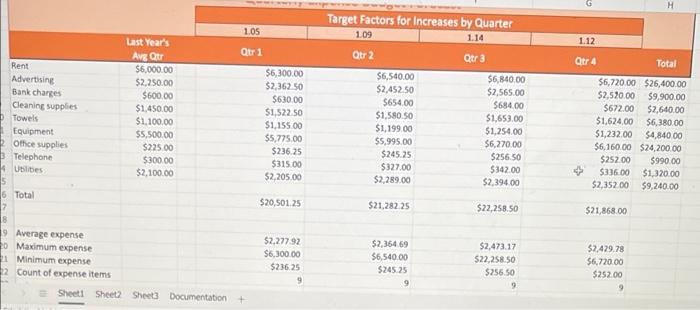
title that represe Create a chart to display the expense categories and total expenses for the current year. Add percentages as data labels. Reposition the chart below the worksheet data beginning in row 24. Resize the chart so the bottom left corner of the chart is in cell H38. Format the chart, and add a descriptive chart title. 27 Target Factors for increases by Quarter 1.05 1.09 1.14 1.12 Qtr 1 Qtr 2 Qtr 3 Qtr 4 Total Rent Advertising Bank charges Cleaning Supplies Towels Equipment Office supplies Telephone Ubbes Last Year's Avg Qtr $6,000.00 $2,250,00 $600.00 $1,450.00 $1,100.00 $5,500.00 $225.00 $300.00 $2,100.00 $6,300.00 $2,362,50 $630,00 $1,522.50 $1,155.00 $5,775.00 $236.25 $315.00 $2,205.00 $6,500.00 $2,452.50 $654,00 $1,580.50 $1,199.00 $5.995.00 $245.25 $327.00 $2,289.00 $6,840.00 $2,565.00 $684.00 $1,653.00 $1.254.00 $6,270.00 $256.50 $342.00 $2,394.00 $6,720.00 $26,400.00 $2,520.00 $9,900.00 $672.00 $2,640.00 $1,624.00 $6,380.00 $1,232.00 54,840.00 $6,160.00 $24,200.00 $252.00 $990.00 $336,00 $1,320.00 $2,352.00 $9,240.00 6 Total $20,501.25 $21,282.25 $22,258.50 $21,868.00 9 Average expense 30 Maximum expense Minimum expense 2 Count of expense items Sheet1 Sheet2 Sheet3 Documentation $2,277.92 $6,300.00 $236.25 9 $2,364 69 $6,540.00 $245.25 9 $2.473.17 $22,258.50 $256.50 9 $2,429.78 $6,720.00 $252.00 9

Step by Step Solution

There are 3 Steps involved in it

1 Expert Approved Answer
Step: 1 Unlock blur-text-image

Question Has Been Solved by an Expert!

Get step-by-step solutions from verified subject matter experts

Step: 2 Unlock
Step: 3 Unlock

Students Have Also Explored These Related General Management Questions!