







Question: To 10.1: write Tkinter code on replit for the following GUI, using the accounts.py code from How Balance and Deposit Checking Savings balance $100.00
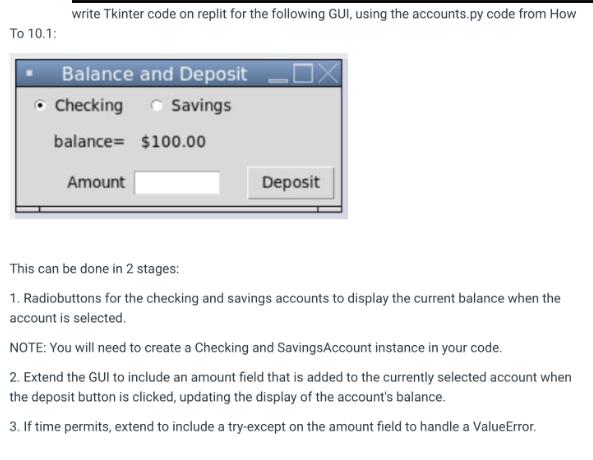
To 10.1: write Tkinter code on replit for the following GUI, using the accounts.py code from How Balance and Deposit Checking Savings balance $100.00 Amount Deposit This can be done in 2 stages: 1. Radiobuttons for the checking and savings accounts to display the current balance when the account is selected. NOTE: You will need to create a Checking and Savings Account instance in your code. 2. Extend the GUI to include an amount field that is added to the currently selected account when the deposit button is clicked, updating the display of the account's balance. 3. If time permits, extend to include a try-except on the amount field to handle a ValueError.
Step by Step Solution
There are 3 Steps involved in it
Heres the code you can use import tkinter as tk from accounts import CheckingAccount SavingsAccount class AccountGUI def initself root selfroot root selfroottitleAccount Management Initialize account ... View full answer

Get step-by-step solutions from verified subject matter experts
 Study Help