



Question: To answer these questions, you will use Wireshark software. On April 13, 2022 I used Wireshark on my office computer to capture 11 data
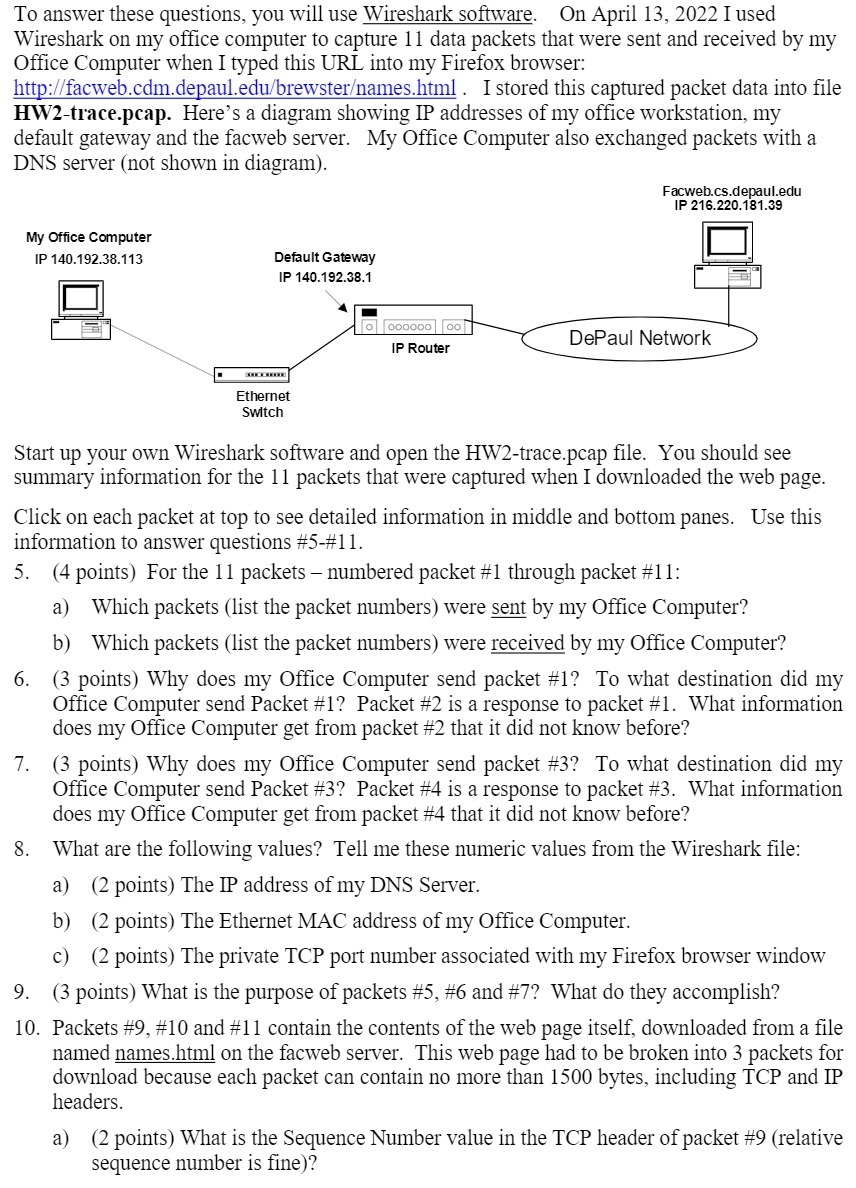
To answer these questions, you will use Wireshark software. On April 13, 2022 I used Wireshark on my office computer to capture 11 data packets that were sent and received by my Office Computer when I typed this URL into my Firefox browser: http://facweb.cdm.depaul.edu/brewster/names.html. I stored this captured packet data into file HW2-trace.pcap. Here's a diagram showing IP addresses of my office workstation, my default gateway and the facweb server. My Office Computer also exchanged packets with a DNS server (not shown in diagram). My Office Computer IP 140.192.38.113 Default Gateway IP 140.192.38.1 000000000 IP Router Facweb.cs.depaul.edu IP 216.220.181.39 DePaul Network Ethernet Switch Start up your own Wireshark software and open the HW2-trace.pcap file. You should see summary information for the 11 packets that were captured when I downloaded the web page. Click on each packet at top to see detailed information in middle and bottom panes. Use this information to answer questions #5-#11. 5. (4 points) For the 11 packets - numbered packet #1 through packet #11: 6. 7. 8. 9. a) Which packets (list the packet numbers) were sent by my Office Computer? b) Which packets (list the packet numbers) were received by my Office Computer? (3 points) Why does my Office Computer send packet #1? To what destination did my Office Computer send Packet #1? Packet #2 is a response to packet #1. What information does my Office Computer get from packet #2 that it did not know before? (3 points) Why does my Office Computer send packet #3? To what destination did my Office Computer send Packet #3? Packet #4 is a response to packet #3. What information does my Office Computer get from packet #4 that it did not know before? What are the following values? Tell me these numeric values from the Wireshark file: a) (2 points) The IP address of my DNS Server. b) (2 points) The Ethernet MAC address of my Office Computer. c) (2 points) The private TCP port number associated with my Firefox browser window (3 points) What is the purpose of packets #5, #6 and #7? What do they accomplish? 10. Packets #9, #10 and #11 contain the contents of the web page itself, downloaded from a file named names.html on the facweb server. This web page had to be broken into 3 packets for download because each packet can contain no more than 1500 bytes, including TCP and IP headers. a) (2 points) What is the Sequence Number value in the TCP header of packet #9 (relative sequence number is fine)?
Step by Step Solution
There are 3 Steps involved in it

Get step-by-step solutions from verified subject matter experts