







Question: to be used in java eclipse eful-files from the Internet can contain viruses. Unless you need to edit, it's safer to stay in Protected View,
to be used in java eclipse
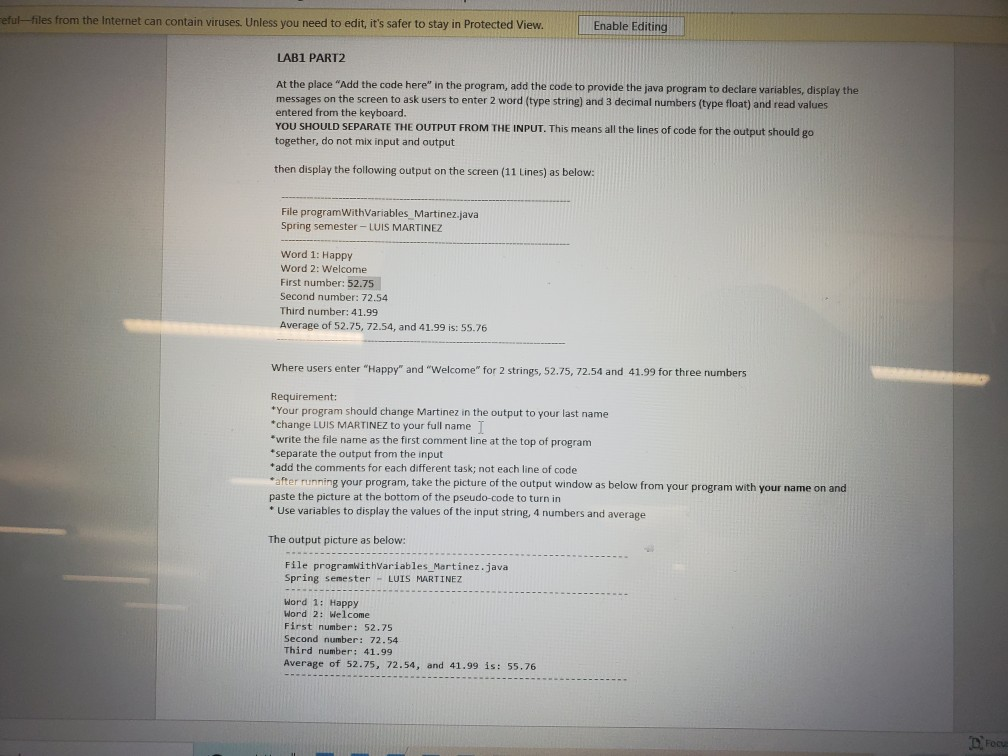
eful-files from the Internet can contain viruses. Unless you need to edit, it's safer to stay in Protected View, Enable Editing LAB1 PART2 At the place "Add the code here in the program, add the code to provide the java program to declare variables, display the messages on the screen to ask users to enter 2 word (type string) and 3 decimal numbers (type float) and read values entered from the keyboard. YOU SHOULD SEPARATE THE OUTPUT FROM THE INPUT. This means all the lines of code for the output should go together, do not mix input and output then display the following output on the screen (11 Lines) as below: File program With Variables Martinez.java Spring semester - LUIS MARTINEZ Word 1: Happy Word 2: Welcome First number: 52.75 Second number: 72.54 Third number: 41.99 Average of 52.75, 72.54, and 41.99 is: 55.76 Where users enter "Happy" and "Welcome" for 2 strings, 52.75, 72.54 and 41.99 for three numbers Requirement: *Your program should change Martinez in the output to your last name *change LUIS MARTINEZ to your full name *write the file name as the first comment line at the top of program *separate the output from the input *add the comments for each different task; not each line of code after running your program, take the picture of the output window as below from your program with your name on and paste the picture at the bottom of the pseudo-code to turn in * Use variables to display the values of the input string, 4 numbers and average The output picture as below: File programwithVariables_Martinez.java Spring senester - LUIS MARTINEZ Word 1: Happy Word 2: Welcome First number: 52.75 Second number: 72.54 Third number: 41.99 Average of 52.75, 72.54, and 41.99 is: 55.76 Droo
Step by Step Solution
There are 3 Steps involved in it

Get step-by-step solutions from verified subject matter experts
 Study Help