







Question: To develop and demonstrate mastery in assembling and analyzing key financial statements using provided transaction data. This project will reflect an understanding of the relationships
To develop and demonstrate mastery in assembling and analyzing key financial statements using provided transaction data. This project will reflect an understanding of the relationships among financial documents and their components through practical application.Task is to use this data to create a complete set of financial statements, demonstrating your ability to interpret and apply accounting data effectively.Tasks and StepbyStep Guide:Income Statement Preparation: Task: Assemble an Income Statement using the provided transactions. Instructions: Calculate Net Income or Loss by deducting total expenses from total revenues. Excel Tip: Use Excel formulas to automatically calculate totals and subtotals to ensure accuracy and efficiency.Statement of Owners Equity: Task: Create the Statement of Owners Equity. Instructions: Start with the beginning owners equity assume zero unless stated otherwise add net income from the Income Statement, include any owner's investments and withdrawals, and compute the ending owner's equity. Excel Tip: Link calculations directly to the Income Statements net income to reflect updates dynamically.Balance Sheet Construction: Task: Construct a Balance Sheet that lists assets, liabilities, and equity. Instructions: Ensure the Balance Sheet balances Total Assets Total Liabilities Owners Equity Excel Tip: Utilize cell references to ensure that totals are automatically updated when changes are made to underlying data.Statement of Cash Flows: Task: Prepare the Statement of Cash Flows using the indirect method. Instructions: Adjust Net Income for noncash transactions and changes in working capital. List cash flows from operating, investing, and financing activities. Excel Tip: Use Excels features to categorize and sum different types of cash flows, and ensure that the final cash position matches the cash shown on the Balance Sheet. Excel Workbook: complete Excel workbook with each statement on a separate sheet. Use formulas for all calculations to enable automatic updates. Documentation: Include a separate sheet in your workbook titled "Explanations." Here, provide explanations for each statement, detailing the accounting principles applied, the treatment of specific transactions, and the distinctions between GAAP and IFRS if applicableKindly express the solution in an excel format, Im having a hard time with it Uploading an excel sheet will be much appreciated Thank you.
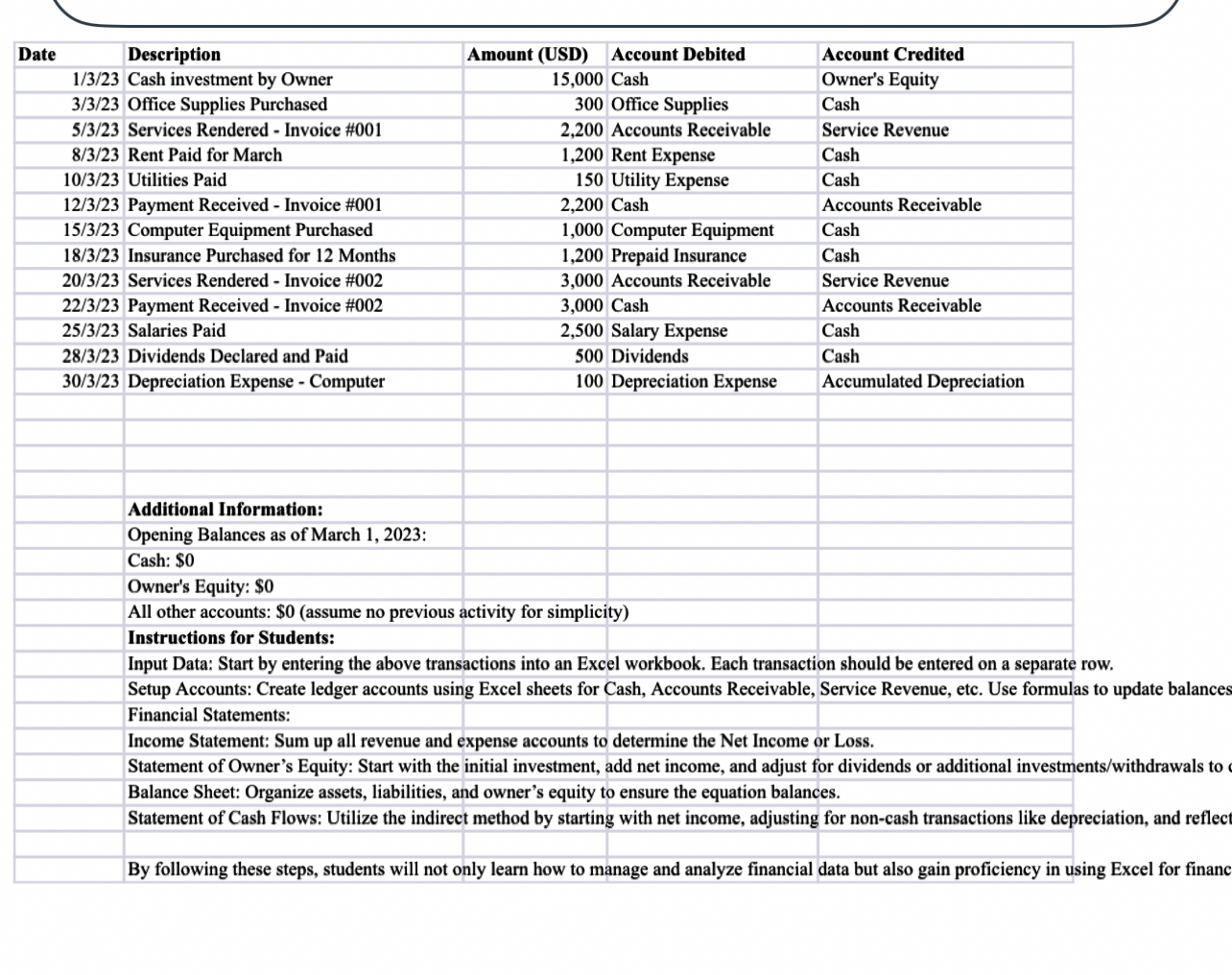
tableOffice Supplies Purchased,Office Supplies,CashServices Rendered Invoice #Accounts Receivable,Service RevenueRent Paid for March,Rent Expense,CashUtilities Paid,Utility Expense,CashPayment Received Invoice #Cash,Accounts ReceivableComputer Equipment Purchased,Computer Equipment,CashInsurance Purchased for Months,Prepaid Insurance,CashServices Rendered Invoice #Accounts Receivable,Service RevenuePayment Received Invoice #Cash,Accounts ReceivableSalaries Paid,Salary Expense,CashDividends Declared and Paid,Dividends,CashDepreciation Expense Computer,Depreciation Expense,Accumulated DepreciationAdditional Information:,,,Opening Balances as of March :Cash: $Owner's Equity: $All other accounts: $assume no previo,simplicityInstructions for Students:,,,
Input Data: Start by entering the above transactions into an Excel workbook. Each transaction should be entered on a separate row.
Setup Accounts: Create ledger accounts using Excel sheets for Cash, Accounts Receivable, Service Revenue, etc. Use formulas to update balances Financial Statements:
Income Statement: Sum up all revenue and expense accounts to determine the Net Income or Loss.
Statement of Owner's Equity: Start with the initial investment, add net income, and adjust for dividends or additional investmentswithdrawals to Balance Sheet: Organize assets, liabilities, and owner's equity to ensure the equation balances.
Statement of Cash Flows: Utilize the indirect method by starting with net income, adjusting for noncash transactions like depreciation, and reflect
By following these steps, students will not only learn how to manage and analyze financial data but also gain proficiency in using Excel for financ
Step by Step Solution
There are 3 Steps involved in it
1 Expert Approved Answer
Step: 1 Unlock

Question Has Been Solved by an Expert!
Get step-by-step solutions from verified subject matter experts
Step: 2 Unlock
Step: 3 Unlock
 Study Help