







Question: To enable iterative calculation in Excel, go to File > > Options > > Formulas and click on the box ( square
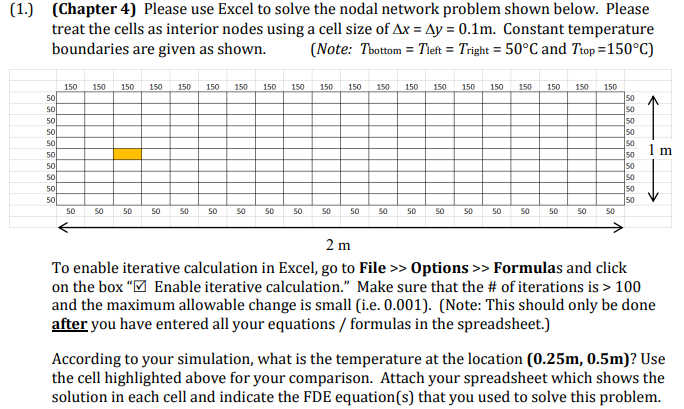
To enable iterative calculation in Excel, go to File Options Formulas and click on the box square Enable iterative calculation." Make sure that the # of iterations is and the maximum allowable change is small ieNote: This should only be done after you have entered all your equations formulas in the spreadsheet.
According to your simulation, what is the temperature at the location mathbf mmathbf m Use the cell highlighted above for your comparison. Attach your spreadsheet which shows the solution in each cell and indicate the FDE equations that you used to solve this problem.
Step by Step Solution
There are 3 Steps involved in it
1 Expert Approved Answer
Step: 1 Unlock

Question Has Been Solved by an Expert!
Get step-by-step solutions from verified subject matter experts
Step: 2 Unlock
Step: 3 Unlock
 Study Help