







Question: to make sure the test works test the code with Now, this is your test data set: 1. Test your loan amount: 10,000,000; 2. test

to make sure the test works test the code with Now, this is your test data set: 1. Test your loan amount: 10,000,000; 2. test your interest rate: 0%; 3. test loan duration: 100; 4. test additional amount: -100; Then, you'll test the normal case: loan amount: $750,000, annual interest rate: 3.5% (you enter 3.5), loan duration: 15 (15 years), additional monthly payment: $500.
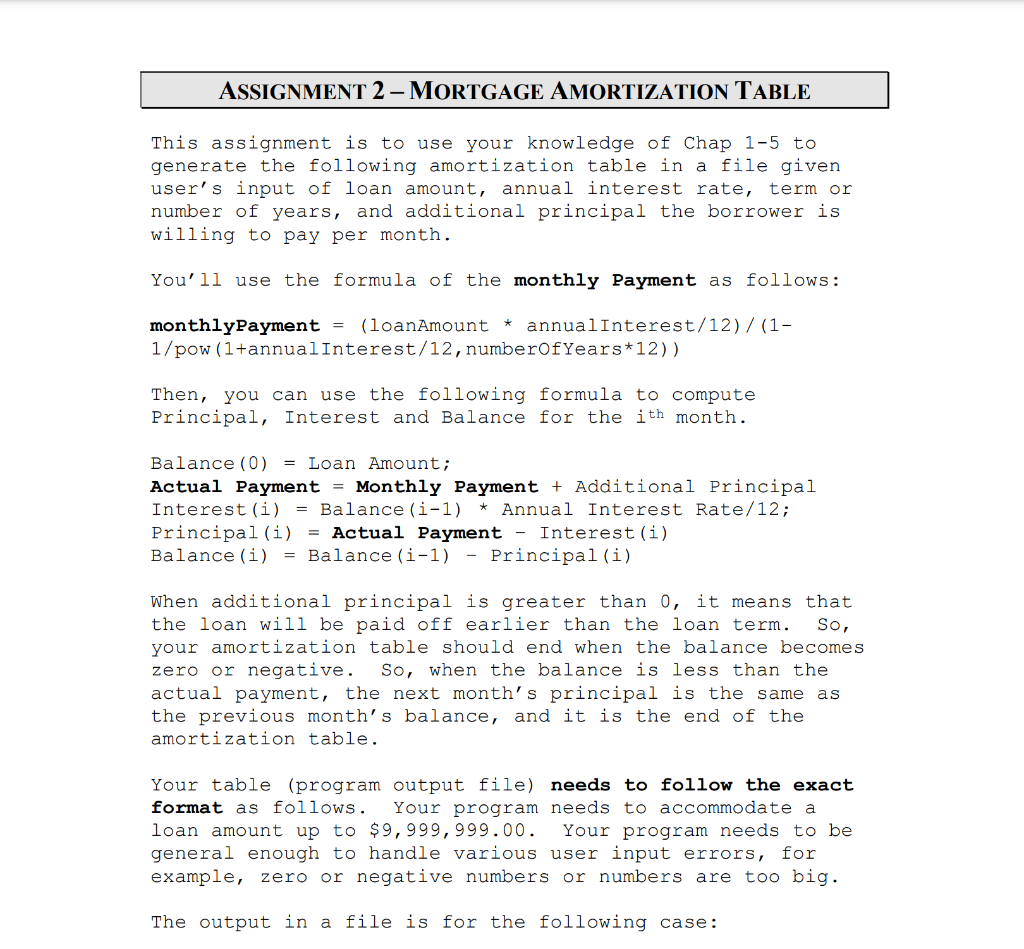
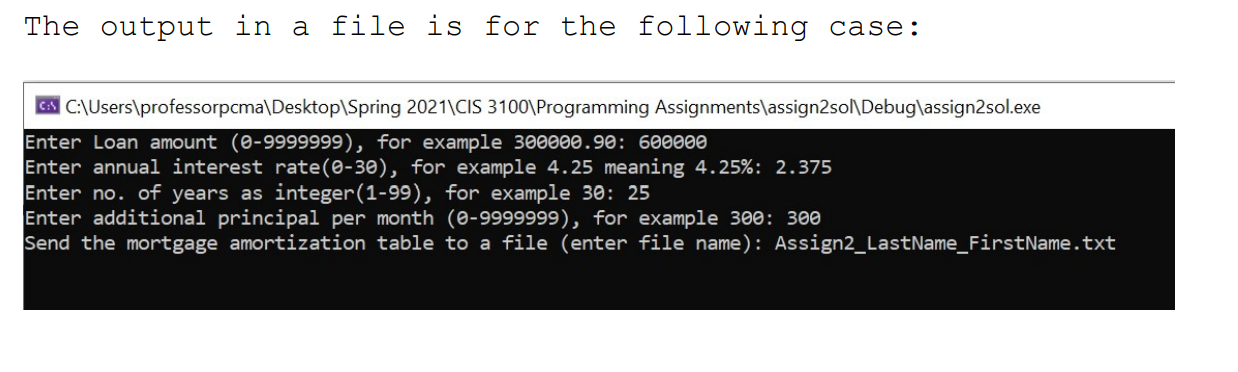
C++ ASSIGNMENT 2-MORTGAGE AMORTIZATION TABLE This assignment is to use your knowledge of Chap 1-5 to generate the following amortization table in a file given user's input of loan amount, annual interest rate, term or number of years, and additional principal the borrower is willing to pay per month. You'll use the formula of the monthly Payment as follows: * monthly Payment (loanAmount annualInterest/12) / (1- 1/pow (1+annualInterest/12, numberOfYears*12)) Then, you can use the following formula to compute Principal, Interest and Balance for the ith month. Balance (0) = Loan Amount; Actual Payment = Monthly Payment + Additional Principal Interest (i) = Balance (i-1) * Annual Interest Rate/12; Principal(i) = Actual Payment - Interest (i) Balance (i) = Balance (i-1) Principal (i) When additional principal is greater than 0, it means that the loan will be paid off earlier than the loan term. So, your amortization table should end when the balance becomes zero or negative. So, when the balance is less than the actual payment, the next month's principal is the same as the previous month's balance, and it is the end of the amortization table. Your table (program output file) needs to follow the exact format as follows. Your program needs to accommodate a loan amount up to $9,999,999.00. Your program needs to be general enough to handle various user input errors, for example, zero or negative numbers or numbers are too big. The output in a file is for the following case: The output in a file is for the following case: C C:\Users\professorpcma\Desktop\Spring 2021\CIS 3100\Programming Assignments\assign2sol\Debug\assign2sol.exe Enter Loan amount (0-9999999), for example 300000.90: 600000 Enter annual interest rate(0-30), for example 4.25 meaning 4.25%: 2.375 Enter no. of years as integer(1-99), for example 30: 25 Enter additional principal per month (0-9999999), for example 300: 300 Send the mortgage amortization table to a file (enter file name): Assign2_LastName_FirstName.txt C++ ASSIGNMENT 2-MORTGAGE AMORTIZATION TABLE This assignment is to use your knowledge of Chap 1-5 to generate the following amortization table in a file given user's input of loan amount, annual interest rate, term or number of years, and additional principal the borrower is willing to pay per month. You'll use the formula of the monthly Payment as follows: * monthly Payment (loanAmount annualInterest/12) / (1- 1/pow (1+annualInterest/12, numberOfYears*12)) Then, you can use the following formula to compute Principal, Interest and Balance for the ith month. Balance (0) = Loan Amount; Actual Payment = Monthly Payment + Additional Principal Interest (i) = Balance (i-1) * Annual Interest Rate/12; Principal(i) = Actual Payment - Interest (i) Balance (i) = Balance (i-1) Principal (i) When additional principal is greater than 0, it means that the loan will be paid off earlier than the loan term. So, your amortization table should end when the balance becomes zero or negative. So, when the balance is less than the actual payment, the next month's principal is the same as the previous month's balance, and it is the end of the amortization table. Your table (program output file) needs to follow the exact format as follows. Your program needs to accommodate a loan amount up to $9,999,999.00. Your program needs to be general enough to handle various user input errors, for example, zero or negative numbers or numbers are too big. The output in a file is for the following case: The output in a file is for the following case: C C:\Users\professorpcma\Desktop\Spring 2021\CIS 3100\Programming Assignments\assign2sol\Debug\assign2sol.exe Enter Loan amount (0-9999999), for example 300000.90: 600000 Enter annual interest rate(0-30), for example 4.25 meaning 4.25%: 2.375 Enter no. of years as integer(1-99), for example 30: 25 Enter additional principal per month (0-9999999), for example 300: 300 Send the mortgage amortization table to a file (enter file name): Assign2_LastName_FirstName.txt
Step by Step Solution
There are 3 Steps involved in it

Get step-by-step solutions from verified subject matter experts
 Study Help