







Question: To start us off, create an abstract ChessPiece class. What instance data would all chess pieces have? Knowing that all the chess pieces move
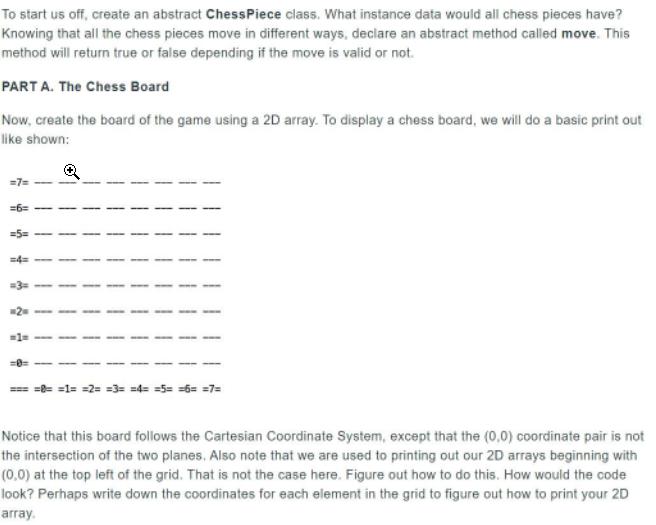
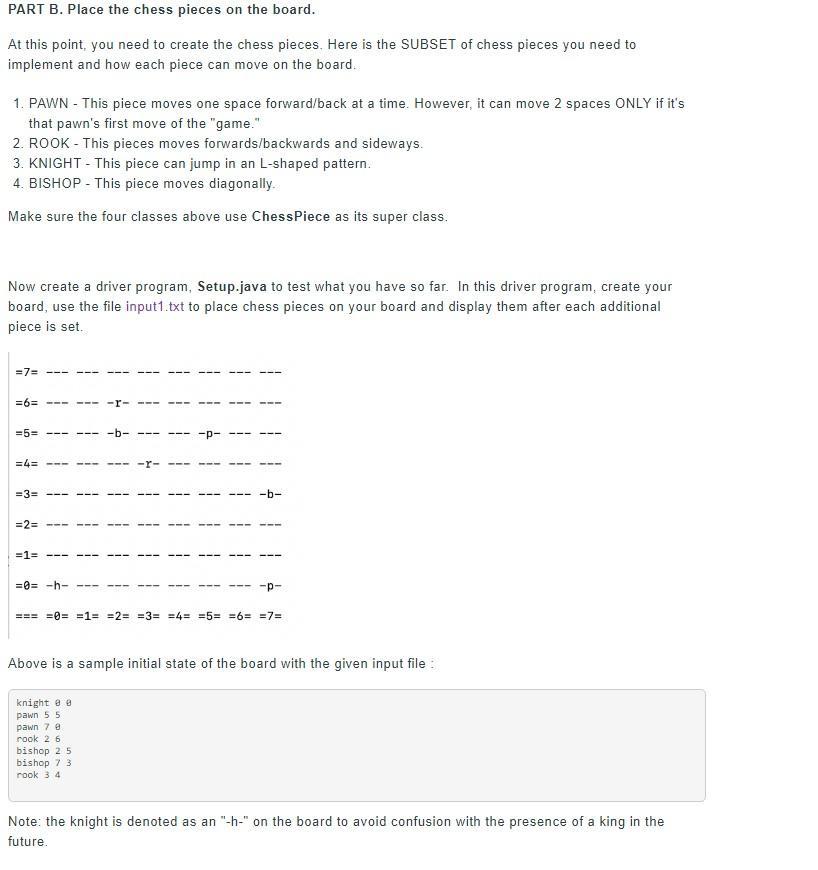
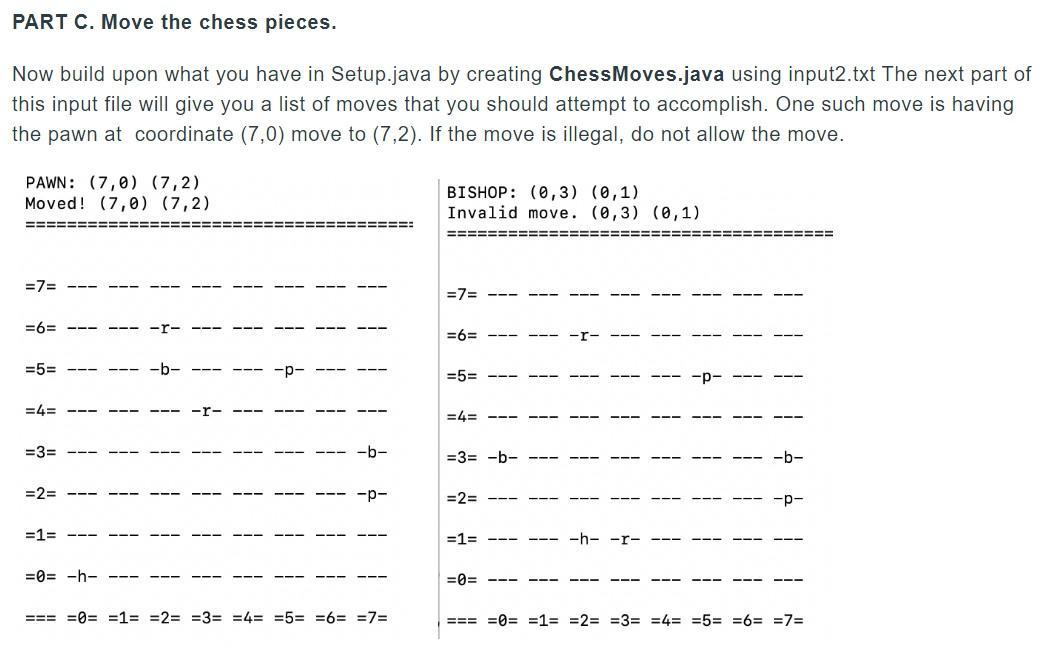
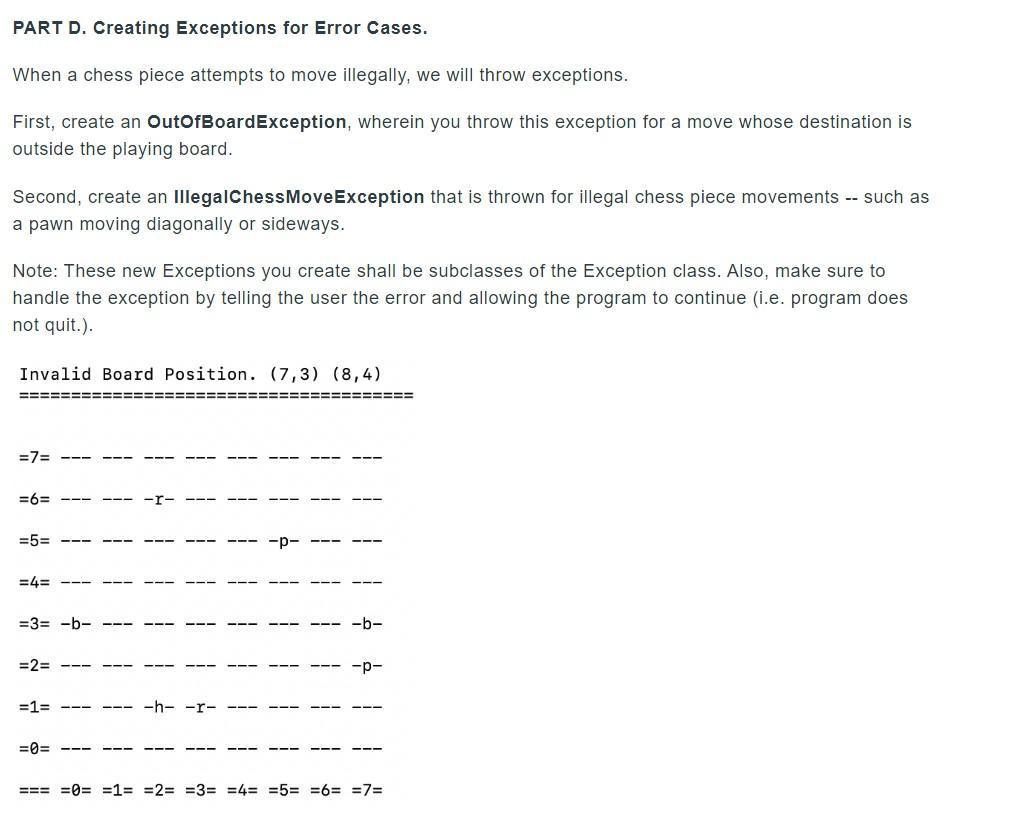
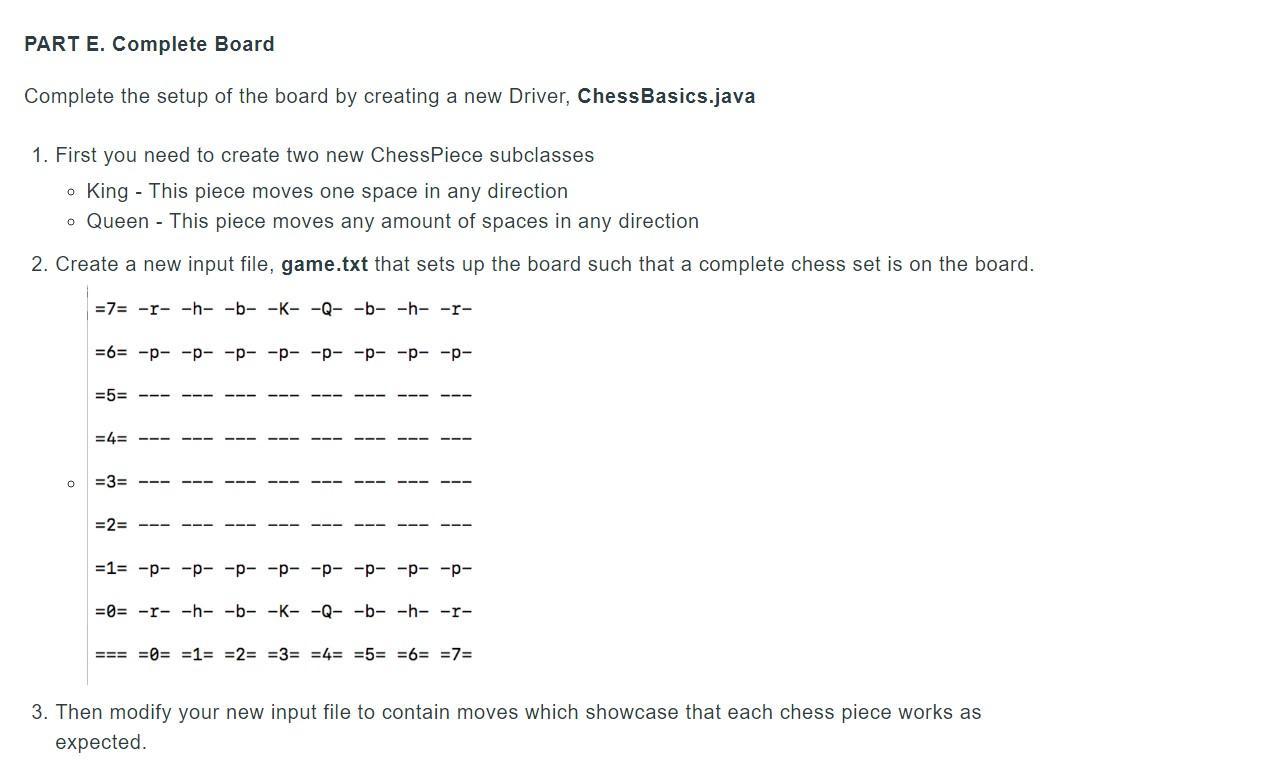

To start us off, create an abstract ChessPiece class. What instance data would all chess pieces have? Knowing that all the chess pieces move in different ways, declare an abstract method called move. This method will return true or false depending if the move is valid or not. PART A. The Chess Board Now, create the board of the game using a 2D array. To display a chess board, we will do a basic print out like shown: =6= 2 == =1= =2= =3= =4= =5= =6= =7= Notice that this board follows the Cartesian Coordinate System, except that the (0,0) coordinate pair is not the intersection of the two planes. Also note that we are used to printing out our 2D arrays beginning with (0,0) at the top left of the grid. That is not the case here. Figure out how to do this. How would the code look? Perhaps write down the coordinates for each element in the grid to figure out how to print your 2D array. PART B. Place the chess pieces on the board. At this point, you need to create the chess pieces. Here is the SUBSET of chess pieces you need to implement and how each piece can move on the board. 1. PAWN - This piece moves one space forward/back at a time. However, it can move 2 spaces ONLY if it's that pawn's first move of the "game." 2. ROOK - This pieces moves forwards/backwards and sideways. 3. KNIGHT - This piece can jump in an L-shaped pattern. 4. BISHOP - This piece moves diagonally. Make sure the four classes above use ChessPiece as its super class. Now create a driver program, Setup.java to test what you have so far. In this driver program, create your board, use the file input1.txt to place chess pieces on your board and display them after each additional piece is set. =7= =6= -r- =5= -b- --- -p- =4= =3= -b- --- -- =2= =1= --- =0= -h- -p- --- === =0= =1= =2= =3= =4= =5= =6= =7= Above is a sample initial state of the board with the given input file : knight e e wn 5 5 wn 7 @ rook 2 6 bishop 2 5 bishop 7 3 rook 3 4 Note: the knight is denoted as an "-h-" on the board to avoid confusion with the presence of a king in the future. PART C. Move the chess pieces. Now build upon what you have in Setup.java by creating ChessMoves.java using input2.txt The next part of this input file will give you a list of moves that you should attempt to accomplish. One such move is having the pawn at coordinate (7,0) move to (7,2). If the move is illegal, do not allow the move. PAWN: (7,0) (7,2) Moved! (7,0) (7,2) BISHOP: (0,3) (0,1) Invalid move. (0,3) (0,1) ==== ==== !========== =7= =7= --- =6= =6= =5= =5= =4= =4= =3= -b- =3= -b- -b- =2= -p- =2= =1= =1= --- -h- =0= -h- =0= --- --- === =0= =1= =2= =3= =4= =5= =6= =7= === =0= =1= =2= =3= =4= =5= =6= =7= | | | | | | } | | | | | | | | | | | } | | | | | 4 | | | | PART D. Creating Exceptions for Error Cases. When a chess piece attempts to move illegally, we will throw exceptions. First, create an OutOfBoardException, wherein you throw this exception for a move whose destination is outside the playing board. Second, create an IllegalChessMoveException that is thrown for illegal chess piece movements -- such as a pawn moving diagonally or sideways. Note: These new Exceptions you create shall be subclasses of the Exception class. Also, make sure to handle the exception by telling the user the error and allowing the program to continue (i.e. program does not quit.). Invalid Board Position. (7,3) (8,4) =7= =6= =5= =4= =3= -b- -b- =2= --- =1= -h- =0= === =0= =1= =2= =3= =4= =5= =6%= =73=D | | | | | | | | | | PART E. Complete Board Complete the setup of the board by creating a new Driver, ChessBasics.java 1. First you need to create two new ChessPiece subclasses o King - This piece moves one space in any direction o Queen This piece moves any amount of spaces in any direction 2. Create a new input file, game.txt that sets up the board such that a complete chess set is on the board. =7= -r- -h- -b- -K- -Q- -b- -h- -r- 363D -- -- -- -- -- -- -- -- =5%3= =4= =3= =2= %3D13 -- -- ---- -- -- -- -- =0= -r- -h- -b- -K- -Q- -b- -h- -r- === =0= =1= =2= =3= =4= =5= =6= =73 3. Then modify your new input file to contain moves which showcase that each chess piece works as expected. BONUS PART: Create a PathwayException wherein it is an illegal move if there is another chess piece on the way - either at the destination coordinate or in the path to the destination coordinate. (Remember, a knight can jump over chess pieces.)
Step by Step Solution
3.50 Rating (163 Votes )
There are 3 Steps involved in it
Answers TASK 1 Setupjava import javaio import javautilScanner public class Setup initialize the empty board with no pieces public static void initBoardString chessBoard chessBoard80 forint i0i 8i int ... View full answer

Get step-by-step solutions from verified subject matter experts
 Study Help