







Question: # TODO : Change class name class SomethingFrame(ttk.Frame): def __init__(self, parent=None): # call parent constructor super().__init__(parent) # TODO : add self to parent with geometry
#TODO: Change class name class SomethingFrame(ttk.Frame): def __init__(self, parent=None): # call parent constructor super().__init__(parent) # TODO: add self to parent with geometry manager # TODO: create atrributes # TODO:call makewidgets()
def makewidgets(self): #TODO: Implement
#TODO: add button callback method
root = tk.Tk() #TODO: change constructor name SomethingFrame(root) root.mainloop()
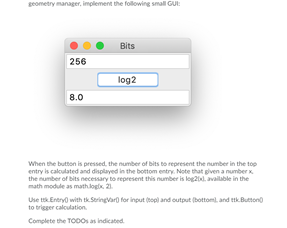
geometry manager, implement the following small GUE Bits 256 log2 8.0 When the button is pressed, the number of bits to represent the number in the top entry is calculated and displayed in the bottom entry. Note that given a number the number of bits necessary to represent this number is log26. valable in the math module as mathog 21. Die Entry with tk Sering var for input (opland output (bottom and ttk Button to trieger calculation Complete the TODOs as indicated geometry manager, implement the following small GUE Bits 256 log2 8.0 When the button is pressed, the number of bits to represent the number in the top entry is calculated and displayed in the bottom entry. Note that given a number the number of bits necessary to represent this number is log26. valable in the math module as mathog 21. Die Entry with tk Sering var for input (opland output (bottom and ttk Button to trieger calculation Complete the TODOs as indicated
Step by Step Solution
There are 3 Steps involved in it

Get step-by-step solutions from verified subject matter experts
 Study Help