



Question: Tools View Week 2(1) - Word Perform the following tasks in your Fedora (or other Linux) you installed in VMWare. To gain full credit and
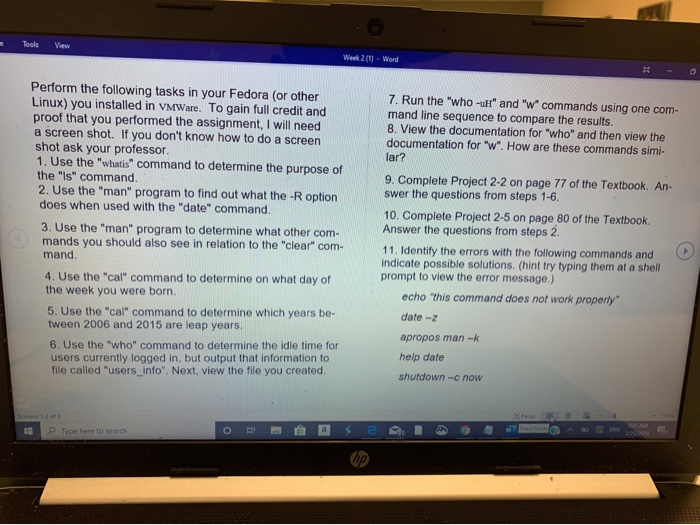
Tools View Week 2(1) - Word Perform the following tasks in your Fedora (or other Linux) you installed in VMWare. To gain full credit and proof that you performed the assignment, I will need a screen shot. If you don't know how to do a screen shot ask your professor. 1. Use the "whatis" command to determine the purpose of the "Is" command. 2. Use the "man" program to find out what the -R option does when used with the "date" command. 7. Run the "who-ul" and "w commands using one com- mand line sequence to compare the results. 8. View the documentation for "who" and then view the documentation for "w". How are these commands simi- lar? 9. Complete Project 2-2 on page 77 of the Textbook. An- swer the questions from steps 1-6. 10. Complete Project 2-5 on page 80 of the Textbook. Answer the questions from steps 2. 11. Identify the errors with the following commands and indicate possible solutions. (hint try typing them at a shell prompt to view the error message.) echo "this command does not work properly" 3. Use the "man" program to determine what other com- mands you should also see in relation to the "clear" com- mand 4. Use the "cal" command to determine on what day of the week you were born. 5. Use the "cal" command to determine which years be- tween 2006 and 2015 are leap years. 6. Use the "who" command to determine the idle time for users currently logged in, but output that information to file called "users_info". Next, view the file you created date-2 apropos man-k help date shutdown - now
Step by Step Solution
There are 3 Steps involved in it

Get step-by-step solutions from verified subject matter experts