







Question: traceroute and ping I use the simple network analyzer traceroute from the Looking glasses website, which will traceroute from a source server to my IP
traceroute and ping
I use the simple network analyzer traceroute from the Looking glasses website, which will traceroute from a source server to my IP address.
I then traceroute from my IP to the destination IP based on the first line of the traceroute showing the IP as the destination (this is the reverse path traceroute). In these two reverse traceroutes, almost the address of the router of the intermediate hop is not the same. Why?
The capture of traceroute from a source to my IP
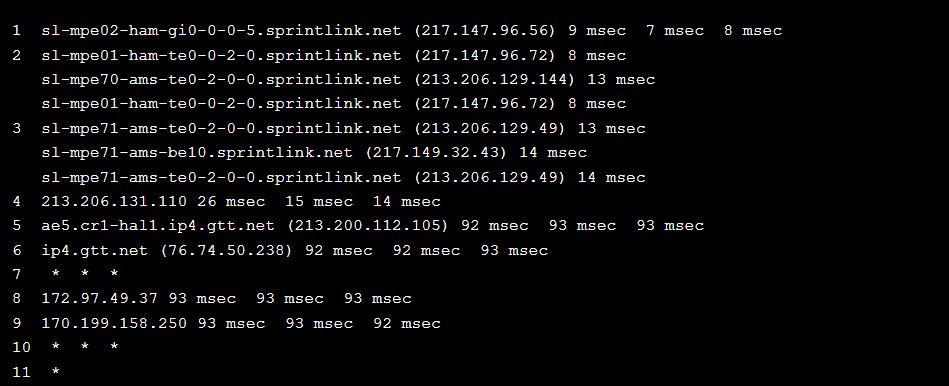
The capture of traceroute from mine to source IP(reverse path with above)

Why most of the intermediate router addresses are different?
1 sl-mpe02-ham-gi0-0-0-5.sprintlink.net (217.147.96.56)9msec7msec8msec 2 sl-mpe01-ham-te0-0-2-0.sprintlink.net (217.147.96.72)8msec sl-mpe70-ams-te0-2-0-0.sprintlink.net (213.206.129.144)13msec sl-mpe01-ham-te0-0-2-0.sprintlink.net (217.147.96.72)8msec 3 sl-mpe71-ams-te0-2-0-0.sprintlink.net (213.206.129.49)13msec sl-mpe71-ams-be10.sprintlink.net (217.149.32.43)14msec sl-mpe71-ams-te0-2-0-0.sprintlink.net (213.206.129.49)14msec 4 213.206.131.110 26msec15msec14msec 5 ae5.cr1-hal1.ip4.gtt.net (213.200.112.105) 92msec93msec93msec 6 ip4.gtt.net (76.74.50.238) 92msec92msec93msec 7 * * * 8 172.97.49.37 93msec93msec93msec 9 170.199.158.250 93msec93msec92msec 10 * * * 11 * GW81AD1600. Backbone. Dal. Ca (129.173.22. 1) 0.495ms0.462ms0.445ms 192. 75.138.17 (192.75.138.17) 7.278ms7.518ms7.506ms ns-hlfx-dr002.ns. eastlink. ca (24.222.79. 121) 1.677ms1.328ms1.073ms ns-hlfx-br002. ns. eastlink. ca (24.215. 102.221) 1.766ms1.506ms1.749ms ae3-8. cr1-hal1. ip4. gtt. net (69.174. 19.173) 2.402ms6.630ms2.375ms ae15. cr3-nyc6. ip4.gtt. net (89.149.186.217)24.896ms14.418ms14.746ms
Step by Step Solution
There are 3 Steps involved in it

Get step-by-step solutions from verified subject matter experts
 Study Help