







Question: Turtle Graphics Python - For the flower: - Change the shape of the square that creates the flower by changing the values used to make
Turtle Graphics Python -
For the flower: - Change the shape of the square that creates the flower by changing the values used to make the square inside of the draw_square() function. - Change the color of the background - Change the color of the flower
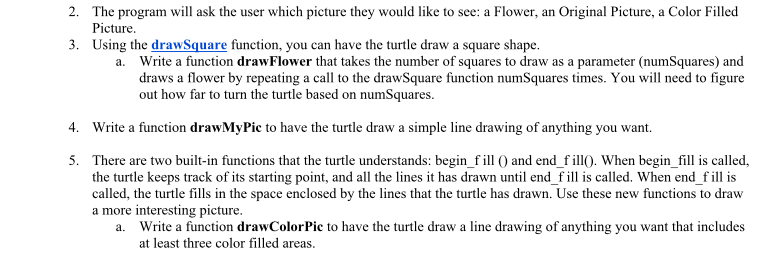
The program will ask the user which picture they would like to see: a Flower, an Original Picture, a Color Filled Picture Using the drawSquare function, you can have the turtle draw a square shape 2. 3. a. Write a function drawFlower that takes the number of squares to draw as a parameter (numSquares) and draws a flower by repeating a call to the drawSquare function numSquares times. You will need to figure out how far to turn the turtle based on numSquares 4. Write a function drawMyPic to have the turtle draw a simple line drawing of anything you want. 5. There are two built-in functions that the turtle understands: begin f ill O and end fill. When begin_fill is called, the turtle keeps track of its starting point, and all the lines it has drawn until end f ill is called. When endfill is called, the turtle fills in the space enclosed by the lines that the turtle has drawn. Use these new functions to dravw a more interesting picture Write a function drawColorPic to have the turtle draw a line drawing of anything you want that includes at least three color filled areas a
Step by Step Solution
There are 3 Steps involved in it

Get step-by-step solutions from verified subject matter experts
 Study Help