







Question: Tutorial 4: PHP * In this tutorial you are asked to continue working on the webpages you made in Assignment#2. Task 1: 1- Create a
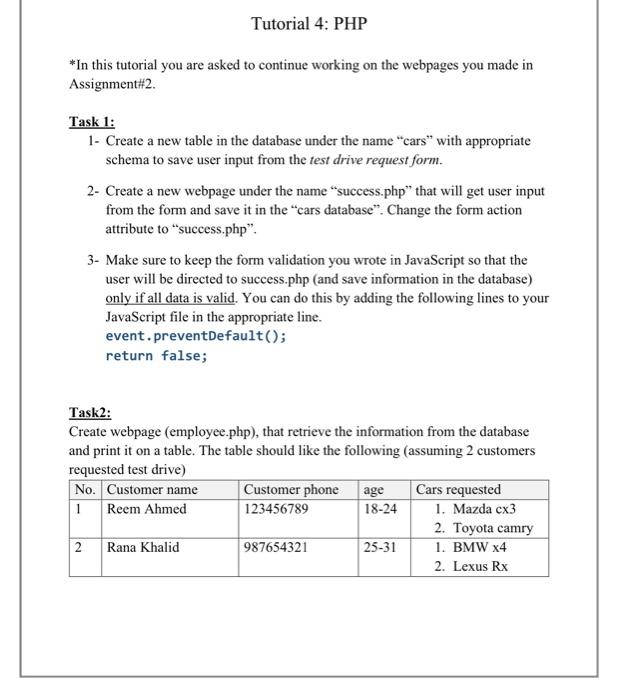
Tutorial 4: PHP * In this tutorial you are asked to continue working on the webpages you made in Assignment#2. Task 1: 1- Create a new table in the database under the name "cars with appropriate schema to save user input from the test drive request form. 2- Create a new webpage under the name success.php" that will get user input from the form and save it in the cars database". Change the form action attribute to success.php". 3- Make sure to keep the form validation you wrote in JavaScript so that the user will be directed to success.php (and save information in the database) only if all data is valid. You can do this by adding the following lines to your JavaScript file in the appropriate line. event.preventDefault(); return false; Task 2: Create webpage (employee.php), that retrieve the information from the database and print it on a table. The table should like the following (assuming 2 customers requested test drive) No. Customer name Customer phone age Cars requested 1 Reem Ahmed 123456789 18-24 1. Mazda cx3 2. Toyota camry 2 Rana Khalid 987654321 25-31 1. BMW X4 2. Lexus Rx
Step by Step Solution
There are 3 Steps involved in it

Get step-by-step solutions from verified subject matter experts
 Study Help