







Question: Written in JAVA part 1: (10 points) With the mathematics you have studied so far in your education you have worked with polynomials. Polynomials are
Written in JAVA
part 1: (10 points) With the mathematics you have studied so far in your education you have worked with polynomials. Polynomials are used to describe curves of various types; people use them in the real world to graph curves. For example, roller coaster designers may use polynomials to describe the curves in their rides. Polynomials appear in many areas of mathematics and science. Write a program which finds an approximate solution to an equation f(x) = 0 for some function f. Use the bisection method. To solve the problem using this method first find two values of x, A and B, such that when evaluated in the function f(x) they give opposites signs for the yvalue. If f(x) is continuous between these two values then we know that there is at least one x which evaluates to a 0 y value, which is between these two values A and B. Treat the positive value as an upper bound and the negative value as a lower bound. Divide the space between A and B in half and evaluate the function at that new point. If the value is positive than it replaces the existing upper-bound and if it is negative it replaces the existing lower-bound. Continue dividing the space between the upper-bound and lower-bound in half and evaluating this new value and generating new upper and lower bounds as the case may be. Continue the evaluation process until the x value that you are plugging into the function evaluates to a y value that is zero plus or minus .0000001.Consider the possibility of finding all the real roots of any given function up to and including x raised to the fifth power. Input should consist of reading the coefficients one at a time to the powers of x up to 5 and some constant. Do a desk check with calculator on y = X2 -2 and identify the variables associated with that problem. Write the code that follows your algorithm. Then test your program on other polynomials such as 2x5 -15x4 + 35x3 -15x2-37x + 30 (roots are -1, 1, 2, 2.5, 3) and 3x5 -17x4 + 25x3 + 5x2 -28x + 12 (roots are -1,1, 2/3, 2, 3). Use at lest 3 methods. One to read the 5 coefficients, one to calculate the value of the polynomial and one to do the binary bisection search. Use the following for loop to work through the X values:for(double x = -5.0000001; x
part 2: (3 points) After it runs as a console program, using the GUI example from my website as a guide, convert this program to a graphics program. Keep the example GUI always working. Create multiple versions as you add code that will implement the polynomial problem. Always be able to go back to a previous working version if you get stuck. When you get the polynomial program working then delete the example code. To debug your compiled program, use System.out.println() to follow intermediate values of your variables to see where your code does not follow the algorithm.
I have part 1 complete and my code is:
import java.util.Scanner;
public class PolySolver {
// the max error allowed
private static final double EPS = 0.0000001;
// method to evaluate a polynomial on given coefficients
public static double polyValue(int coeffs[], double x) {
double ans = 0.0;
// starting at first position
// evaluate the polynomial using
// Horners rule
for(int coeff : coeffs) {
ans = (ans * x) + coeff;
}
return ans;
}
// method for reading coefficients from the user
public static int[] getCoeff(Scanner scn) {
int[] res = new int[6];
// read the power coefficients
System.out.println("Please enter the 5th Coefficient");
res[0] = scn.nextInt();
System.out.println("Please enter the 4th Coefficient");
res[1] = scn.nextInt();
System.out.println("Please enter the 3rd Coefficient");
res[2] = scn.nextInt();
System.out.println("Please enter the 2nd Coefficient");
res[3] = scn.nextInt();
System.out.println("Please enter the 1st Coefficient");
res[4] = scn.nextInt();
System.out.println("Please enter the zero Coefficient");
res[5] = scn.nextInt();
// return the result
return res;
}
// method for calculating the root and printing it
public static double bisection(int[] coeffs, double lower, double upper) {
// if values at lower and upper is not of opposite sign then exit
if(polyValue(coeffs, lower) * polyValue(coeffs, upper) > 0) {
return -1; // this is error
}
double mid = (lower + upper) / 2;
// repeat till the root converges
while(Math.abs(polyValue(coeffs, mid)) > EPS) {
if(polyValue(coeffs, lower) * polyValue(coeffs, mid)
// lower and mid are of opposite sign
upper = mid;
}
else {
lower = mid;
}
mid = (lower + upper) / 2;
}
// return the root
return mid; // mid is the root
}
public static void main(String[] args) {
// the main method
// get the polynomials
Scanner scn = new Scanner(System.in);
int[] coeffs = getCoeff(scn);
// loop over x until opposite sign valuee are read
double lastX = -5.0000001;
double lastVal = polyValue(coeffs, lastX);
// loop
for(double x = -5.0000001; x
// if signs are opposite then call bisection
if(lastVal * polyValue(coeffs, x)
double root = bisection(coeffs, lastX, x);
// print the root
System.out.println("root is " + root);
// update the lastX and last value
lastX = x;
lastVal = polyValue(coeffs, x);
}
}
// close scanner
scn.close();
}
}
I need help for part 2 the GUI:
Example of a GUI:
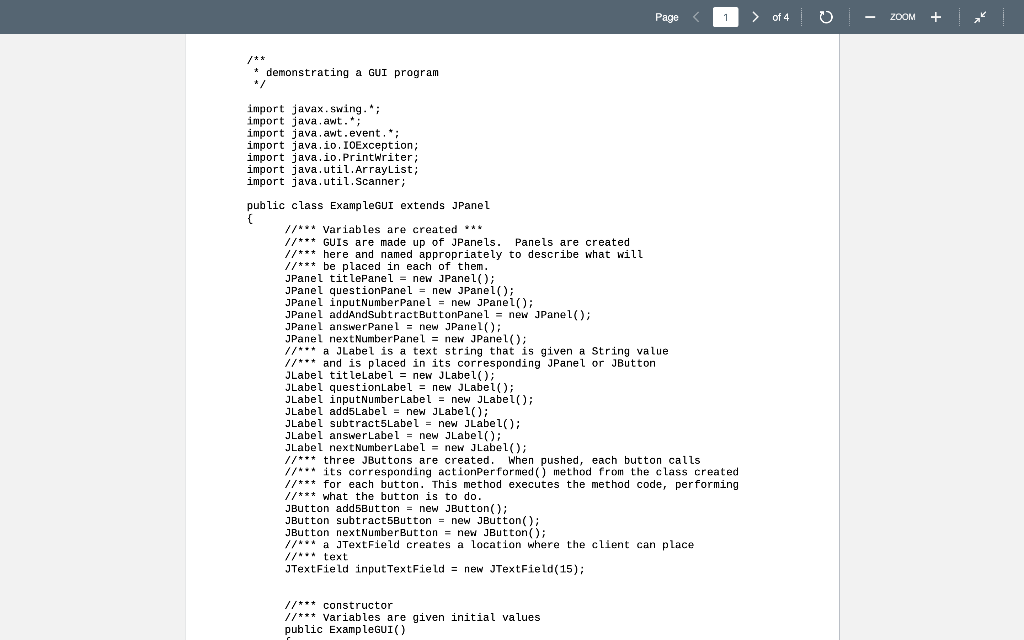
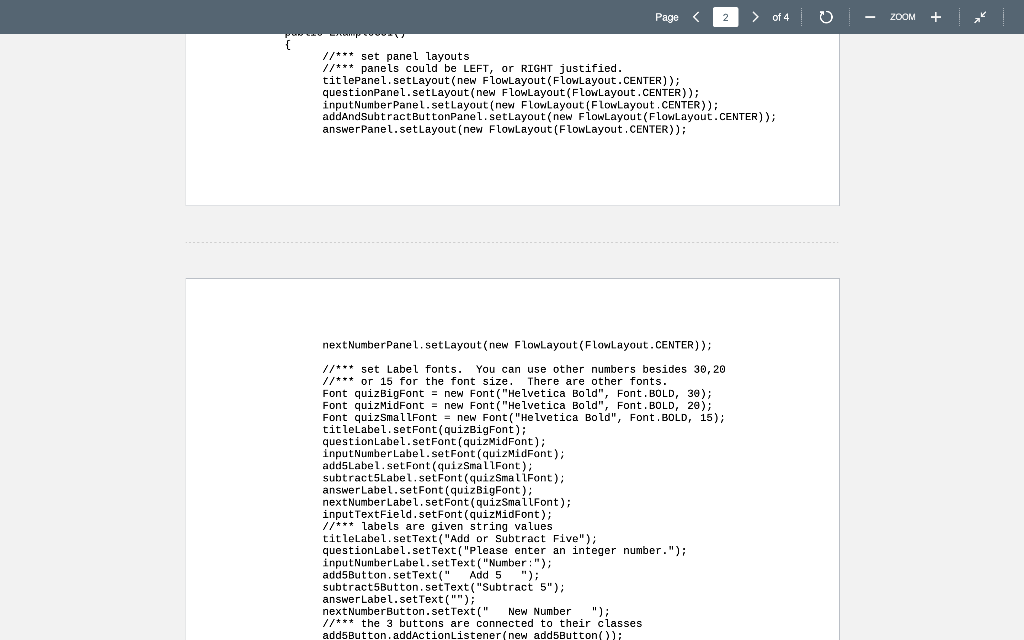
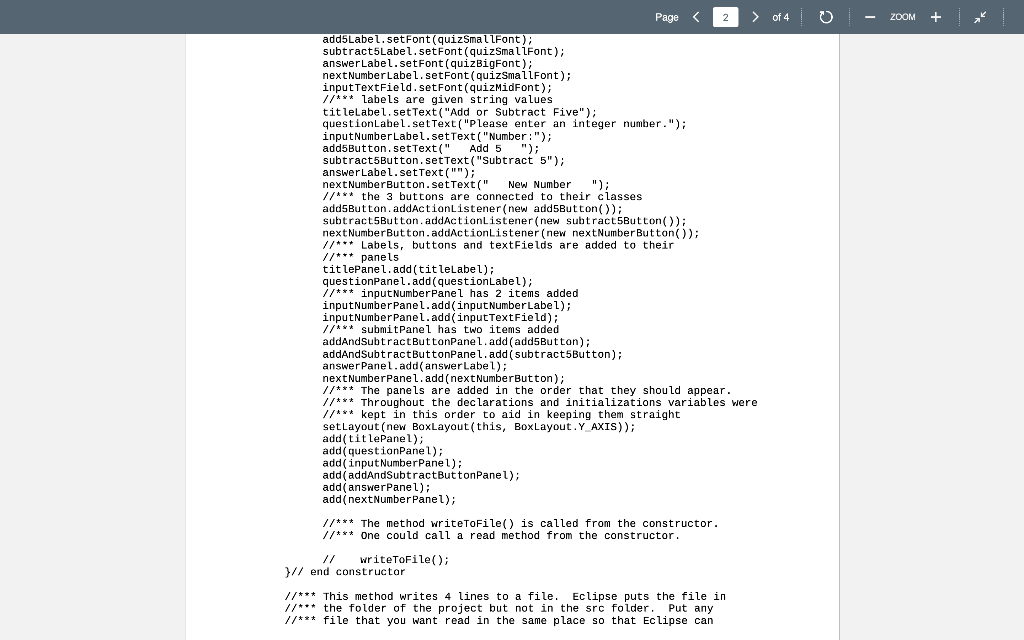
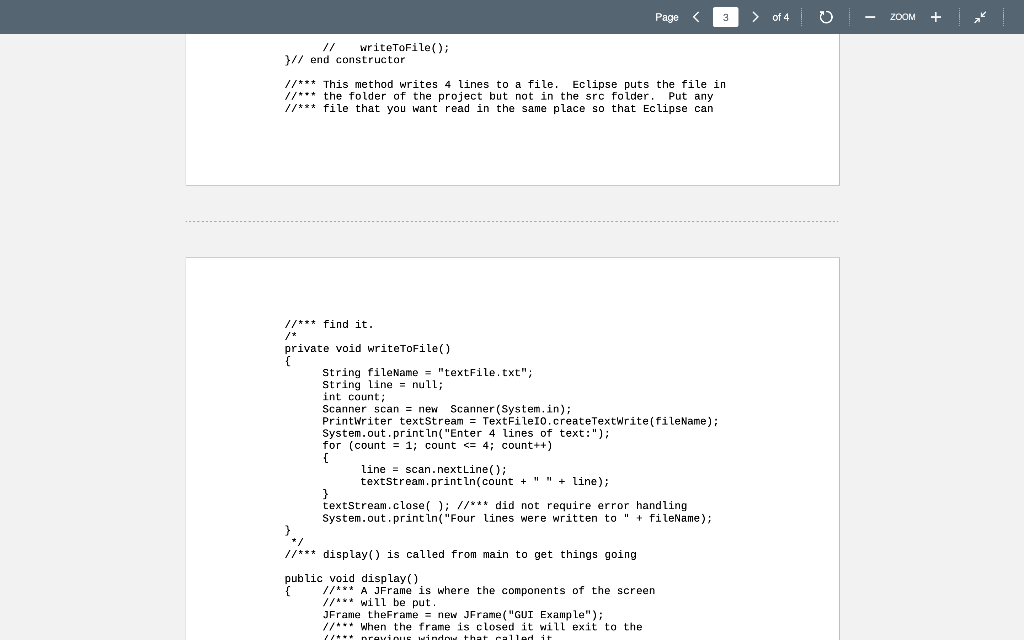
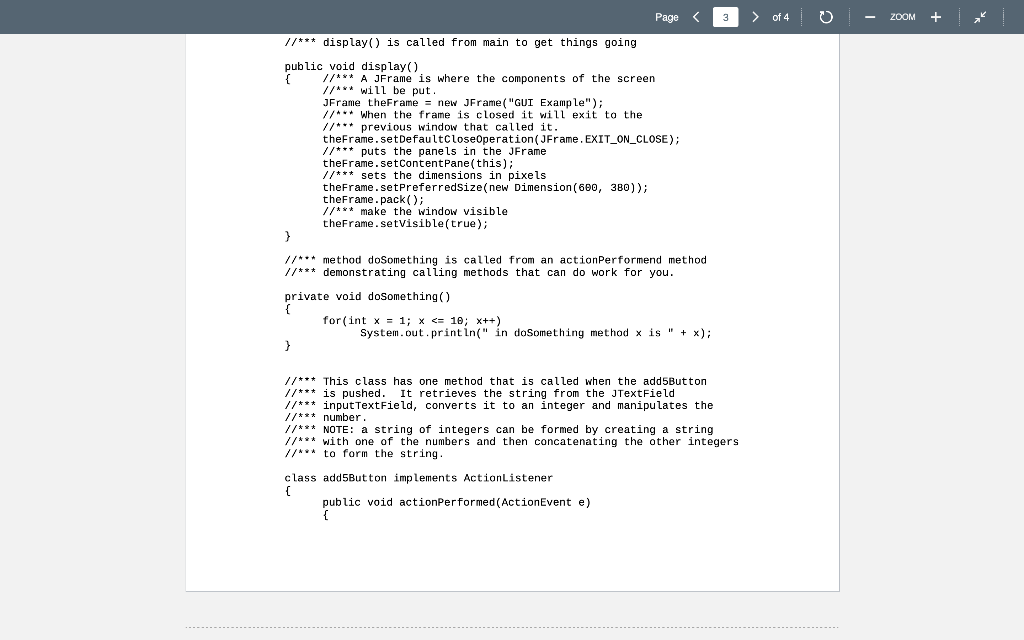
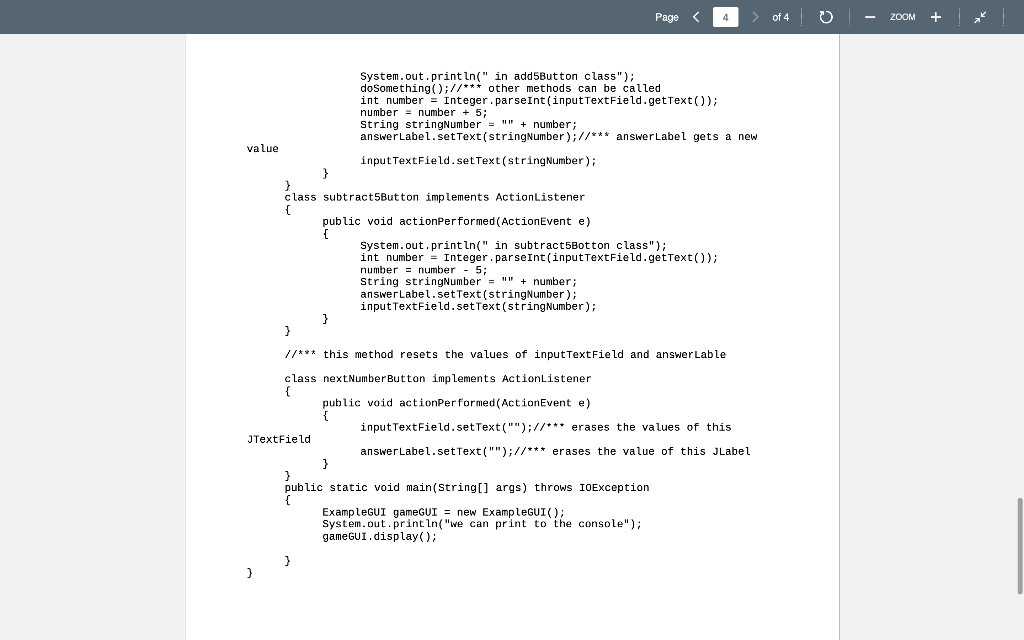
Thank you will give a like !!!
Page of 4 ZOOM * demonstrating a GUI program import javax.swing.*; import java.awt.; import java.awt.event.; import java.io.IOException; import java.io.Printwriter; import java.util.ArrayList; import java.util.Scanner; public class ExampleGUI extends JPanel { //*** variables are created *** //*** GUIS are made up of JPanels. Panels are created //*** here and named appropriately to describe what will //*** be placed in each of them. JPanel titlePanel = new JPanel(); JPanel questionPanel = new JPanel(); JPanel inputNumber Panel = new JPanel(); JPanel addAndSubtractButtonPanel = new JPanel(); JPanel answer Panel = new JPanel(); JPanel next Number Panel = new JPanel(); 1/*** a JLabel is a text string that is given a string value //*** and is placed in its corresponding JPanel or JButton JLabel titlelabel = new JLabel(); JLabel questionLabel = new JLabel(); JLabel inputNumber Label = new JLabel(); JLabel add5Label = new JLabel(); JLabel subtract5Label = new JLabel(); JLabel answerLabel = new JLabel(); JLabel next Number Label = new JLabel(); //*** three JButtons are created. When pushed, each button calls //*** its corresponding actionPerformed() method from the class created //*** for each button. This method executes the method code, performing //*** what the button is to do. JButton add5Button = new JButton(); JButton subtract5Button = new JButton(); JButton next Number Button = new JButton(); //*** a JTextField creates a location where the client can place //*** text JTextField input TextField = new JTextField(15); //*** constructor //*** variables are given initial values public ExampleGUI) Page of 4 ZOOM //*** set panel layouts //*** panels could be LEFT, or RIGHT justified. titlePanel.setLayout(new FlowLayout(FlowLayout.CENTER)); questionPanel.setLayout(new FlowLayout (FlowLayout.CENTER)); input Number Panel.set Layout(new FlowLayout(FlowLayout.CENTER)); addAndSubtractButtonPanel.setLayout(new FlowLayout (FlowLayout.CENTER)); answer Panel.setLayout(new FlowLayout (FlowLayout .CENTER)); next NumberPanel.setLayout(new FlowLayout (FlowLayout.CENTER)); //*** set Label fonts. You can use other numbers besides 30,20 //*** or 15 for the font size. There are other fonts. Font quizBigFont = new Font("Helvetica Bold", Font.BOLD, 30); Font quizMidFont = new Font("Helvetica Bold", Font. BOLD, 20); Font quizSmallFont = new Font("Helvetica Bold", Font.BOLD, 15); titleLabel. setFont (quizBigFont); questionLabel.setFont(quizMidFont); inputNumber Label. setFont(quizMidFont); add5Label. setFont (quizSmallFont); subtract5Label. setFont (quizSmallfont); answerLabel. setFont (quizBigFont); next Numberlabel. setFont (quizSmallFont); inputTextField.setFont (quizMidfont); 1/*** labels are given string values titleLabel.setText("Add or Subtract Five"); questionLabel.setText("Please enter an integer number."); input Number Label.setText("Number :"); add5Button. set Text(" Add 5 "); subtract5Button.setText("Subtract 5"); answerLabel.setText(""); next Number Button.setText" New Number "); //*** the 3 buttons are connected to their classes add5Button.addActionListener(new add5Button(); ZOOM Page > of 4 add5Label. setFont(quizSmallFont); subtract5Label. setFont(quizSmallFont); answerLabel. setFont(quizBigFont). nextNumber Label. setFont(quizSmallFont); inputTextField. setFont(quizMidFont); //*** labels are given string values titleLabel.setText("Add or Subtract Five"); questionLabel.setText("Please enter an integer number."); inputNumberLabel.setText("Number:"); add5Button.setText(" Add 5 "); subtract5Button.setText("Subtract 5"); answerLabel.setText(""); nextNumberButton.setText(" New Number "); //*** the 3 buttons are connected to their classes add5Button.addActionListener(new add5Button()); subtract5Button.addActionListener(new subtract5Button()); next NumberButton.addActionListener(new next Number Button()); //*** Labels, buttons and textFields are added to their //*** panels titlePanel.add(titleLabel); questionPanel.add(questionLabel); 77*** input Number Panel has 2 items added inputNumber Panel.add( inputNumberLabel); inputNumber Panel.add input TextField); //*** submitPanel has two items added addAndSubtractButtonPanel.add(add5Button); addAnd SubtractButtonPanel.add( subtract5Button); answer Panel.add(answerLabel); next NumberPanel.add(nextNumberButton); //*** The panels are added in the order that they should appear. 11*** Throughout the declarations and initializations variables were //*** kept in this order to aid in keeping them straight setLayout(new BoxLayout(this, BoxLayout. Y AXIS)); add(titlePanel); add questionPanel); add( input Number Panel); add(addAndSubtractButtonPanel); add(answerPanel); add(next Number Panel); 1/*** One could call a read method from the constructor //*** The method writeToFile() is called from the constructor. writeToFile(); }// end constructor //*** This method writes 4 lines to a file. Eclipse puts the file in //*** the folder of the project but not in the src folder Put any //*** file that you want read in the same place so that Eclipse can Page > of 4 ZOOM writeToFile(); // end constructor //*** This method writes 4 lines to a file. Eclipse puts the file in //*** the folder of the project but not in the src folder. Put any //*** file that you want read in the same place so that Eclipse can //*** find it. private void writeToFile() String fileName = "textFile.txt"; String line = null; int count; Scanner scan = new Scanner(System.in); PrintWriter textStream = Textfile10.createTextWrite(fileName); System.out.println("Enter 4 lines of text:"); for (count = 1; count of 4 ZOOM //*** display() is called from main to get things going public void display { //*** A JFrame is where the components of the screen //*** will be put. JFrame theFrame = new JFrame("GUI Example"); //*** When the frame is closed it will exit to the //*** previous window that called it. theFrame.setDefaultCloseOperation(JFrame.EXIT_ON_CLOSE); //*** puts the panels in the JFrame theFrame.setContentPane(this); //*** sets the dimensions in pixels theFrame.setPreferredSize(new Dimension(680, 380)); theFrame.pack(); //*** make the window visible theFrame.setVisible(true); } //*** method doSomething is called from an actionPerformend method //*** demonstrating calling methods that can do work for you. private void do something() for(int x = 1; x of 4 ZOOM * demonstrating a GUI program import javax.swing.*; import java.awt.; import java.awt.event.; import java.io.IOException; import java.io.Printwriter; import java.util.ArrayList; import java.util.Scanner; public class ExampleGUI extends JPanel { //*** variables are created *** //*** GUIS are made up of JPanels. Panels are created //*** here and named appropriately to describe what will //*** be placed in each of them. JPanel titlePanel = new JPanel(); JPanel questionPanel = new JPanel(); JPanel inputNumber Panel = new JPanel(); JPanel addAndSubtractButtonPanel = new JPanel(); JPanel answer Panel = new JPanel(); JPanel next Number Panel = new JPanel(); 1/*** a JLabel is a text string that is given a string value //*** and is placed in its corresponding JPanel or JButton JLabel titlelabel = new JLabel(); JLabel questionLabel = new JLabel(); JLabel inputNumber Label = new JLabel(); JLabel add5Label = new JLabel(); JLabel subtract5Label = new JLabel(); JLabel answerLabel = new JLabel(); JLabel next Number Label = new JLabel(); //*** three JButtons are created. When pushed, each button calls //*** its corresponding actionPerformed() method from the class created //*** for each button. This method executes the method code, performing //*** what the button is to do. JButton add5Button = new JButton(); JButton subtract5Button = new JButton(); JButton next Number Button = new JButton(); //*** a JTextField creates a location where the client can place //*** text JTextField input TextField = new JTextField(15); //*** constructor //*** variables are given initial values public ExampleGUI) Page of 4 ZOOM //*** set panel layouts //*** panels could be LEFT, or RIGHT justified. titlePanel.setLayout(new FlowLayout(FlowLayout.CENTER)); questionPanel.setLayout(new FlowLayout (FlowLayout.CENTER)); input Number Panel.set Layout(new FlowLayout(FlowLayout.CENTER)); addAndSubtractButtonPanel.setLayout(new FlowLayout (FlowLayout.CENTER)); answer Panel.setLayout(new FlowLayout (FlowLayout .CENTER)); next NumberPanel.setLayout(new FlowLayout (FlowLayout.CENTER)); //*** set Label fonts. You can use other numbers besides 30,20 //*** or 15 for the font size. There are other fonts. Font quizBigFont = new Font("Helvetica Bold", Font.BOLD, 30); Font quizMidFont = new Font("Helvetica Bold", Font. BOLD, 20); Font quizSmallFont = new Font("Helvetica Bold", Font.BOLD, 15); titleLabel. setFont (quizBigFont); questionLabel.setFont(quizMidFont); inputNumber Label. setFont(quizMidFont); add5Label. setFont (quizSmallFont); subtract5Label. setFont (quizSmallfont); answerLabel. setFont (quizBigFont); next Numberlabel. setFont (quizSmallFont); inputTextField.setFont (quizMidfont); 1/*** labels are given string values titleLabel.setText("Add or Subtract Five"); questionLabel.setText("Please enter an integer number."); input Number Label.setText("Number :"); add5Button. set Text(" Add 5 "); subtract5Button.setText("Subtract 5"); answerLabel.setText(""); next Number Button.setText" New Number "); //*** the 3 buttons are connected to their classes add5Button.addActionListener(new add5Button(); ZOOM Page > of 4 add5Label. setFont(quizSmallFont); subtract5Label. setFont(quizSmallFont); answerLabel. setFont(quizBigFont). nextNumber Label. setFont(quizSmallFont); inputTextField. setFont(quizMidFont); //*** labels are given string values titleLabel.setText("Add or Subtract Five"); questionLabel.setText("Please enter an integer number."); inputNumberLabel.setText("Number:"); add5Button.setText(" Add 5 "); subtract5Button.setText("Subtract 5"); answerLabel.setText(""); nextNumberButton.setText(" New Number "); //*** the 3 buttons are connected to their classes add5Button.addActionListener(new add5Button()); subtract5Button.addActionListener(new subtract5Button()); next NumberButton.addActionListener(new next Number Button()); //*** Labels, buttons and textFields are added to their //*** panels titlePanel.add(titleLabel); questionPanel.add(questionLabel); 77*** input Number Panel has 2 items added inputNumber Panel.add( inputNumberLabel); inputNumber Panel.add input TextField); //*** submitPanel has two items added addAndSubtractButtonPanel.add(add5Button); addAnd SubtractButtonPanel.add( subtract5Button); answer Panel.add(answerLabel); next NumberPanel.add(nextNumberButton); //*** The panels are added in the order that they should appear. 11*** Throughout the declarations and initializations variables were //*** kept in this order to aid in keeping them straight setLayout(new BoxLayout(this, BoxLayout. Y AXIS)); add(titlePanel); add questionPanel); add( input Number Panel); add(addAndSubtractButtonPanel); add(answerPanel); add(next Number Panel); 1/*** One could call a read method from the constructor //*** The method writeToFile() is called from the constructor. writeToFile(); }// end constructor //*** This method writes 4 lines to a file. Eclipse puts the file in //*** the folder of the project but not in the src folder Put any //*** file that you want read in the same place so that Eclipse can Page > of 4 ZOOM writeToFile(); // end constructor //*** This method writes 4 lines to a file. Eclipse puts the file in //*** the folder of the project but not in the src folder. Put any //*** file that you want read in the same place so that Eclipse can //*** find it. private void writeToFile() String fileName = "textFile.txt"; String line = null; int count; Scanner scan = new Scanner(System.in); PrintWriter textStream = Textfile10.createTextWrite(fileName); System.out.println("Enter 4 lines of text:"); for (count = 1; count of 4 ZOOM //*** display() is called from main to get things going public void display { //*** A JFrame is where the components of the screen //*** will be put. JFrame theFrame = new JFrame("GUI Example"); //*** When the frame is closed it will exit to the //*** previous window that called it. theFrame.setDefaultCloseOperation(JFrame.EXIT_ON_CLOSE); //*** puts the panels in the JFrame theFrame.setContentPane(this); //*** sets the dimensions in pixels theFrame.setPreferredSize(new Dimension(680, 380)); theFrame.pack(); //*** make the window visible theFrame.setVisible(true); } //*** method doSomething is called from an actionPerformend method //*** demonstrating calling methods that can do work for you. private void do something() for(int x = 1; x
Step by Step Solution
There are 3 Steps involved in it

Get step-by-step solutions from verified subject matter experts
 Study Help