







Question: Type in all text and numbers shown in the spreadsheet below. Create formulae to display a total for each sales Rep. Create formulae to calculate
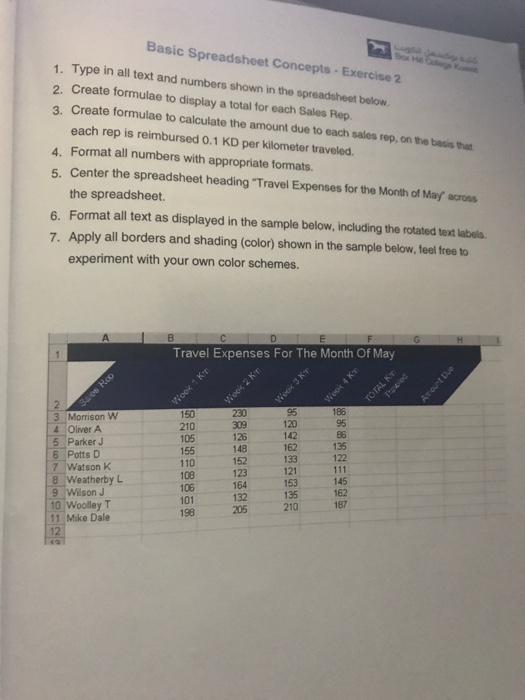
Type in all text and numbers shown in the spreadsheet below. Create formulae to display a total for each sales Rep. Create formulae to calculate the amount due to each sales rep, on the basis that each rep is reimbursed 0.1 KD per kilometer traveled. Format all numbers with appropriate formats. Center the spreadsheet heading "Travel Expenses for the Month of May" across the spreadsheet. Format all text as displayed in the sample below, including the rotated text labels. Apply all borders and shading (color) shown in the sample below, feel free to experiment with your own color schemes
Step by Step Solution
There are 3 Steps involved in it
1 Expert Approved Answer
Step: 1 Unlock

Question Has Been Solved by an Expert!
Get step-by-step solutions from verified subject matter experts
Step: 2 Unlock
Step: 3 Unlock
 Study Help