







Question: Basic Spreadsheet Concepts- Exercise 2 1. Type in all text and numbers shown in the spreadsheet below 2. Create formulae to display a total for
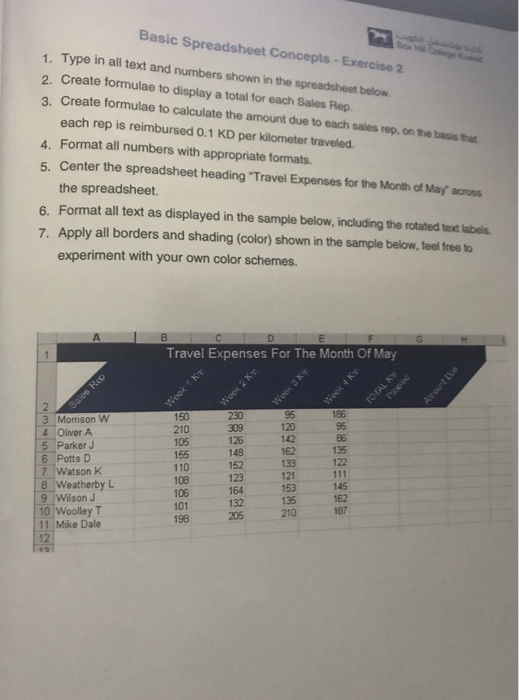
Basic Spreadsheet Concepts- Exercise 2 1. Type in all text and numbers shown in the spreadsheet below 2. Create formulae to display a total for each Sales Rep. 3. Create formulae to calculate the amount due to each sales rep, on the basis that each rep is reimbursed 0.1 KD per kilometer traveled. 4. Format all numbers with appropriate formats. 5. Center the spreadsheet heading "Travel Expenses for the Month of May across the spreadsheet. 6. Format all text as displayed in the sample below, including the rotated text labels 7. Apply all borders and shading (color) shown in the sample below, feel free to experiment with your own color schemes. Travel Expenses For The Month Of May 186 95 3 Morrison W 4 Oliver A 5 ParkerJ 6 Potts D 7-watson K 150 210 105 155 110 108 106 101 198 95 120 142 162 133 121 153 135 309 126 148 135 122 123 164 132 8 Weatherby L 145 162 9 Wilson J 10 Woolley T 11 Mike Dale 210187
Step by Step Solution
There are 3 Steps involved in it

Get step-by-step solutions from verified subject matter experts
 Study Help