







Question: Typing quickly and correctly is an essential skill for working effectively with computers and the Internet. In this project, you will build a GUI application
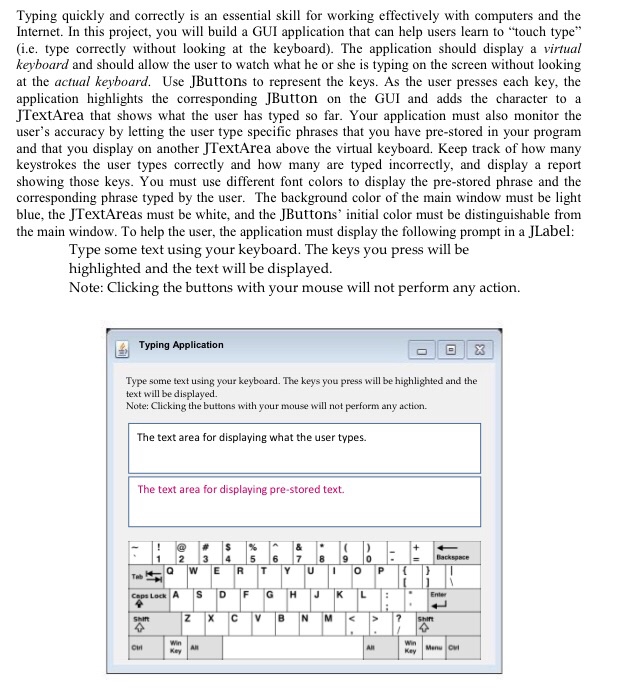
Typing quickly and correctly is an essential skill for working effectively with computers and the Internet. In this project, you will build a GUI application that can help users learn to "touch type (i.e. type correctly without looking at the keyboard). The application should display a virtual keyboard and should allow the user to watch what he or she is typing on the screen without looking at the actual keyboard. Use JButtons to represent the keys. As the user presses each key, the application highlights the corresponding JButton on the GUI and adds the character to a JTextArea that shows what the user has typed so far. Your application must also monitor the user's accuracy by letting the user type specific phrases that you have pre-stored in your program and that you display on another JTextArea above the virtual keyboard. Keep track of how many keystrokes the user types correctly and how many are typed incorrectly, and display a report showing those keys. You must use different font colors to display the pre-stored phrase and the corresponding phrase typed by the user. The background color of the main window must be light blue, the JTextAreas must be white, and the JButtons' initial color must be distinguishable from the main window. To help the user, the application must display the following prompt in a JLabel Type some text using your keyboard. The keys you press will be highlighted and the text will be displayed. Note: Clicking the buttons with your mouse will not perform any action. Typing Application Type some text using your keyboard. The keys you press will be highlighted and the text will be displaved. Note: Clicking the buttons with your mouse will not perform any action The text area for displaying what the user types. The text area for displaying pre-stored text. 1 2 3 4 5 6 7 8 9 0 Caps Lock A |S |D |F Shit Win Key ?? Key Typing quickly and correctly is an essential skill for working effectively with computers and the Internet. In this project, you will build a GUI application that can help users learn to "touch type (i.e. type correctly without looking at the keyboard). The application should display a virtual keyboard and should allow the user to watch what he or she is typing on the screen without looking at the actual keyboard. Use JButtons to represent the keys. As the user presses each key, the application highlights the corresponding JButton on the GUI and adds the character to a JTextArea that shows what the user has typed so far. Your application must also monitor the user's accuracy by letting the user type specific phrases that you have pre-stored in your program and that you display on another JTextArea above the virtual keyboard. Keep track of how many keystrokes the user types correctly and how many are typed incorrectly, and display a report showing those keys. You must use different font colors to display the pre-stored phrase and the corresponding phrase typed by the user. The background color of the main window must be light blue, the JTextAreas must be white, and the JButtons' initial color must be distinguishable from the main window. To help the user, the application must display the following prompt in a JLabel Type some text using your keyboard. The keys you press will be highlighted and the text will be displayed. Note: Clicking the buttons with your mouse will not perform any action. Typing Application Type some text using your keyboard. The keys you press will be highlighted and the text will be displaved. Note: Clicking the buttons with your mouse will not perform any action The text area for displaying what the user types. The text area for displaying pre-stored text. 1 2 3 4 5 6 7 8 9 0 Caps Lock A |S |D |F Shit Win Key ?? Key
Step by Step Solution
There are 3 Steps involved in it

Get step-by-step solutions from verified subject matter experts
 Study Help