





Question: ) . u g W . 12 //======================================================= Create a C++ console application project in Visual Studio or another tool. Downlo Lab03.cpp which contains the
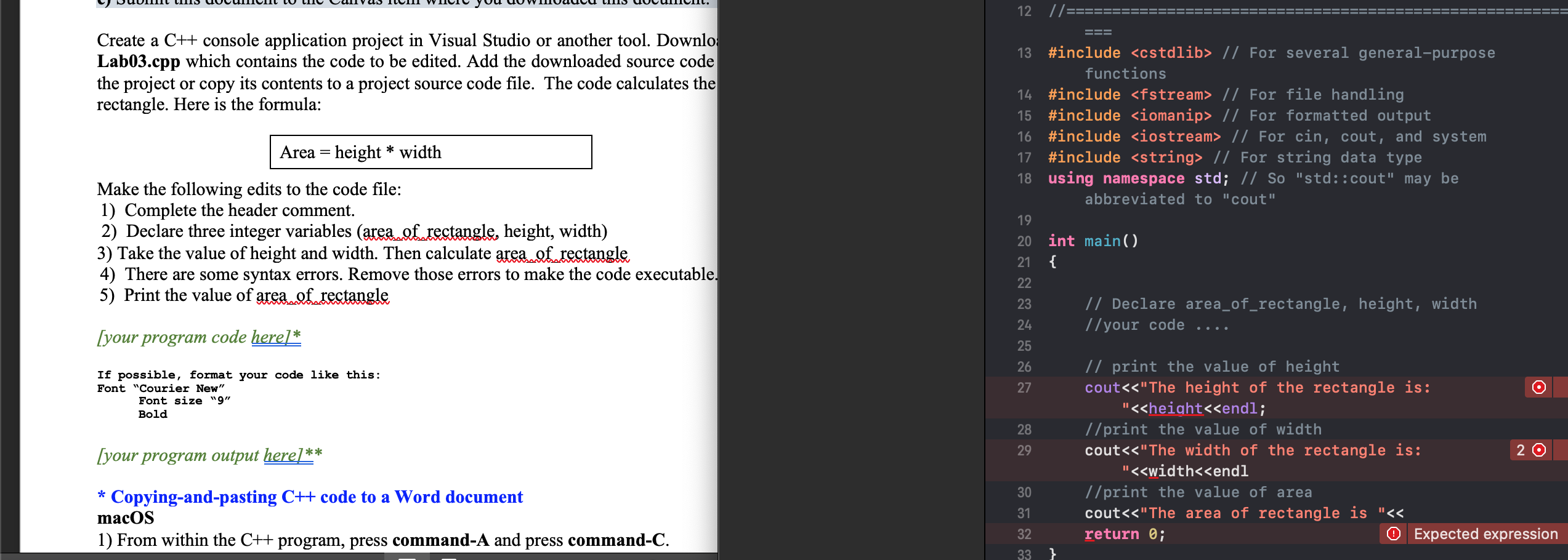
 ) . u g W . 12 //======================================================= Create a C++

) . u g W . 12 //======================================================= Create a C++ console application project in Visual Studio or another tool. Downlo Lab03.cpp which contains the code to be edited. Add the downloaded source code the project or copy its contents to a project source code file. The code calculates the rectangle. Here is the formula: === 13 #include // For several general-purpose functions 14 #include // For file handling, 15 #include // For formatted output 16 #include // For cin, cout, and system 17 #include // For string data type 18 using namespace std; // So "std::cout" may be 'abbreviated to "cout", | Area = height * width Make the following edits to the code file: 1) Complete the header comment. 2) Declare three integer variables (area of rectangle, height, width) 3) Take the value of height and width. Then calculate area...f rectangle 4) There are some syntax errors. Remove those errors to make the code executable. 5) Print the value of area...f rectangle 20 int main() 21 { // Declare area_of_rectangle, height, width //your code .... [your program code here] * If possible, format your code like this: Font "Courier New" Font size "9" Bold [your program output here] ** // print the value of height cout

Step by Step Solution

There are 3 Steps involved in it

1 Expert Approved Answer
Step: 1 Unlock blur-text-image
Question Has Been Solved by an Expert!

Get step-by-step solutions from verified subject matter experts

Step: 2 Unlock
Step: 3 Unlock

Students Have Also Explored These Related Databases Questions!